超高对比度
🟡 Updated this year🖼️ Gallery (1 images)
🔍 Analysis
- 🏆 #154 of 308 gui mods in this game by downloads
📋 About This Mod
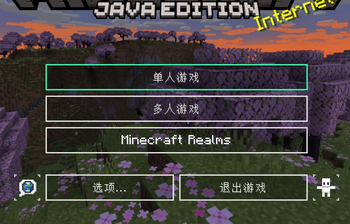
(https://cdn.modrinth.com/data/cached_images/0ab233aa06118803d0480d93ad285838f56da526.png)提供了半透明的默认UI,部分按钮重新绘制。游戏内部查看的包和存档的默认图标经过修改,创造模式选择物品类型的框只剩下一个白色轮廓,快捷栏更加简洁且带有数字,书本翻页的箭头改成块状的。 English:Provides a semi-transparent default UI, with some buttons redrawn. The default icons for data packs and single-server saves in the in-game menus have been modified. The box for selecting item types in Creative mode is now just a white outline. The hotbar is cleaner and includes numbers, and the book page-turning arrows have been changed to a block-style shape with a pointed tip.
📊 Mod Details
- Game
- Minecraft Resource Packs
- Author
- 44326
- Version
- 1.3
- Downloads
- 68
- Endorsements
- 0
- Category
- gui
- Created
- 5/6/2026
- Updated
- 6/20/2026
- Game Versions
- 1.20.1
- Tags
- gui, simplistic, utility
🔧 How to Install Minecraft Resource Packs Mods
Download from Modrinth. Use Prism Launcher or drop into your mods folder.
📖 Full step-by-step install guide for Minecraft Resource Packs →
Visit the official mod page for specific installation instructions for this mod.
🎮 Need cheat codes or console commands? Check ur gaming wiki for Minecraft Resource Packs commands, item IDs, and more.
❓ Frequently Asked Questions
Which Minecraft Resource Packs versions does 超高对比度 support?
The author lists 1.20.1. Other versions may work but are untested by the author.
What is the latest version of 超高对比度?
Version 1.3, published 2026-06-20 with 68 downloads recorded at the source.
Keep browsing — more Minecraft Resource Packs mods await