Biome O' Plenty x Reimaginated
🟡 Updated this year🖼️ Gallery (1 images)
🔍 Analysis
- 🏆 #45 of 225 blocks mods in this game by downloads
📋 About This Mod
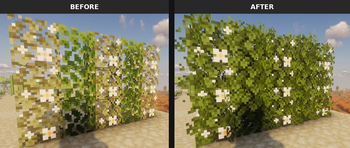
## 📦 About This pack was created to fix flowering oak leaves colormap between Biomes O' Plenty and Reimaginated. **Note:** Currently, this pack is in its early stages and **only adjusts the colors of some leaves**. The project will continue to be updated over time if necessary. ## ⚠️ Requirements For this compatibility pack to function correctly, you **must** have the following mod installed: - **(https://modrinth.com/mod/polytone)** (Required for custom colormaps) ## ⚙️ Installation & Load Order 1. Ensure you have the **Polytone** mod installed in your mods folder. 2. Download this resource pack and place it in your `resourcepacks` folder. 3. In-game, navigate to **Options > Resource Packs** and enable it. 4. **CRITICAL:** The load order of your active packs makes a huge difference! Please configure it exactly as shown in the image below, keeping this compatibility pack *above* the main Reimaginated pack: !(https://cdn.modrinth.com/data/cached_images/714ab266edf9d0f83b7baf60782ca6be8a4eba23.png) ## 🐛 Feedback, Issues & Suggestions Did you find any color inconsistencies or would like to request integration with another mod (like Terralith, for example)? Feel free to **(https://github.com/twk0d/Biome-O-Plenty-x-Reimaginated/issues)**! All feedback is welcome to help improve the pack.
## 📦 About This pack was created to fix flowering oak leaves colormap between Biomes O' Plenty and Reimaginated.
## ⚠️ Requirements For this compatibility pack to function correctly, you must have the following mod installed: - (https://modrinth.com/mod/polytone)** (Required for custom colormaps)
## ⚙️ Installation & Load Order 1. Ensure you have the Polytone mod installed in your mods folder. 2. Download this resource pack and place it in your `resourcepacks` folder. 3. In-game, navigate to Options > Resource Packs and enable it. 4. CRITICAL:* The load order of your active packs makes a huge difference! Please configure it exactly as shown in the image below, keeping this compatibility pack above the main Reimaginated pack:
!(https://cdn.modrinth.com/data/cached_images/714ab266edf9d0f83b7baf60782ca6be8a4eba23.png)
## 🐛 Feedback, Issues & Suggestions Did you find any color inconsistencies or would like to request integration with another mod (like Terralith, for example)?
Feel free to *(https://github.com/twk0d/Biome-O-Plenty-x-Reimaginated/issues)**! All feedback is welcome to help improve the pack.
📊 Mod Details
- Game
- Minecraft Resource Packs
- Author
- Kaokod
- Version
- 0.1
- Downloads
- 38
- Endorsements
- 1
- Category
- blocks
- Created
- 6/25/2026
- Updated
- 6/22/2026
- Game Versions
- 1.21, 1.21.1
- Tags
- blocks, modded, utility
🔧 How to Install Minecraft Resource Packs Mods
Download from Modrinth. Use Prism Launcher or drop into your mods folder.
📖 Full step-by-step install guide for Minecraft Resource Packs →
Visit the official mod page for specific installation instructions for this mod.
🎮 Need cheat codes or console commands? Check ur gaming wiki for Minecraft Resource Packs commands, item IDs, and more.
❓ Frequently Asked Questions
Which Minecraft Resource Packs versions does Biome O' Plenty x Reimaginated support?
The author lists 1.21, 1.21.1. Other versions may work but are untested by the author.
What is the latest version of Biome O' Plenty x Reimaginated?
Version 0.1, published 2026-06-22 with 38 downloads recorded at the source.
Keep browsing — more Minecraft Resource Packs mods await