Blood Scythe
⚪ Last updated 2024🖼️ Gallery (1 images)
🔍 Analysis
- 👍 0.2% endorsement rate
- 🏆 #64 of 395 combat mods in this game by downloads
📋 About This Mod
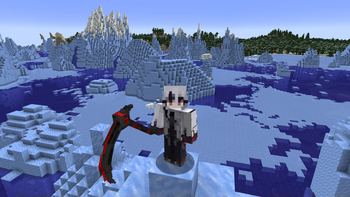
## Blood Scythe Resource Pack Transform your Minecraft experience with the **Blood Scythe Resource Pack** for version 1.21. This pack replaces the standard `netherite sword` with an intricately designed Blood Scythe, adding a touch of dark elegance to your adventures. ### Features: - **3D Model**: The Blood Scythe features a detailed 3D model, providing a visually striking upgrade to your weapon. - **Unique Design**: The Blood Scythe boasts a menacing blade with a deep crimson hue, giving your weapon a fierce and intimidating look. - **High-Quality Textures**: Enjoy detailed and high-resolution textures that make the Blood Scythe stand out in any environment. - **Immersive Experience**: Enhance your gameplay with the thematic style of the Blood Scythe, perfect for those who love a darker aesthetic. ### Installation: 1. Download the resource pack. 2. Place the file in the `resourcepacks` folder located in your `.minecraft` directory. 3. Activate the pack from the Resource Packs menu in-game. 4. Enjoy your new Blood Scythe! Upgrade your Netherite sword to the Blood Scythe and bring a new level of excitement to your Minecraft adventures!
## Blood Scythe Resource Pack
Transform your Minecraft experience with the Blood Scythe Resource Pack for version 1. 21. This pack replaces the standard `netherite sword` with an intricately designed Blood Scythe, adding a touch of dark elegance to your adventures.
### Features: - 3D Model: The Blood Scythe features a detailed 3D model, providing a visually striking upgrade to your weapon. - Unique Design: The Blood Scythe boasts a menacing blade with a deep crimson hue, giving your weapon a fierce and intimidating look. - High-Quality Textures: Enjoy detailed and high-resolution textures that make the Blood Scythe stand out in any environment. - Immersive Experience: Enhance your gameplay with the thematic style of the Blood Scythe, perfect for those who love a darker aesthetic.
### Installation: 1. Download the resource pack. 2. Place the file in the `resourcepacks` folder located in your `.minecraft` directory. 3. Activate the pack from the Resource Packs menu in-game. 4. Enjoy your new Blood Scythe!
Upgrade your Netherite sword to the Blood Scythe and bring a new level of excitement to your Minecraft adventures!
📊 Mod Details
- Game
- Minecraft Resource Packs
- Author
- Linaryx
- Version
- 1.0.0
- Downloads
- 11,339
- Endorsements
- 20
- Category
- combat
- Created
- 6/28/2024
- Updated
- 6/27/2024
- Game Versions
- 1.21, 1.21.1, 1.21.2, 1.21.3, 1.21.4
- Tags
- combat, items, models
🔧 How to Install Minecraft Resource Packs Mods
Download from Modrinth. Use Prism Launcher or drop into your mods folder.
📖 Full step-by-step install guide for Minecraft Resource Packs →
Visit the official mod page for specific installation instructions for this mod.
🎮 Need cheat codes or console commands? Check ur gaming wiki for Minecraft Resource Packs commands, item IDs, and more.
❓ Frequently Asked Questions
Which Minecraft Resource Packs versions does Blood Scythe support?
The author lists 1.21, 1.21.1, 1.21.2, 1.21.3, 1.21.4, 1.21.5. Other versions may work but are untested by the author.
What is the latest version of Blood Scythe?
Version 1.0.0, published 2024-06-27 with 11,339 downloads recorded at the source.
Keep browsing — more Minecraft Resource Packs mods await