Quixotic - Better Ping Icon (BPI)
🟠 Updated over a year ago🖼️ Gallery (8 images)
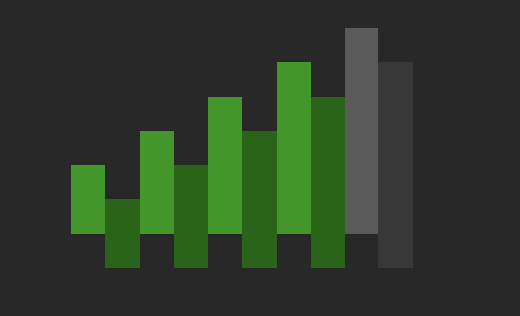

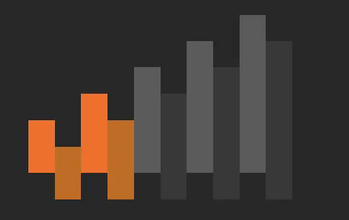

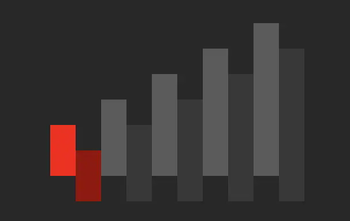
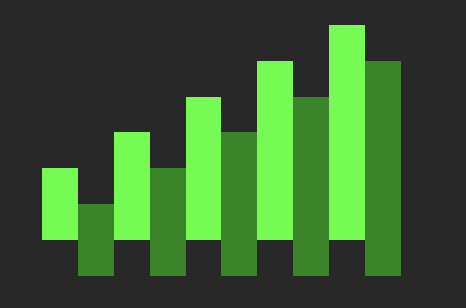

🔍 Analysis
- 🏆 #26 of 660 16x mods in this game by downloads
📋 About This Mod
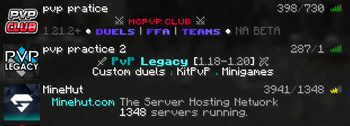
This resource pack makes it easier to see the amount of ping you have on a server. Hope you enjoy :)
How to download and use on Minecraft Java edition:
1. Download the pack. 2. Launch Minecrat 1. 21. 4 and click on Options -> Resource Packs and drag the pack into Minecraft.
Color meaning:
• Light green = Good Ping
• Dark green = Not so good but still playable
• Yellow = High ping
• Orange = Very high ping, might not be playable
• Red = ur cooked
Please leave comments if you want anything changed or you want more resource packs.
📊 Mod Details
- Game
- Minecraft Resource Packs
- Author
- qui.xotic815
- Version
- 1.21.4
- Downloads
- 150
- Endorsements
- 3
- Category
- 16x
- Created
- 7/10/2025
- Updated
- 6/29/2025
- Game Versions
- 1.21.4
- Tags
- 16x, utility, vanilla-like
🔧 How to Install Minecraft Resource Packs Mods
Download from Modrinth. Use Prism Launcher or drop into your mods folder.
📖 Full step-by-step install guide for Minecraft Resource Packs →
Visit the official mod page for specific installation instructions for this mod.
🎮 Need cheat codes or console commands? Check ur gaming wiki for Minecraft Resource Packs commands, item IDs, and more.
❓ Frequently Asked Questions
Which Minecraft Resource Packs versions does Quixotic - Better Ping Icon (BPI) support?
The author lists 1.21.4. Other versions may work but are untested by the author.
What is the latest version of Quixotic - Better Ping Icon (BPI)?
Version 1.21.4, published 2025-06-29 with 150 downloads recorded at the source.
Keep browsing — more Minecraft Resource Packs mods await