Better Mace!
🟡 Updated this year🖼️ Gallery (7 images)


🔍 Analysis
- 👍 0.1% endorsement rate
- 🏆 #375 of 408 combat mods in this game by downloads
📋 About This Mod
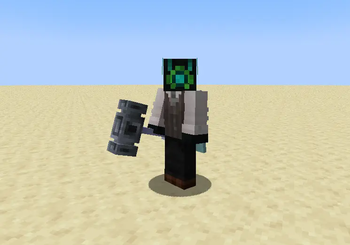
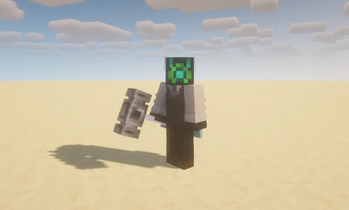
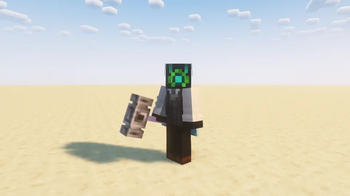
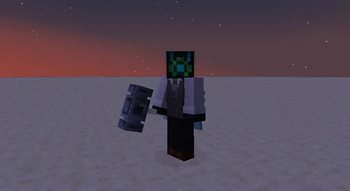
# **Better Mace! - 3D Mace Model** !(https://cdn.modrinth.com/data/cached_images/cf672bec7b2a571bec871d2e3d9c5a94482bae32.png) - This resource pack replaces Minecraft’s default mace with a 3D model designed to better match its intended form. - Compatible with Glowing Enchanted Tools! Put the Better Mace pack above it. (https://modrinth.com/resourcepack/glowing-enchanted-tools) - This pack aims to enhance the mace without altering gameplay, animations, or item behavior. It is purely a visual upgrade. **Features** - The 3D mace model completey overhauls the visuals which gives the mace a more realistic and satisfying appearance. - Emissive elements (shader compatible) When using shaders, the mace’s rod emits a subtle glow for improved visual clarity and style. # **How to Install?** > 1. Click on "Download" and select your Game Version. !(https://cdn.modrinth.com/data/cached_images/8ce756a92d610c1c06685df8d9bd85c8a7cd02af.png) !(https://cdn.modrinth.com/data/cached_images/d09f991d904ae855853b3593ef1101be172a1bc1.png) > 2. Click yet again on "Download", and it should download. !(https://cdn.modrinth.com/data/cached_images/b1f0c7741375ab3274e728a9e7c1bf54ecdfda50.png) !(https://cdn.modrinth.com/data/cached_images/85ba907993f16e99ed95069c3b8a03fe1dac5e93.png) > 3. After it's been downloaded, open Minecraft and go to Options !(https://cdn.modrinth.com/data/cached_images/a5da3b40c467df0002ff778eb9de65f206edc49c.jpeg) Then, click on Resource Packs !(https://cdn.modrinth.com/data/cached_images/71f6d969f3ccb08e08c74eecc1d4e810d9ae3401.jpeg) And click on Open Pack Folder !(https://cdn.modrinth.com/data/cached_images/df0c9832107046a9bfd5147392e099d258334c05.jpeg) This windows should open, assuming you're on Windows 11, click on the + icon right next to the "resourcepacks" tab, then on the left side of the screen, click on Downloads. After you're in downloads, drag and drop the "Better Mace.zip" file into the "resourcepacks" folder at the top left corner. !(https://cdn.modrinth.com/data/cached_images/e870e9a76faad0045d92783b018de54abf735134.jpeg) > 4. Once you've done that, close File Explorer and go into Minecraft and hover onto the Better Mace name, and click on the Arrow. !(https://cdn.modrinth.com/data/cached_images/c09d044a024e5bc97976125518215f36f8d6268b.jpeg) > 5. Final step! Click on done, and enjoy your mace :) !(https://cdn.modrinth.com/data/cached_images/a303b91d2a971d93216cabbacd123c1ed8455216.jpeg)
# Better Mace! - 3D Mace Model !(https://cdn.modrinth.com/data/cached_images/cf672bec7b2a571bec871d2e3d9c5a94482bae32.png)
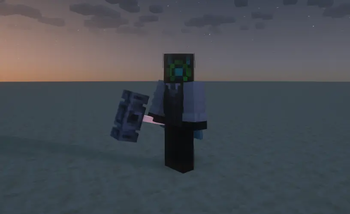
- This resource pack replaces Minecraft’s default mace with a 3D model designed to better match its intended form.
- Compatible with Glowing Enchanted Tools! Put the Better Mace pack above it. (https://modrinth.com/resourcepack/glowing-enchanted-tools)
- This pack aims to enhance the mace without altering gameplay, animations, or item behavior. It is purely a visual upgrade.
Features
- The 3D mace model
- completey overhauls the visuals which gives the mace a more realistic and satisfying appearance.
- Emissive elements (shader compatible)
- When using shaders, the mace’s rod emits a subtle glow for improved visual clarity and style.
# How to Install? > 1. Click on "Download" and select your Game Version. !(https://cdn.modrinth.com/data/cached_images/8ce756a92d610c1c06685df8d9bd85c8a7cd02af.png) !(https://cdn.modrinth.com/data/cached_images/d09f991d904ae855853b3593ef1101be172a1bc1.png) > 2. Click yet again on "Download", and it should download. !(https://cdn.modrinth.com/data/cached_images/b1f0c7741375ab3274e728a9e7c1bf54ecdfda50.png) !(https://cdn.modrinth.com/data/cached_images/85ba907993f16e99ed95069c3b8a03fe1dac5e93.png) > 3. After it's been downloaded, open Minecraft and go to Options !(https://cdn.modrinth.com/data/cached_images/a5da3b40c467df0002ff778eb9de65f206edc49c.jpeg) Then, click on Resource Packs !(https://cdn.modrinth.com/data/cached_images/71f6d969f3ccb08e08c74eecc1d4e810d9ae3401.jpeg) And click on Open Pack Folder !(https://cdn.modrinth.com/data/cached_images/df0c9832107046a9bfd5147392e099d258334c05.jpeg) This windows should open, assuming you're on Windows 11, click on the + icon right next to the "resourcepacks" tab, then on the left side of the screen, click on Downloads. After you're in downloads, drag and drop the "Better Mace.zip" file into the "resourcepacks" folder at the top left corner. !(https://cdn.modrinth.com/data/cached_images/e870e9a76faad0045d92783b018de54abf735134.jpeg) > 4. Once you've done that, close File Explorer and go into Minecraft and hover onto the Better Mace name, and click on the Arrow. !(https://cdn.modrinth.com/data/cached_images/c09d044a024e5bc97976125518215f36f8d6268b.jpeg) > 5. Final step! Click on done, and enjoy your mace :) !(https://cdn.modrinth.com/data/cached_images/a303b91d2a971d93216cabbacd123c1ed8455216.jpeg)
📊 Mod Details
- Game
- Minecraft Resource Packs
- Author
- Magnus25GD
- Version
- 1.2
- Downloads
- 2,158
- Endorsements
- 3
- Category
- combat
- Created
- 8/23/2025
- Updated
- 11/21/2025
- Game Versions
- 1.21, 1.21.1, 1.21.2, 1.21.3, 1.21.4
- Tags
- combat, items, vanilla-like
🔧 How to Install Minecraft Resource Packs Mods
Download from Modrinth. Use Prism Launcher or drop into your mods folder.
📖 Full step-by-step install guide for Minecraft Resource Packs →
Visit the official mod page for specific installation instructions for this mod.
🎮 Need cheat codes or console commands? Check ur gaming wiki for Minecraft Resource Packs commands, item IDs, and more.
❓ Frequently Asked Questions
Which Minecraft Resource Packs versions does Better Mace! support?
The author lists 1.21, 1.21.1, 1.21.2, 1.21.3, 1.21.4, 1.21.5. Other versions may work but are untested by the author.
What is the latest version of Better Mace!?
Version 1.2, published 2025-11-21 with 2,158 downloads recorded at the source.
Keep browsing — more Minecraft Resource Packs mods await