Balayya
🟡 Updated this year🖼️ Gallery (2 images)

🔍 Analysis
- 🏆 #109 of 168 audio mods in this game by downloads
📋 About This Mod
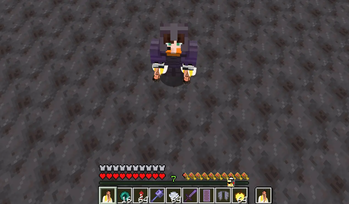
# Balayya Babu Totem of Undying Bring the unmatched energy of Nandamuri Balakrishna to your Minecraft world! This resource pack completely revamps the **Totem of Undying** with custom Balayya Babu visuals and his iconic **"Tokki paadi dobbutha"** audio effect when saving you from fatal damage. ## Key Features * **Balayya Totem Texture:** Replaces the vanilla Totem of Undying texture with custom Balayya Babu artwork. * **Iconic Audio Effect:** Plays Balayya's famous "Tokki paadi dobbutha" voice line upon totem activation (`use_totem.ogg`). * **Clean Integration:** Includes custom pack artwork and streamlined asset files for seamless gameplay. * **Vanilla Friendly:** Lightweight design with zero impact on game performance. ## Compatibility * **Minecraft Version:** Works across modern Java Edition versions (1.20+). * **Dependencies:** None required! Operates directly on vanilla Minecraft. Fully compatible alongside mods like Sodium, Iris, or OptiFine. ## How to Install 1. Download the `.zip` file. 2. Place the file inside your `.minecraft/resourcepacks` directory. 3. Open Minecraft, go to **Options > Resource Packs**, and move the pack to the right-hand column.
# Balayya Babu Totem of Undying
Bring the unmatched energy of Nandamuri Balakrishna to your Minecraft world! This resource pack completely revamps the Totem of Undying with custom Balayya Babu visuals and his iconic "Tokki paadi dobbutha" audio effect when saving you from fatal damage.
## Key Features Balayya Totem Texture: Replaces the vanilla Totem of Undying texture with custom Balayya Babu artwork. Iconic Audio Effect: Plays Balayya's famous "Tokki paadi dobbutha" voice line upon totem activation (`use_totem.ogg`). Clean Integration: Includes custom pack artwork and streamlined asset files for seamless gameplay. Vanilla Friendly: Lightweight design with zero impact on game performance.
## Compatibility Minecraft Version: Works across modern Java Edition versions (1. 20+). Dependencies: None required! Operates directly on vanilla Minecraft. Fully compatible alongside mods like Sodium, Iris, or OptiFine.
## How to Install 1. Download the `.zip` file. 2. Place the file inside your `.minecraft/resourcepacks` directory. 3. Open Minecraft, go to Options > Resource Packs, and move the pack to the right-hand column.
📊 Mod Details
- Game
- Minecraft Resource Packs
- Author
- Sunny69
- Version
- 1.21.11
- Downloads
- 21
- Endorsements
- 0
- Category
- audio
- Created
- 8/21/2026
- Updated
- 8/16/2026
- Game Versions
- 1.11, 1.11.1, 1.11.2, 1.12, 1.12.1
- Tags
- audio, items, models
🔧 How to Install Minecraft Resource Packs Mods
Download from Modrinth. Use Prism Launcher or drop into your mods folder.
📖 Full step-by-step install guide for Minecraft Resource Packs →
Visit the official mod page for specific installation instructions for this mod.
🎮 Need cheat codes or console commands? Check ur gaming wiki for Minecraft Resource Packs commands, item IDs, and more.
❓ Frequently Asked Questions
Which Minecraft Resource Packs versions does Balayya support?
The author lists 1.11, 1.11.1, 1.11.2, 1.12, 1.12.1, 1.12.2. Other versions may work but are untested by the author.
What is the latest version of Balayya?
Version 1.21.11, published 2026-08-16 with 21 downloads recorded at the source.
Keep browsing — more Minecraft Resource Packs mods await