AIMY PVP - Centered Smaller PvP Crosshair
🟡 Updated this year🖼️ Gallery (9 images)
🔍 Analysis
- 🏆 #284 of 305 combat mods in this game by downloads
📋 About This Mod
<div align="center"> <img src="https://cdn.modrinth.com/data/cached_images/5207b34f8b7692e5229b33cccfaaa645e7f2a2c5.png" alt="AimyCrosshair_Logo" width="500" /> </div> <div align="center"> !(https://img.shields.io/modrinth/dt/cuWlzYoH?style=flat&logo=modrinth&logoSize=auto&label=Downloads&color=%231BD96A) !(https://img.shields.io/badge/Loader-Vanilla-%237C31C3?style=flat) !(https://img.shields.io/badge/Versions-1.6.1_to_26.2-%231E4CE0) </div> !(https://cdn.modrinth.com/data/cached_images/0ece9d88b5b5c5aee3174c29fc9b6e87b6cad3bc.webp) <details> <summary> ⚙️ Installation guide</summary> - Go into the **Versions** tab of this page and download the resource pack for the version that you need. - Now put the file you just downloaded into the Minecraft's **resourcepacks** folder, which is situated in this directory. ``` C:\Users\YOU\AppData\Roaming\.minecraft\resourcepacks ``` - No need to unzip or changing file structure. - Go into Minecraft --> Options --> Go into Resource packs and apply the resource pack you've just put in. </details> <div align="center"> <a href="https://github.com/ilb0tta/AimyCrosshair/discussions/new/choose"> <img src="https://cdn.modrinth.com/data/cached_images/c887725284d8d8982af82d67e1f0bf312f37b787.png" alt="Share Ideas" width="220" /> </a> <a href="https://modrinth.com/user/ilb0tta"> <img src="https://cdn.modrinth.com/data/cached_images/3a7d7dc62395c8d762033e154f215242a73c6d5e.png" alt="View ilb0tta's Projects" width="350" /> </a> <a href="https://github.com/ilb0tta/AimyCrosshair/issues"> <img src="https://cdn.modrinth.com/data/cached_images/58482361c463123af1a0c94e748ee91f6906a531.png" alt="Report an Issue" width="260" /> </a> </div> ## 🎁 Overview This sleek resource pack provides a cleaner Minecraft experience with a **smaller, perfectly centered custom crosshair**. **NO MODS or OPTIFINE NEEDED.** ## ⭐ Features - Smaller, Centered and Perfectly aligned. - Vanilla Friendly. - Enhanced Precision. - Clean and Modern Look. - Always Updated. ## 📖 License and more This pack is licensed under **ARR**, which stands for "All Rights Reserved". (https://github.com/ilb0tta/AimyCrosshair/wiki/LICENSE) <details> <summary>Credits</summary> - **Resource Pack & Assets © ilb0tta**. All Rights Reserved. - **"pack.png" Artwork © ilb0tta**. All Rights Reserved. - **"Aimy" name and branding © ilb0tta**. All Rights Reserved. </details> <details> <summary>My Goal</summary> My goal is to provide the community with **high-quality content** that **improves players' gameplay**. So please, don't steal, copy or redistribute someone else's work. Making something with your own hands makes you feel more confident and grateful towards yourself. ❤️ </details> Thank you for supporting my projects,\ I truly appreciate it!\ ilb0tta. <sub><small>*Not an Official Minecraft Product. Not approved by or associated with Mojang A.B. or Microsoft. All original logos and trademarks belong to their respective owners.* </small> </sub>
!(https://img.shields.io/modrinth/dt/cuWlzYoH?style=flat&logo=modrinth&logoSize=auto&label=Downloads&color=%231BD96A) !(https://img.shields.io/badge/Loader-Vanilla-%237C31C3?style=flat) !(https://img.shields.io/badge/Versions-1. 6. 1_to_26. 2-%231E4CE0)
!(https://cdn.modrinth.com/data/cached_images/0ece9d88b5b5c5aee3174c29fc9b6e87b6cad3bc.webp)
⚙️ Installation guide
- Go into the Versions tab of this page and download the resource pack for the version that you need.
- Now put the file you just downloaded into the Minecraft's resourcepacks folder, which is situated in this directory.
``` C:\Users\YOU\AppData\Roaming\.minecraft\resourcepacks ``` - No need to unzip or changing file structure.
- Go into Minecraft --> Options --> Go into Resource packs and apply the resource pack you've just put in.

## 🎁 Overview
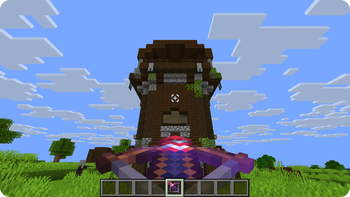
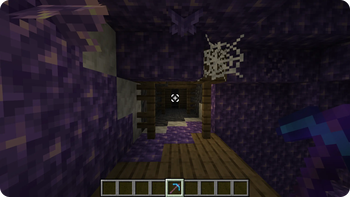
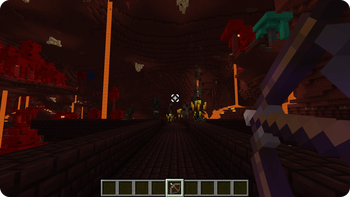
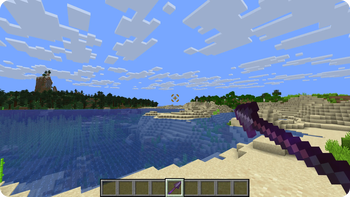
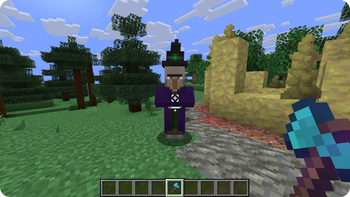
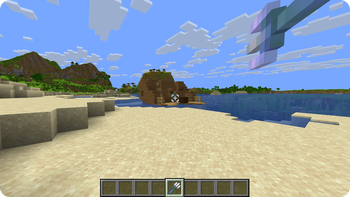
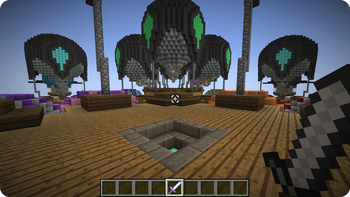
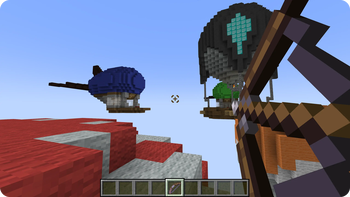
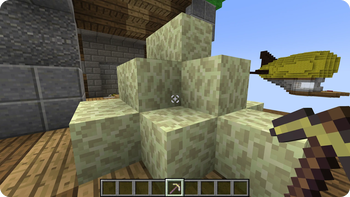
This sleek resource pack provides a cleaner Minecraft experience with a smaller, perfectly centered custom crosshair.
NO MODS or OPTIFINE NEEDED.
## ⭐ Features
- Smaller, Centered and Perfectly aligned.
- Vanilla Friendly.
- Enhanced Precision.
- Clean and Modern Look.
- Always Updated.
## 📖 License and more
This pack is licensed under ARR, which stands for "All Rights Reserved". (https://github.com/ilb0tta/AimyCrosshair/wiki/LICENSE)
Credits
- Resource Pack & Assets © ilb0tta. All Rights Reserved.
- "pack.png" Artwork © ilb0tta. All Rights Reserved.
- "Aimy" name and branding © ilb0tta. All Rights Reserved.
My Goal
My goal is to provide the community with high-quality content that improves players' gameplay. So please, don't steal, copy or redistribute someone else's work. Making something with your own hands makes you feel more confident and grateful towards yourself. ❤️
Thank you for supporting my projects,\ I truly appreciate it!\ ilb0tta.
Not an Official Minecraft Product. Not approved by or associated with Mojang A. B. or Microsoft. All original logos and trademarks belong to their respective owners.
📊 Mod Details
- Game
- Minecraft Resource Packs
- Author
- ilb0tta
- Version
- 1.0.0
- Downloads
- 95
- Endorsements
- 0
- Category
- combat
- Created
- 8/20/2026
- Updated
- 7/23/2026
- Game Versions
- 1.20.2, 1.20.3, 1.20.4, 1.20.5, 1.20.6
- Tags
- combat, gui, simplistic
🔧 How to Install Minecraft Resource Packs Mods
Download from Modrinth. Use Prism Launcher or drop into your mods folder.
📖 Full step-by-step install guide for Minecraft Resource Packs →
Visit the official mod page for specific installation instructions for this mod.
🎮 Need cheat codes or console commands? Check ur gaming wiki for Minecraft Resource Packs commands, item IDs, and more.
❓ Frequently Asked Questions
Which Minecraft Resource Packs versions does AIMY PVP - Centered Smaller PvP Crosshair support?
The author lists 1.20.2, 1.20.3, 1.20.4, 1.20.5, 1.20.6, 1.21. Other versions may work but are untested by the author.
What is the latest version of AIMY PVP - Centered Smaller PvP Crosshair?
Version 1.0.0, published 2026-07-23 with 95 downloads recorded at the source.
Keep browsing — more Minecraft Resource Packs mods await