3D Skin Layers RP
🟡 Updated this year🖼️ Gallery (3 images)
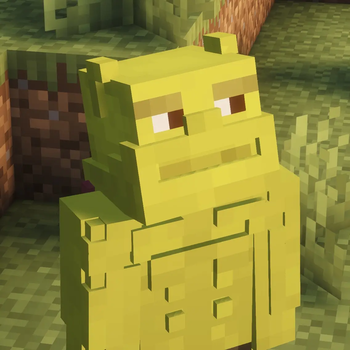
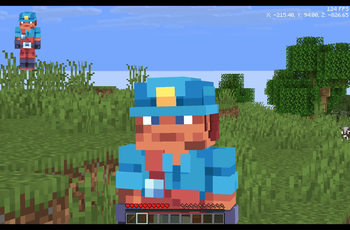
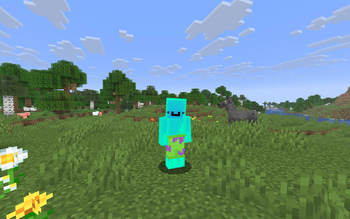
🔍 Analysis
- 👍 0.5% endorsement rate
- 🏆 #283 of 333 minecraft mods in this game by downloads
📋 About This Mod
# 3D Skin Layers - Resource Pack Edition Enhance your Minecraft character appearance! This resource pack brings 3D skin layer enhancements directly to your game, designed to complement or work alongside the **3D Skin Layers** mod experience. --- ## ✨ Features * **Enhanced 3D Layers:** Gives depth and detail to player skin overlays (jackets, sleeves, hats, pants). * **Vanilla Friendly:** Designed to seamlessly blend with Minecraft's default aesthetics. * **High Compatibility:** Works smoothly with custom skins and various client setups. <center> --- ## 📸 Preview --- ## ⚙️ Requirements * **Entity Model Features (EMF):** Required for 3D model features to render properly. (https://cdn.modrinth.com/data/cached_images/36702c1bd38d0696122546aae5c00a45ac134eec.png)](https://modrinth.com/mod/entity-model-features) --- ## 📦 Installation 1. Download the `.zip` file for your Minecraft version. 2. Open Minecraft and go to **Options > Resource Packs**. 3. Click **Open Pack Folder** and drop the downloaded `.zip` file into the folder. 4. Move the resource pack to the top of the active list in Minecraft and click **Done**! --- ## 💬 Issue Tracker & Support Found an issue or have a suggestion? * **Discord / Issue Tracker:** `synth_24` (Contact directly on Discord for bug reports and support)
# 3D Skin Layers - Resource Pack Edition
Enhance your Minecraft character appearance! This resource pack brings 3D skin layer enhancements directly to your game, designed to complement or work alongside the 3D Skin Layers mod experience.
## ✨ Features
Enhanced 3D Layers: Gives depth and detail to player skin overlays (jackets, sleeves, hats, pants). Vanilla Friendly: Designed to seamlessly blend with Minecraft's default aesthetics. High Compatibility: Works smoothly with custom skins and various client setups.
## 📸 Preview
## ⚙️ Requirements
Entity Model Features (EMF): Required for 3D model features to render properly.
[!(https://cdn.modrinth.com/data/cached_images/36702c1bd38d0696122546aae5c00a45ac134eec.png)](https://modrinth.com/mod/entity-model-features)
## 📦 Installation
1. Download the `.zip` file for your Minecraft version. 2. Open Minecraft and go to Options > Resource Packs. 3. Click Open Pack Folder and drop the downloaded `.zip` file into the folder. 4. Move the resource pack to the top of the active list in Minecraft and click Done!
## 💬 Issue Tracker & Support
Found an issue or have a suggestion? * Discord / Issue Tracker: `synth_24` (Contact directly on Discord for bug reports and support)
📊 Mod Details
- Game
- Minecraft Resource Packs
- Author
- Synth_
- Version
- 1.0
- Downloads
- 1,212
- Endorsements
- 6
- Category
- minecraft
- Created
- 8/10/2026
- Updated
- 8/9/2026
- Game Versions
- 1.20, 1.20.1, 1.20.2, 1.20.3, 1.20.4
🔧 How to Install Minecraft Resource Packs Mods
Download from Modrinth. Use Prism Launcher or drop into your mods folder.
📖 Full step-by-step install guide for Minecraft Resource Packs →
Visit the official mod page for specific installation instructions for this mod.
🎮 Need cheat codes or console commands? Check ur gaming wiki for Minecraft Resource Packs commands, item IDs, and more.
❓ Frequently Asked Questions
Which Minecraft Resource Packs versions does 3D Skin Layers RP support?
The author lists 1.20, 1.20.1, 1.20.2, 1.20.3, 1.20.4, 1.20.5. Other versions may work but are untested by the author.
What is the latest version of 3D Skin Layers RP?
Version 1.0, published 2026-08-09 with 1,212 downloads recorded at the source.
Keep browsing — more Minecraft Resource Packs mods await