Block-Accurate: 3D Item Models
🟡 Updated this year🖼️ Gallery (7 images)

🔍 Analysis
- 👍 0.2% endorsement rate
- 🏆 #253 of 364 minecraft mods in this game by downloads
📋 About This Mod
# Block-Accurate: 3D Item Models <img src="https://raw.githubusercontent.com/teyokuma/3D-Item-Models/refs/heads/latest/images/product_header.png" width="1024"> ***Accurate 3D models for 2D sprite items!*** ## **❔ About** **Block-Accurate: 3D Item Models** is a resource pack for *Minecraft: Java Edition* that brings accurate 3D models to items throughout the game while preserving the look and feel of vanilla Minecraft. The pack replaces flat item sprites with models matching their placed blocks, equipped items, and entities, improves model consistency, and is designed to remain compatible with other resource packs by reusing Minecraft's built-in assets whenever possible. ## **🌟 Features** ### 3D Models for 2D Sprite Items <img src="https://github.com/user-attachments/assets/04386540-6639-4dad-a839-62fbf4ff8a0b" width="512"> - As the name *Block-Accurate* suggests, almost every placeable item (such as Cauldrons and Brewing Stands) uses the same model as its placed block - Wearable items (such as Helmets and Chestplates) use the same model as when they are equipped - Items that place entities (such as Minecarts, Armor Stands, and Cushions) also use models matching their corresponding entities ### Improved Item Model Consistency - The orientation of every block and item model has been adjusted to match the rendering used on the Minecraft Wiki and the Minecraft Launcher profile icon - Fences and Walls use models that accurately match their placed appearance (Wall models follow the Bedrock Edition style) - Display issues for certain items, such as Heads and Copper Golem Statues, have been fixed to improve their appearance in both first-person and third-person views ### Resource Pack Compatibility - Custom models and textures are kept to a minimum by referencing Minecraft's built-in model and texture files whenever possible - This helps maintain compatibility with many other resource packs - Entity models cannot be referenced directly from Minecraft, so custom models are included while still using the original textures - Resource packs that replace models in non-standard ways may not be fully compatible - The pack also takes advantage of modern item model definition features, including the **Special** and **Composite** model types, to maximize the use of vanilla assets ### Supports Versions from 1.17 to the Latest Release - Compatible with every Minecraft version from **1.17** to the latest release - Continuously maintained since its initial release in **2021** - Uses directory overrides to support changes in Minecraft's file structure while maintaining compatibility with older versions ### Enhanced Visual Representation (1.21.2+) - Uses the new item model definition system introduced in **1.21.2** to represent visual details that are not displayed by default The following items automatically display the correct appearance based on their data: - **Paintings** — Painting variant <img src="https://github.com/user-attachments/assets/6c4dab57-c98a-4058-9555-923ac04eb4d7" width="512"> - **Armor Trim** — Trim pattern <img src="https://github.com/user-attachments/assets/c117c9d1-f238-4711-9783-1ab627db5489" width="512"> - **Chest Minecarts** — Christmas chest texture when applicable ## **🛠️ Installation** Mods such as **Optifine**, **CIT**, etc. are **NOT required**. 1. Download the resourcepack 2. Put the resource pack in `.minecraft/resourcepack` 3. Launch Minecraft 4. Open Options, Resource Packs… 5. Select and activate `Block-Accurate-v**` ## **🧩 Mod compatibility** It may not be fully supported. More mods will be supported in the future. *Most mod compatible support was provided by **@pictochats_**. Thank you very much!* - (https://modrinth.com/mod/ad-astra) - (https://modrinth.com/mod/architects-palette) - (https://modrinth.com/mod/biomes-o-plenty) - (https://modrinth.com/mod/boatload) - (https://modrinth.com/mod/bountiful-fares) - (https://www.curseforge.com/minecraft/mc-mods/chimes) - (https://modrinth.com/mod/comforts/) - (https://modrinth.com/mod/create) - (https://modrinth.com/mod/createaddition) - (https://modrinth.com/mod/deeperdarker) - (https://modrinth.com/mod/mmmmmmmmmmmm) - (https://www.curseforge.com/minecraft/mc-mods/dustrial-decor) - (https://modrinth.com/mod/farmers-delight) - (https://modrinth.com/mod/immersive-weathering) - (https://modrinth.com/mod/quark) - (https://modrinth.com/mod/create-steam-n-rails) *(incomplete)* - (https://modrinth.com/mod/realistic-torches) - (https://modrinth.com/mod/supplementaries) - (https://modrinth.com/mod/supplementaries-squared) - (https://modrinth.com/mod/twigs) - (https://
# Block-Accurate: 3D Item Models
Accurate 3D models for 2D sprite items!
## ❔ About
Block-Accurate: 3D Item Models is a resource pack for Minecraft: Java Edition that brings accurate 3D models to items throughout the game while preserving the look and feel of vanilla Minecraft.
The pack replaces flat item sprites with models matching their placed blocks, equipped items, and entities, improves model consistency, and is designed to remain compatible with other resource packs by reusing Minecraft's built-in assets whenever possible.
## 🌟 Features
### 3D Models for 2D Sprite Items
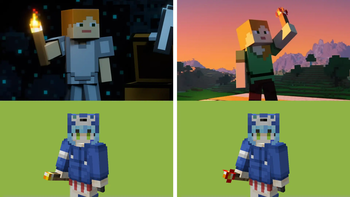
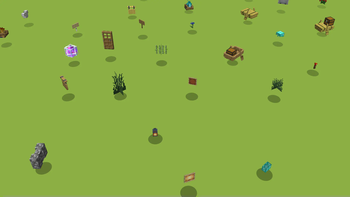
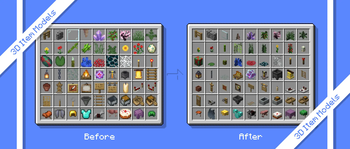
- As the name Block-Accurate suggests, almost every placeable item (such as Cauldrons and Brewing Stands) uses the same model as its placed block
- Wearable items (such as Helmets and Chestplates) use the same model as when they are equipped
- Items that place entities (such as Minecarts, Armor Stands, and Cushions) also use models matching their corresponding entities
### Improved Item Model Consistency
- The orientation of every block and item model has been adjusted to match the rendering used on the Minecraft Wiki and the Minecraft Launcher profile icon
- Fences and Walls use models that accurately match their placed appearance (Wall models follow the Bedrock Edition style)
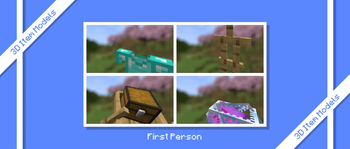
- Display issues for certain items, such as Heads and Copper Golem Statues, have been fixed to improve their appearance in both first-person and third-person views
### Resource Pack Compatibility
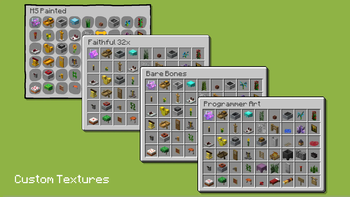
- Custom models and textures are kept to a minimum by referencing Minecraft's built-in model and texture files whenever possible
- This helps maintain compatibility with many other resource packs
- Entity models cannot be referenced directly from Minecraft, so custom models are included while still using the original textures
- Resource packs that replace models in non-standard ways may not be fully compatible
- The pack also takes advantage of modern item model definition features, including the Special and Composite model types, to maximize the use of vanilla assets
### Supports Versions from 1. 17 to the Latest Release
- Compatible with every Minecraft version from 1. 17 to the latest release
- Continuously maintained since its initial release in 2021
- Uses directory overrides to support changes in Minecraft's file structure while maintaining compatibility with older versions
### Enhanced Visual Representation (1. 21. 2+)
- Uses the new item model definition system introduced in 1. 21. 2 to represent visual details that are not displayed by default
The following items automatically display the correct appearance based on their data:
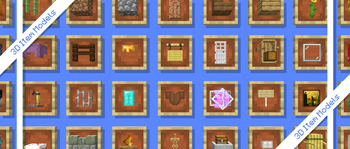
- Paintings — Painting variant
- Armor Trim — Trim pattern
- Chest Minecarts — Christmas chest texture when applicable
## 🛠️ Installation
Mods such as Optifine, CIT, etc. are NOT required.
1. Download the resourcepack 2. Put the resource pack in `.minecraft/resourcepack` 3. Launch Minecraft 4. Open Options, Resource Packs… 5. Select and activate `Block-Accurate-v`
## 🧩 Mod compatibility*
It may not be fully supported. More mods will be supported in the future.
Most mod compatible support was provided by @pictochats_. Thank you very much!
- (https://modrinth.com/mod/ad-astra)
- (https://modrinth.com/mod/architects-palette)
- (https://modrinth.com/mod/biomes-o-plenty)
- (https://modrinth.com/mod/boatload)
- (https://modrinth.com/mod/bountiful-fares)
- (https://www.curseforge.com/minecraft/mc-mods/chimes)
- (https://modrinth.com/mod/comforts/)
- (https://modrinth.com/mod/create)
- (https://modrinth.com/mod/createaddition)
- (https://modrinth.com/mod/deeperdarker)
- (https://modrinth.com/mod/mmmmmmmmmmmm)
- ['Dustrial Decor](https://www.curseforge.com/minecraft/mc-mods/dustrial-decor)
- (https://modrinth.com/mod/farmers-delight)
- (https://modrinth.com/mod/immersive-weathering)
- (https://modrinth.com/mod/quark)
- (https://modrinth.com/mod/create-steam-n-rails) (incomplete)*
- (https://modrinth.com/mod/realistic-torches)
- (https://modrinth.com/mod/supplementaries)
- (https://modrinth.com/mod/supplementaries-squared)
- (https://modrinth.com/mod/twigs)
- (https://
📊 Mod Details
- Game
- Minecraft Resource Packs
- Author
- teyokuma-jp
- Version
- 2.4
- Downloads
- 35,530
- Endorsements
- 56
- Category
- minecraft
- Created
- 10/9/2024
- Updated
- 7/12/2026
- Game Versions
- 1.17, 1.17.1, 1.18, 1.18.1, 1.18.2
- Tags
- modded, models, tweaks
🔧 How to Install Minecraft Resource Packs Mods
Download from Modrinth. Use Prism Launcher or drop into your mods folder.
📖 Full step-by-step install guide for Minecraft Resource Packs →
Visit the official mod page for specific installation instructions for this mod.
🎮 Need cheat codes or console commands? Check ur gaming wiki for Minecraft Resource Packs commands, item IDs, and more.
❓ Frequently Asked Questions
Which Minecraft Resource Packs versions does Block-Accurate: 3D Item Models support?
The author lists 1.17, 1.17.1, 1.18, 1.18.1, 1.18.2, 23w13a_or_b. Other versions may work but are untested by the author.
What is the latest version of Block-Accurate: 3D Item Models?
Version 2.4, published 2026-07-12 with 35,530 downloads recorded at the source.
Keep browsing — more Minecraft Resource Packs mods await