YTcounter
🟡 Updated this year🖼️ Gallery (2 images)

🔍 Analysis
- 🏆 #19 of 33 decoration mods in this game by downloads
📋 About This Mod
# 📺 YTCounter — Social Media Counter for Minecraft Display real-time YouTube subscribers, TikTok followers and Twitch followers directly in your Minecraft server — via PlaceholderAPI. ## 🌟 What is YTCounter? YTCounter is a lightweight, fully asynchronous Minecraft plugin that connects your server to the most popular social media platforms. It fetches live subscriber and follower counts from YouTube, TikTok and Twitch, and exposes them as PlaceholderAPI placeholders usable in any plugin that supports PAPI. Whether you want to show your channel growth in a hologram, a scoreboard, a TAB list, or a chat message — YTCounter makes it effortless. ## ✨ Features 📊 Real-time counters — YouTube, TikTok, Twitch (more platforms coming) ⚡ 100% Asynchronous — zero lag, never blocks the main thread 🔁 Auto-refresh — configurable update interval (default: 60 seconds) 🧠 Smart cache — no HTTP request on every placeholder call 🔌 Universal PlaceholderAPI support — works with any PAPI-compatible plugin 🖱️ Clickable links — clicking a counter value in chat opens the channel URL (Adventure/MiniMessage contexts) 🎨 MiniMessage & RGB support — fully styled messages 🗺️ Folia compatible — works on Paper, Spigot, Purpur, Pufferfish, Leaf, Folia 🔐 Permission system — granular control over commands 🔄 Hot reload — /counter reload without restarting the server 📦 Internal API — other plugins can query YTCounter programmatically 🌐 Expandable architecture — adding Instagram, Kick, Discord etc. requires zero changes to existing code ## 🔌 Compatible plugins (PlaceholderAPI) YTCounter placeholders work out of the box in: !(https://cdn.modrinth.com/data/cached_images/2204304e91593bd30c2114aa771b6fc27645780e.png) ## 📌 Placeholders Main placeholders: !(https://cdn.modrinth.com/data/cached_images/1e53d394daaf3ffb529bd8ad55c45aa9d6a2c44d.png) Examples: %ytcounter_subscribers_DragonMC% → 1.234.567 %ytcounter_followers_dragonmc% → 98.765 %ytcounter_name_DragonMC% → DragonMC %ytcounter_url_DragonMC% → https://www.youtube.com/@DragonMC %ytcounter_raw_DragonMC% → 1234567 ## 💬 Commands Command | Description | Permission --- | --- | --- /counter youtube <url> | Register a YouTube channel | ytcounter.use /counter tiktok <url> | Register a TikTok profile | ytcounter.use /counter twitch <url> | Register a Twitch channel | ytcounter.use /counter list | List all registered channels | ytcounter.admin /counter remove <platform> <handle> | Remove a channel | ytcounter.admin /counter reload | Reload config without restart | ytcounter.reload /counter info | Show plugin info and status | ytcounter.use /counter help | Show help | ytcounter.use Aliases: /ytcounter, /ytc ## 🔑 Permissions Permission | Default | Description --- | --- | --- ytcounter.use | OP | Use /counter commands ytcounter.admin | OP | List and remove channels ytcounter.reload | OP | Reload the plugin ytcounter.bypass-cooldown | OP | Skip command cooldown ## 🚀 Installation Step 1 — Install PlaceholderAPI YTCounter requires PlaceholderAPI. Download it from SpigotMC and place it in your plugins/ folder. Step 2 — Install YTCounter Place YTCounter-1.0.0.jar in your server's plugins/ folder and restart the server. The plugin will create: ``` plugins/ └── YTCounter/ ├── config.yml └── messages.yml ``` Step 3 — Configure API Keys Open plugins/YTCounter/config.yml and fill in your API keys. ## 🔑 How to get API Keys ### 🔴 YouTube Data API v3 Go to Google Cloud Console Create a project Enable YouTube Data API v3 Create API Key Paste it in config.yml: ``` youtube: api-key: "YOUR_KEY_HERE" ``` 💡 Free quota: 10,000 units/day ### 🟣 Twitch Helix API Go to Twitch Developer Console Create app Copy Client ID + Secret Paste in config.yml: ``` twitch: client-id: "your_client_id" client-secret: "your_client_secret" ``` ### 🖤 TikTok No API key required (automatic mode) ``` tiktok: api-key: "" ``` ## ⚙️ config.yml ``` # ============================================================ # YTCounter - Configuration # ============================================================ # How often (in seconds) the plugin fetches fresh data from APIs. # Minimum: 30 | Recommended: 60-300 update-interval: 60 # --- YouTube --- youtube: api-key: "YOUR_YOUTUBE_API_KEY_HERE" # --- Twitch --- twitch: client-id: "YOUR_TWITCH_CLIENT_ID_HERE" client-secret: "YOUR_TWITCH_CLIENT_SECRET_HERE" # --- TikTok --- tiktok: api-key: "" # leave empty — automatic mode works without a key # --- Cache --- cache: enabled: true ttl: 60 # how long (seconds) a cached value stays valid # --- Formatting --- format: use-locale-format: true # true = 1.234.567 | false = 1234567 locale: "it_IT" # change to en_US, de_DE, fr_FR, etc. loading-text: "..." # shown while first fetch is in progress error-text: "N/A" # shown if the API returns an error # --- Logging --- logging: level: "INFO"
# 📺 YTCounter — Social Media Counter for Minecraft Display real-time YouTube subscribers, TikTok followers and Twitch followers directly in your Minecraft server — via PlaceholderAPI.
## 🌟 What is YTCounter? YTCounter is a lightweight, fully asynchronous Minecraft plugin that connects your server to the most popular social media platforms. It fetches live subscriber and follower counts from YouTube, TikTok and Twitch, and exposes them as PlaceholderAPI placeholders usable in any plugin that supports PAPI.
Whether you want to show your channel growth in a hologram, a scoreboard, a TAB list, or a chat message — YTCounter makes it effortless.
## ✨ Features 📊 Real-time counters — YouTube, TikTok, Twitch (more platforms coming) ⚡ 100% Asynchronous — zero lag, never blocks the main thread 🔁 Auto-refresh — configurable update interval (default: 60 seconds) 🧠 Smart cache — no HTTP request on every placeholder call 🔌 Universal PlaceholderAPI support — works with any PAPI-compatible plugin 🖱️ Clickable links — clicking a counter value in chat opens the channel URL (Adventure/MiniMessage contexts) 🎨 MiniMessage & RGB support — fully styled messages 🗺️ Folia compatible — works on Paper, Spigot, Purpur, Pufferfish, Leaf, Folia 🔐 Permission system — granular control over commands 🔄 Hot reload — /counter reload without restarting the server 📦 Internal API — other plugins can query YTCounter programmatically 🌐 Expandable architecture — adding Instagram, Kick, Discord etc. requires zero changes to existing code
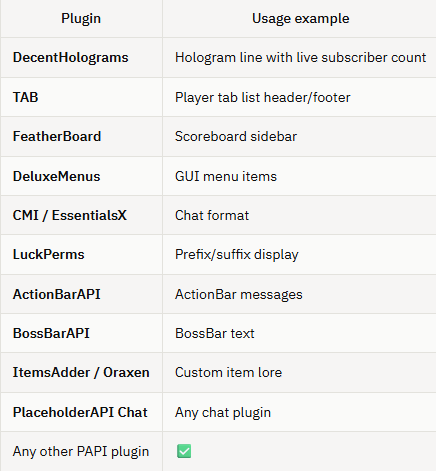
## 🔌 Compatible plugins (PlaceholderAPI) YTCounter placeholders work out of the box in:
## 📌 Placeholders Main placeholders:
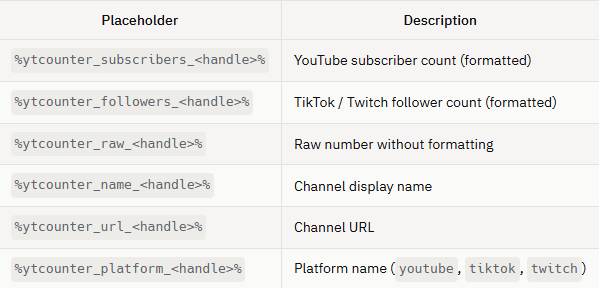
Examples: %ytcounter_subscribers_DragonMC% → 1. 234. 567 %ytcounter_followers_dragonmc% → 98. 765 %ytcounter_name_DragonMC% → DragonMC %ytcounter_url_DragonMC% → https://www.youtube.com/@DragonMC %ytcounter_raw_DragonMC% → 1234567
## 💬 Commands
Command | Description | Permission
--- | --- | ---
/counter youtube
Aliases: /ytcounter, /ytc
## 🔑 Permissions Permission | Default | Description --- | --- | --- ytcounter.use | OP | Use /counter commands ytcounter.admin | OP | List and remove channels ytcounter.reload | OP | Reload the plugin ytcounter.bypass-cooldown | OP | Skip command cooldown
## 🚀 Installation Step 1 — Install PlaceholderAPI YTCounter requires PlaceholderAPI. Download it from SpigotMC and place it in your plugins/ folder.
Step 2 — Install YTCounter Place YTCounter-1. 0. 0.jar in your server's plugins/ folder and restart the server.
The plugin will create:
``` plugins/ └── YTCounter/ ├── config.yml └── messages.yml ```
Step 3 — Configure API Keys Open plugins/YTCounter/config.yml and fill in your API keys.
## 🔑 How to get API Keys
### 🔴 YouTube Data API v3 Go to Google Cloud Console Create a project Enable YouTube Data API v3 Create API Key Paste it in config.yml:
``` youtube: api-key: "YOUR_KEY_HERE" ```
💡 Free quota: 10,000 units/day
### 🟣 Twitch Helix API Go to Twitch Developer Console Create app Copy Client ID + Secret Paste in config.yml:
``` twitch: client-id: "your_client_id" client-secret: "your_client_secret" ```
### 🖤 TikTok No API key required (automatic mode)
``` tiktok: api-key: ""
## ⚙️ config.yml
# ============================================================ # YTCounter - Configuration # ============================================================ # How often (in seconds) the plugin fetches fresh data from APIs. # Minimum: 30 | Recommended: 60-300 update-interval: 60 # --- YouTube --- youtube: api-key: "YOUR_YOUTUBE_API_KEY_HERE" # --- Twitch --- twitch: client-id: "YOUR_TWITCH_CLIENT_ID_HERE" client-secret: "YOUR_TWITCH_CLIENT_SECRET_HERE" # --- TikTok --- tiktok: api-key: "" # leave empty — automatic mode works without a key # --- Cache --- cache: enabled: true ttl: 60 # how long (seconds) a cached value stays valid # --- Formatting --- format: use-locale-format: true # true = 1. 234. 567 | false = 1234567 locale: "it_IT" # change to en_US, de_DE, fr_FR, etc. loading-text: "..." # shown while first fetch is in progress error-text: "N/A" # shown if the API returns an error # --- Logging --- logging: level: "INFO"
📊 Mod Details
- Game
- Minecraft Plugins
- Author
- drago_45_
- Version
- 1.0.0
- Downloads
- 17
- Endorsements
- 0
- Category
- decoration
- Created
- 7/8/2026
- Updated
- 6/21/2026
- Game Versions
- 1.21, 1.21.1, 1.21.2, 1.21.3, 1.21.4
- Tags
- decoration, social, utility
🔧 How to Install Minecraft Plugins Mods
Download from Modrinth. Use Prism Launcher or drop into your mods folder.
📖 Full step-by-step install guide for Minecraft Plugins →
Visit the official mod page for specific installation instructions for this mod.
🎮 Need cheat codes or console commands? Check ur gaming wiki for Minecraft Plugins commands, item IDs, and more.
❓ Frequently Asked Questions
Which Minecraft Plugins versions does YTcounter support?
The author lists 1.21, 1.21.1, 1.21.2, 1.21.3, 1.21.4, 1.21.5. Other versions may work but are untested by the author.
What is the latest version of YTcounter?
Version 1.0.0, published 2026-06-21 with 17 downloads recorded at the source.
Keep browsing — more Minecraft Plugins mods await