X-Chat
🟡 Updated this year🖼️ Gallery (2 images)

🔍 Analysis
- 🏆 #471 of 1317 bukkit mods in this game by downloads
📋 About This Mod
<div align="center"> (https://img.shields.io/badge/Available%20on-Spigot-orange?style=for-the-badge&logo=spigotmc&logoColor=white)](https://www.spigotmc.org/resources/135770/) (https://img.shields.io/badge/Wiki-Documentation-blue?style=for-the-badge&logo=readme&logoColor=white)](https://wiki-x-proyects.vercel.app/) (https://img.shields.io/badge/Discord-Community-7289da?style=for-the-badge&logo=discord&logoColor=white)](https://discord.xproyects.qzz.io/) # **X-Chat** ### *Advanced chat management with MiniMessage and custom formats* </div> ### 📝 **Description** X-Chat is a comprehensive chat management plugin that gives you full control over your server's chat experience. From priority-weighted formats and interactive hover/click effects to real-time moderation filters and custom emojis — everything is configurable from YAML files. Supports all major color formats and gracefully handles both Paper and Spigot servers. Compatible with Minecraft 1.18+. ### ✨ **Features** - **Priority-based Format System:** Create unlimited chat formats (admin, vip, default, etc.) with numeric priorities. The highest-priority format the player has permission for is automatically selected. Each format has independent color permissions (legacy, hex, MiniMessage). - **Full Color Format Support:** MiniMessage (`<red>`, `<gradient>`), Legacy (`&c`, `&l`), Hex (`&#FF0000`), BBCode (``, ``), and HTML shorthand (`<b>`, `<i>`, `<u>`, `<s>`) — all auto-converted seamlessly. - **Interactive Player Names:** Hover over a player's name to see custom info (rank, ping, etc. via PlaceholderAPI). Click to execute configurable actions (suggest command, run command, open URL, copy to clipboard). Works with all formats. - **Auto-Mentions:** Automatically detects when a player mentions another by name in chat. Highlights the mentioned name with a custom gradient format and plays a configurable sound. Supports optional `@` prefix requirement. - **Smart Moderation Suite:** Anti-Spam (configurable cooldown), Anti-Caps (percentage threshold with auto-lowercase or block), Anti-Advertising (regex-based IP and Discord link detection), and Smart Censor (partial `w**d` or full `****` word censoring). Each filter has its own bypass permission. - **Dynamic Chat Tags:** `` — shows held item with hover tooltip (name, amount, durability, enchantments). `` — displays coordinates with click-to-copy. `` — shows player latency. All individually configurable with their own YAML files. - **Custom Emoji System:** Define text shortcuts that are replaced with emojis or formatted text. Supports MiniMessage in emoji values. Permission-gated or open to everyone. - **Auto-Links:** URLs in chat are automatically converted to clickable links with configurable hover text. - **Private Messaging System:** `/msg`, `/r` (reply) — usable by all players by default. Includes SocialSpy for staff, ignore system with persistence, and self-message prevention. - **Chat History:** Per-player message log saved in memory and disk. View with `/chatlog` or `/history` with paginated output. - **Custom Join/Leave Messages:** Configurable join, leave, and first-join messages with MiniMessage and PlaceholderAPI support. Cancels default Bukkit messages. - **Auto-Broadcaster:** Timed announcements with random or sequential order, configurable sounds, and multi-line MiniMessage support. - **Custom Death Messages:** Per-cause death messages (PvP, fall, drown, fire, lava, void, explosion, cactus, lightning, magic, projectile, etc.) with MiniMessage formatting. - **Placeholders in Messages:** Allow players to use PlaceholderAPI placeholders directly in their chat messages (configurable with permission). - **6 Language Files:** EN, ES, PT, JA, RU, and CUSTOM — switch languages at runtime with `/xchat locate`. - **Dynamic Command Registration:** All commands (names and aliases) are defined in `config.yml` — no need to edit `plugin.yml`. Changes apply on reload. - **Config Auto-Updater:** Detects outdated configurations, creates a backup, and rebuilds automatically on startup. - **Paper & Spigot Compatible:** Hover, click, and interactive effects work natively on Paper. On Spigot, they are automatically stripped to plain text — no errors, no crashes. - **Folia Supported:** Fully compatible with Folia's regionized threading. ### 🖥️ **Compatibility** | Software | Supported | |---|---| | Bukkit / Spigot / Paper / Purpur | ✅ | | Folia | ✅ | | PlaceholderAPI | ✅ (soft) | | Vault | ✅ (soft) | | Minecraft | 1.18 → 1.21+ | ### 🛠️ **Main Commands** **`/msg <player> <message>`** Sends a private message to a player. Usable by everyone by default. **`/r <message>`** Replies to the last player who sent you a private message. Usable by everyone by default. **`/clearchat`** Clears the chat for all online players. **`/socialspy`** Toggles SocialSpy mode — see all private messages sent between players. **`/ignore <player>`** Ignores a player. You
# X-Chat ### Advanced chat management with MiniMessage and custom formats
### 📝 Description X-Chat is a comprehensive chat management plugin that gives you full control over your server's chat experience. From priority-weighted formats and interactive hover/click effects to real-time moderation filters and custom emojis — everything is configurable from YAML files. Supports all major color formats and gracefully handles both Paper and Spigot servers. Compatible with Minecraft 1. 18+.
### ✨ Features
- Priority-based Format System: Create unlimited chat formats (admin, vip, default, etc.) with numeric priorities. The highest-priority format the player has permission for is automatically selected. Each format has independent color permissions (legacy, hex, MiniMessage).
- Full Color Format Support: MiniMessage (``) — all auto-converted seamlessly.
- Interactive Player Names: Hover over a player's name to see custom info (rank, ping, etc. via PlaceholderAPI). Click to execute configurable actions (suggest command, run command, open URL, copy to clipboard). Works with all formats.
- Auto-Mentions: Automatically detects when a player mentions another by name in chat. Highlights the mentioned name with a custom gradient format and plays a configurable sound. Supports optional `@` prefix requirement.
- Smart Moderation Suite: Anti-Spam (configurable cooldown), Anti-Caps (percentage threshold with auto-lowercase or block), Anti-Advertising (regex-based IP and Discord link detection), and Smart Censor (partial `wd` or full `` word censoring). Each filter has its own bypass permission.
- Dynamic Chat Tags: `` — shows held item with hover tooltip (name, amount, durability, enchantments). `` — displays coordinates with click-to-copy. `` — shows player latency. All individually configurable with their own YAML files.
- Custom Emoji System: Define text shortcuts that are replaced with emojis or formatted text. Supports MiniMessage in emoji values. Permission-gated or open to everyone.
- Auto-Links: URLs in chat are automatically converted to clickable links with configurable hover text.
- Private Messaging System: `/msg`, `/r` (reply) — usable by all players by default. Includes SocialSpy for staff, ignore system with persistence, and self-message prevention.
- Chat History: Per-player message log saved in memory and disk. View with `/chatlog` or `/history` with paginated output.
- Custom Join/Leave Messages: Configurable join, leave, and first-join messages with MiniMessage and PlaceholderAPI support. Cancels default Bukkit messages.
- Auto-Broadcaster: Timed announcements with random or sequential order, configurable sounds, and multi-line MiniMessage support.
- Custom Death Messages: Per-cause death messages (PvP, fall, drown, fire, lava, void, explosion, cactus, lightning, magic, projectile, etc.) with MiniMessage formatting.
- Placeholders in Messages: Allow players to use PlaceholderAPI placeholders directly in their chat messages (configurable with permission).
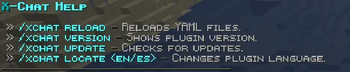
- 6 Language Files: EN, ES, PT, JA, RU, and CUSTOM — switch languages at runtime with `/xchat locate`.
- Dynamic Command Registration: All commands (names and aliases) are defined in `config.yml` — no need to edit `plugin.yml`. Changes apply on reload.
- Config Auto-Updater: Detects outdated configurations, creates a backup, and rebuilds automatically on startup.
- Paper & Spigot Compatible: Hover, click, and interactive effects work natively on Paper. On Spigot, they are automatically stripped to plain text — no errors, no crashes.
- Folia Supported: Fully compatible with Folia's regionized threading.
### 🖥️ Compatibility
| Software | Supported | |---|---| | Bukkit / Spigot / Paper / Purpur | ✅ | | Folia | ✅ | | PlaceholderAPI | ✅ (soft) | | Vault | ✅ (soft) | | Minecraft | 1. 18 → 1. 21+ |
### 🛠️ Main Commands
`/msg
`/r
`/clearchat` Clears the chat for all online players.
`/socialspy` Toggles SocialSpy mode — see all private messages sent between players.
`/ignore
📊 Mod Details
- Game
- Minecraft Plugins
- Author
- Fabian767689
- Version
- 1.4
- Downloads
- 270
- Endorsements
- 1
- Category
- bukkit
- Created
- 6/5/2026
- Updated
- 8/26/2026
- Game Versions
- 1.16.5, 1.17, 1.17.1, 1.18, 1.18.1
- Tags
- social, utility
🔧 How to Install Minecraft Plugins Mods
Download from Modrinth. Use Prism Launcher or drop into your mods folder.
📖 Full step-by-step install guide for Minecraft Plugins →
Visit the official mod page for specific installation instructions for this mod.
🎮 Need cheat codes or console commands? Check ur gaming wiki for Minecraft Plugins commands, item IDs, and more.
❓ Frequently Asked Questions
Which Minecraft Plugins versions does X-Chat support?
The author lists 1.16.5, 1.17, 1.17.1, 1.18, 1.18.1, 1.18.2. Other versions may work but are untested by the author.
What is the latest version of X-Chat?
Version 1.4, published 2026-08-26 with 270 downloads recorded at the source.
Keep browsing — more Minecraft Plugins mods await