WorldGuardFlagPanel
🟡 Updated this year🖼️ Gallery (3 images)
🔍 Analysis
- 🏆 #44 of 135 folia mods in this game by downloads
📋 About This Mod
<div align="center"> # WorldGuardFlagPanel ### A native GUI panel for managing WorldGuard flags — fully compatible with Folia (https://img.shields.io/badge/Folia-Compatible-green.svg)](https://papermc.io/software/folia) (https://img.shields.io/badge/Paper-1.21.8+-blue.svg)](https://papermc.io/) (https://img.shields.io/badge/Java-21+-orange.svg)](https://www.oracle.com/java/) (https://img.shields.io/badge/WorldGuard-7.0.13+-red.svg)](https://dev.enginehub.org/worldguard/) (https://img.shields.io/badge/license-MIT-blue)](https://github.com/Euphillya/WorldGuardFlagPanel) (https://github.com/Euphillya/WorldGuardFlagPanel) • (https://github.com/Euphillya/WorldGuardFlagPanel/issues) • (https://modrinth.com/plugin/worldguardflagpanel) • (https://discord.gg/uUJQEB7XNN) (https://wsrv.nl/?url=https%3A%2F%2Ffaststats.dev%2Fembed%2Fdefault%3A83f973ef-4bbd-4059-b386-4b08cdbac339%3Aservers-and-players.svg%3Fw%3D960%26h%3D340%26theme%3Ddark)](https://faststats.dev/project/worldguardflagpanel/minecraft-plugin) </div> --- ## 📖 About **WorldGuardFlagPanel** is a lightweight Paper/Folia plugin that adds a fully interactive **in-game GUI** to manage (https://dev.enginehub.org/worldguard/) region flags — no complex commands needed. Instead of typing `/region flag <region> <flag> <value>` every time, simply open the panel, click a flag, and the value cycles or a form opens for you to type a new one. Changes are saved instantly. --- ## ✨ Key Features ### 🖱️ Native In-Game Panel - **Click-through interface** — Flags are listed with their current value; one click toggles or opens an editor - **State flags** — Cycle through `ALLOW` → `DENY` → *(unset)* with a single click - **Boolean flags** — Toggle `TRUE` / `FALSE` instantly - **Text / numeric flags** — Opens a native input form pre-filled with the current value - **Set flags** — Multiline editor, one entry per line - **game-mode flag** — Dropdown selector: `Survival`, `Creative`, `Adventure`, `Spectator` - **Location flags** — Accepts `x,y,z` or `x,y,z,world` format ### 🏝️ Smart Region Detection - **Auto-detect** — Opens the panel for the region you're standing in - **Multi-region selector** — If you're inside overlapping regions, a picker lets you choose which one to edit - **Direct access** — Target any region by name: `/wgfpanel <region>` - **Global region** — Falls back to `__global__` when no region is found at your position ### 🌍 Multi-language Support - Ships with `fr_FR` 🇫🇷 and `en_GB` 🇬🇧 - Language is picked automatically from each player's Minecraft client locale - Fully customizable via `.toml` files ### ⚡ Performance - **Instant saves** — Region changes are persisted to disk immediately after each edit --- ## 📋 Requirements | Component | Minimum version | |--------------------|-----------------| | Paper **or** Folia | 1.21.8 | | WorldGuard | 7.0.13 | | WorldEdit | 7.3.11 | | Java | 21 | --- ## 🚀 Installation 1. **Download** the latest `.jar` from (https://github.com/Euphillya/WorldGuardFlagPanel/releases). 2. **Place** it in your server's `plugins/` folder. 3. Make sure **WorldGuard** and **WorldEdit** are already installed. 4. **Restart** the server. No configuration file is required to get started. --- ## 🎮 Commands ### `/wgfpanel ` | Usage | Behaviour | |----------------------|-------------------------------------------------------------------------------------------------------| | `/wgfpanel` | Opens the panel for the region at your position. Shows a region selector if multiple regions overlap. | | `/wgfpanel <region>` | Opens the panel for the specified region, wherever you are. | > Tab-completion is available for region names. --- ## 🔐 Permissions | Permission | Description | Default | |-----------------------------|----------------------------------------------------------|---------| | `worldguardflagpanel.use` | Allows opening the panel for regions the player **owns** | OP | | `worldguardflagpanel.admin` | Full access to **all** regions in any world | OP | > Without `worldguardflagpanel.admin`, players can only edit regions where they are set as **owner** in WorldGuard. --- ## 🌍 Languages The plugin ships with two built-in translations: - 🇫🇷 `fr_FR` — French - 🇬🇧 `en_GB` — English The displayed language is automatically determined by **each player's Minecraft client locale** — no configuration needed. To customize messages, edit the `.toml` files located in: ``` plugins/WorldGuardFlagPanel/language/ ``` --- ## 📊 Statistics This plugin collec
# WorldGuardFlagPanel
### A native GUI panel for managing WorldGuard flags — fully compatible with Folia
[!(https://img.shields.io/badge/Folia-Compatible-green.svg)](https://papermc.io/software/folia) [!(https://img.shields.io/badge/Paper-1. 21. 8+-blue.svg)](https://papermc.io/) [!(https://img.shields.io/badge/Java-21+-orange.svg)](https://www.oracle.com/java/) [!(https://img.shields.io/badge/WorldGuard-7. 0. 13+-red.svg)](https://dev.enginehub.org/worldguard/) [!(https://img.shields.io/badge/license-MIT-blue)](https://github.com/Euphillya/WorldGuardFlagPanel)
(https://github.com/Euphillya/WorldGuardFlagPanel) • (https://github.com/Euphillya/WorldGuardFlagPanel/issues) • (https://modrinth.com/plugin/worldguardflagpanel) • (https://discord.gg/uUJQEB7XNN)
[!(https://wsrv.nl/?url=https%3A%2F%2Ffaststats.dev%2Fembed%2Fdefault%3A83f973ef-4bbd-4059-b386-4b08cdbac339%3Aservers-and-players.svg%3Fw%3D960%26h%3D340%26theme%3Ddark)](https://faststats.dev/project/worldguardflagpanel/minecraft-plugin)
## 📖 About
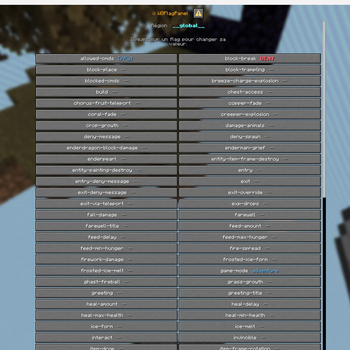
WorldGuardFlagPanel is a lightweight Paper/Folia plugin that adds a fully interactive in-game GUI to manage (https://dev.enginehub.org/worldguard/) region flags — no complex commands needed.
Instead of typing `/region flag
## ✨ Key Features
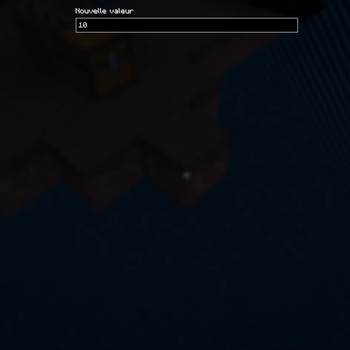
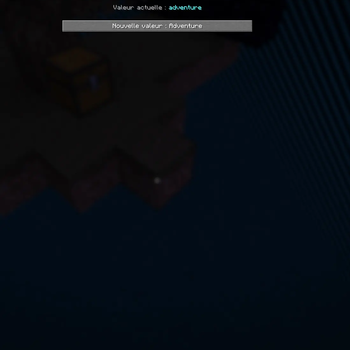
### 🖱️ Native In-Game Panel - Click-through interface — Flags are listed with their current value; one click toggles or opens an editor - State flags — Cycle through `ALLOW` → `DENY` → (unset) with a single click - Boolean flags — Toggle `TRUE` / `FALSE` instantly - Text / numeric flags — Opens a native input form pre-filled with the current value - Set flags — Multiline editor, one entry per line - game-mode flag — Dropdown selector: `Survival`, `Creative`, `Adventure`, `Spectator` - Location flags — Accepts `x,y,z` or `x,y,z,world` format
### 🏝️ Smart Region Detection
- Auto-detect — Opens the panel for the region you're standing in
- Multi-region selector — If you're inside overlapping regions, a picker lets you choose which one to edit
- Direct access — Target any region by name: `/wgfpanel
### 🌍 Multi-language Support - Ships with `fr_FR` 🇫🇷 and `en_GB` 🇬🇧 - Language is picked automatically from each player's Minecraft client locale - Fully customizable via `.toml` files
### ⚡ Performance - Instant saves — Region changes are persisted to disk immediately after each edit
## 📋 Requirements
| Component | Minimum version | |--------------------|-----------------| | Paper or Folia | 1. 21. 8 | | WorldGuard | 7. 0. 13 | | WorldEdit | 7. 3. 11 | | Java | 21 |
## 🚀 Installation
1. Download the latest `.jar` from (https://github.com/Euphillya/WorldGuardFlagPanel/releases). 2. Place it in your server's `plugins/` folder. 3. Make sure WorldGuard and WorldEdit are already installed. 4. Restart the server.
No configuration file is required to get started.
## 🎮 Commands
### `/wgfpanel `
| Usage | Behaviour |
|----------------------|-------------------------------------------------------------------------------------------------------|
| `/wgfpanel` | Opens the panel for the region at your position. Shows a region selector if multiple regions overlap. |
| `/wgfpanel
> Tab-completion is available for region names.
## 🔐 Permissions
| Permission | Description | Default | |-----------------------------|----------------------------------------------------------|---------| | `worldguardflagpanel.use` | Allows opening the panel for regions the player owns | OP | | `worldguardflagpanel.admin` | Full access to all regions in any world | OP |
> Without `worldguardflagpanel.admin`, players can only edit regions where they are set as owner in WorldGuard.
## 🌍 Languages
The plugin ships with two built-in translations:
- 🇫🇷 `fr_FR` — French
- 🇬🇧 `en_GB` — English
The displayed language is automatically determined by each player's Minecraft client locale — no configuration needed.
To customize messages, edit the `.toml` files located in: ``` plugins/WorldGuardFlagPanel/language/ ```
## 📊 Statistics
This plugin collec
📊 Mod Details
- Game
- Minecraft Plugins
- Author
- Euphyllia
- Version
- 1.0-4
- Downloads
- 131
- Endorsements
- 1
- Category
- folia
- Created
- 6/6/2026
- Updated
- 6/4/2026
- Game Versions
- 1.21.8, 1.21.9, 1.21.10, 1.21.11, 26.1
- Tags
- management, technology, utility
🔧 How to Install Minecraft Plugins Mods
Download from Modrinth. Use Prism Launcher or drop into your mods folder.
📖 Full step-by-step install guide for Minecraft Plugins →
Visit the official mod page for specific installation instructions for this mod.
🎮 Need cheat codes or console commands? Check ur gaming wiki for Minecraft Plugins commands, item IDs, and more.
❓ Frequently Asked Questions
Which Minecraft Plugins versions does WorldGuardFlagPanel support?
The author lists 1.21.8, 1.21.9, 1.21.10, 1.21.11, 26.1, 26.1.1. Other versions may work but are untested by the author.
What is the latest version of WorldGuardFlagPanel?
Version 1.0-4, published 2026-06-04 with 131 downloads recorded at the source.
Keep browsing — more Minecraft Plugins mods await