WorldEditDisplay
🟡 Updated this year🖼️ Gallery (6 images)




🔍 Analysis
- 👍 1.2% endorsement rate — high engagement, a strong quality signal
- 🏆 #128 of 169 folia mods in this game by downloads
📋 About This Mod
# WorldEditDisplay <div align="center"> (https://img.shields.io/badge/Minecraft-1.21.x-brightgreen.svg)](https://www.minecraft.net/) (https://img.shields.io/badge/Java-21-orange.svg)](https://www.oracle.com/java/) (https://img.shields.io/badge/License-Apache2.0-blue.svg)](LICENSE) A server-side WorldEdit selection visualization plugin </div> --- ### About WorldEditDisplay is a server-side plugin for Minecraft that adds visual selection rendering for WorldEdit. It intercepts WorldEdit's CUI (Client User Interface) protocol packets and renders selections using Display Entities on the server side. This means players can see their WorldEdit selections without installing any client-side mods. ### Features **Selection Types** - Cuboid - Box selections with edge lines and grid display - Polygon - 2D polygon boundaries with vertical columns - Ellipsoid - Smooth elliptical selections - Cylinder - Circular selections with adjustable height - Polyhedron - Complex 3D polyhedral structures **Visual Rendering** - Uses Minecraft's Display Entity (TextDisplay) system - Customizable hex colors (#RRGGBBAA) for all visual elements - Adjustable line thickness and grid density - Translucent face filling for Cuboid, Polygon, and Polyhedron regions - Grid overlay for easier size calculation **Multi-language Support** The interface is available in multiple languages with automatic client language detection: - Traditional Chinese (zh_tw) - English (en_us) **Player Settings** Players can customize their own rendering preferences: - Choose preferred hex colors for elements - Enable or disable face filling - Adjust line thickness within server limits - Control grid spacing and density - Changes apply immediately **Selection Sharing** - Share your WorldEdit selection with other players in real-time - Invite, accept, revoke, and unwatch shares via `/wedisplay share` - Each shared selection is displayed in a unique auto-generated color - Share relationships persist across server restarts **View All Mode** *(op-only by default)* - Toggle monitoring of all online players' selections via `/wedisplay view` - Hide specific players from your view, toggle name labels, and list monitored players **Configuration System** - Server-wide defaults in `config.yml` - Per-player overrides in `player_config/*.yml` - Hot reload without server restart ### Requirements - Minecraft 1.20 ~ 1.21.x (Paper / Folia / Spigot) - Java 21 or higher - Required plugins: - (https://github.com/retrooper/packetevents) 2.11.1+ ### Installation 1. Make sure WorldEdit and PacketEvents are installed on your server 2. Download `WorldEditDisplay.jar` 3. Place it in your server's `plugins` folder 4. Restart the server 5. Edit `plugins/WorldEditDisplay/config.yml` if needed 6. Use `/wedisplayreload` to reload the configuration ### Commands **Admin Commands** `/wedisplayreload` - Reload plugin configuration - Permission: `worldeditdisplay.reload` (default: op) **Player Commands** `/wedisplay set <renderer> <setting> <value>` - Configure personal rendering settings - Example: `/wedisplay set cuboid edge_color #FFD700FF` - Permission: `worldeditdisplay.use.settings` `/wedisplay reset <renderer> ` - Reset to server defaults - Example: `/wedisplay reset cuboid` (reset all settings) - Example: `/wedisplay reset cuboid edge_color` (reset specific setting) `/wedisplay show ` - Show current settings - Example: `/wedisplay show` (show all) - Example: `/wedisplay show cuboid` (show specific renderer) `/wedisplay toggle` - Toggle rendering on/off - Quick command to enable or disable selection visualization - Works independently for each player `/wedisplay reloadplayer` - Reload your personal configuration file `/wedisplay lang <language>` - Set interface language - Example: `/wedisplay lang en_us` - Supported: zh_tw, en_us `/wedisplay share invite <player>` - Invite a player to view your selection - Permission: `worldeditdisplay.use.share.invite` `/wedisplay share accept <player>` - Accept a pending share invitation - Permission: `worldeditdisplay.use.share.accept` `/wedisplay share revoke <player>` - Revoke a share you previously granted - Permission: `worldeditdisplay.use.share.revoke` `/wedisplay share unwatch <player>` - Stop watching another player's selection - Permission: `worldeditdisplay.use.share.unwatch` `/wedisplay share list ` - List current share relationships - Permission: `worldeditdisplay.use.share.list` **View All Sub-commands** *(op-only by default)* `/wedisplay view` - Toggle view-all mode (see all online players' selections) - Permission: `worldeditdisplay.use.view` `/wedisplay view hide <player>` - Exclude a player from your view-all mode - Permission: `worldeditdisplay.use.view.hide` `/wedisplay view hideall` - Exclude all online players from view-all mode - Permission: `worldeditdisplay.use.view.hide` `/wedisplay view unhide <player>` - Rem
# WorldEditDisplay
[!(https://img.shields.io/badge/Minecraft-1. 21.x-brightgreen.svg)](https://www.minecraft.net/) [!(https://img.shields.io/badge/Java-21-orange.svg)](https://www.oracle.com/java/) [!(https://img.shields.io/badge/License-Apache2. 0-blue.svg)](LICENSE)
A server-side WorldEdit selection visualization plugin
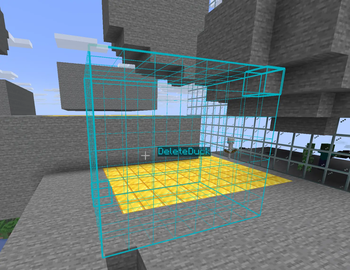
WorldEditDisplay is a server-side plugin for Minecraft that adds visual selection rendering for WorldEdit. It intercepts WorldEdit's CUI (Client User Interface) protocol packets and renders selections using Display Entities on the server side. This means players can see their WorldEdit selections without installing any client-side mods.
### Features
Selection Types - Cuboid - Box selections with edge lines and grid display - Polygon - 2D polygon boundaries with vertical columns - Ellipsoid - Smooth elliptical selections - Cylinder - Circular selections with adjustable height - Polyhedron - Complex 3D polyhedral structures
Visual Rendering - Uses Minecraft's Display Entity (TextDisplay) system - Customizable hex colors (#RRGGBBAA) for all visual elements - Adjustable line thickness and grid density - Translucent face filling for Cuboid, Polygon, and Polyhedron regions - Grid overlay for easier size calculation
Multi-language Support
The interface is available in multiple languages with automatic client language detection: - Traditional Chinese (zh_tw) - English (en_us)
Player Settings
Players can customize their own rendering preferences: - Choose preferred hex colors for elements - Enable or disable face filling - Adjust line thickness within server limits - Control grid spacing and density - Changes apply immediately
Selection Sharing - Share your WorldEdit selection with other players in real-time - Invite, accept, revoke, and unwatch shares via `/wedisplay share` - Each shared selection is displayed in a unique auto-generated color - Share relationships persist across server restarts
View All Mode (op-only by default) - Toggle monitoring of all online players' selections via `/wedisplay view` - Hide specific players from your view, toggle name labels, and list monitored players
Configuration System - Server-wide defaults in `config.yml` - Per-player overrides in `player_config/.yml` - Hot reload without server restart
### Requirements
- Minecraft 1. 20 ~ 1. 21.x (Paper / Folia / Spigot)
- Java 21 or higher
- Required plugins:
- - (https://github.com/retrooper/packetevents) 2. 11. 1+
### Installation
1. Make sure WorldEdit and PacketEvents are installed on your server 2. Download `WorldEditDisplay.jar` 3. Place it in your server's `plugins` folder 4. Restart the server 5. Edit `plugins/WorldEditDisplay/config.yml` if needed 6. Use `/wedisplayreload` to reload the configuration
### Commands
Admin Commands
`/wedisplayreload` - Reload plugin configuration - Permission: `worldeditdisplay.reload` (default: op)
Player Commands
`/wedisplay set
`/wedisplay reset
`/wedisplay show ` - Show current settings - Example: `/wedisplay show` (show all) - Example: `/wedisplay show cuboid` (show specific renderer)
`/wedisplay toggle` - Toggle rendering on/off - Quick command to enable or disable selection visualization - Works independently for each player
`/wedisplay reloadplayer` - Reload your personal configuration file
`/wedisplay lang
`/wedisplay share invite
`/wedisplay share accept
`/wedisplay share revoke
`/wedisplay share unwatch
`/wedisplay share list ` - List current share relationships - Permission: `worldeditdisplay.use.share.list`
View All Sub-commands (op-only by default)*
`/wedisplay view` - Toggle view-all mode (see all online players' selections) - Permission: `worldeditdisplay.use.view`
`/wedisplay view hide
`/wedisplay view hideall` - Exclude all online players from view-all mode - Permission: `worldeditdisplay.use.view.hide`
`/wedisplay view unhide
📊 Mod Details
- Game
- Minecraft Plugins
- Author
- TWME
- Version
- 2.5.1
- Downloads
- 1,894
- Endorsements
- 22
- Category
- folia
- Created
- 1/13/2026
- Updated
- 8/24/2026
- Game Versions
- 1.19.4, 1.20, 1.20.1, 1.20.2, 1.20.3
- Tags
- utility
🔧 How to Install Minecraft Plugins Mods
Download from Modrinth. Use Prism Launcher or drop into your mods folder.
📖 Full step-by-step install guide for Minecraft Plugins →
Visit the official mod page for specific installation instructions for this mod.
🎮 Need cheat codes or console commands? Check ur gaming wiki for Minecraft Plugins commands, item IDs, and more.
❓ Frequently Asked Questions
Which Minecraft Plugins versions does WorldEditDisplay support?
The author lists 1.19.4, 1.20, 1.20.1, 1.20.2, 1.20.3, 1.20.4. Other versions may work but are untested by the author.
What is the latest version of WorldEditDisplay?
Version 2.5.1, published 2026-08-24 with 1,894 downloads recorded at the source.
Keep browsing — more Minecraft Plugins mods await