WildRTP GUI
🟡 Updated this year🖼️ Gallery (2 images)
🔍 Analysis
- 🏆 #11 of 333 adventure mods in this game by downloads
📋 About This Mod
# (https://modrinth.com/plugin/wildrtp) REQUIRED! This plugin requires (https://modrinth.com/plugin/wildrtp) to function. Please ensure it is installed and configured on your server before using this GUI add-on. Take your server's random teleportation to the next level! WildRTP GUI replaces the standard command-based experience with a sleek, interactive menu, allowing your players to choose their destination visually. ## Features - **Fully Customizable**: titles, lore, materials, colors - **Smart Layouts**: automatically adjusts layout based on the number of worlds you have - **Intuitive UI**: clean, modern interface that makes navigation easy for players - **Movetimer**: enable or disable MoveTimer independent from WildRTP configuration - **Override existing rtp / wild / wildrtp / ... commands** - **Supports up to 6 worlds** ### Example GUI with 3 worlds !(https://cdn.modrinth.com/data/oKFnRLoh/images/1c02607b1de09ed93b8a813af21403ac3f14c9ee.gif) ### Example GUI with 6 worlds !(https://cdn.modrinth.com/data/oKFnRLoh/images/eba520318de51450d81e24c9cae15c557a1b7766.png) ### Commands - /rtpgui <reload|updates> ### Permissions - **wildrtp.gui** - Allows you to use the GUI (default = true) - **wildrtp.gui.admin** - Allows reload and check for updates (only op) <details> <summary>Config</summary> ``` # WildRTP GUI # by Joni gui: title: '&8ʀᴛᴘᴍᴇɴᴜ' fill-background: true background-material: GRAY_STAINED_GLASS_PANE # Worlds to show in the GUI # A maximum of 6 worlds can be shown # The GUI will automatically adjust depending on the number of worlds worlds: world: material: GRASS_BLOCK display-name: <#00FF00>🌍 Overworld RTP lore: - '&f&l| <#00FF00>Teleport &fto a random' - '&f&l| &flocation in <#00FF00>The Overworld' - '&f&l| &fClick to <#00FF00>teleport &fnow!' world_nether: material: NETHERRACK display-name: <#FF5500>🔥 Nether RTP lore: - '&f&l| <#FF5500>Teleport &fto a random' - '&f&l| &flocation in <#FF5500>The Nether' - '&f&l| &fClick to <#FF5500>teleport &fnow!' world_the_end: material: END_STONE display-name: <#F7E07A>🪨 The End RTP lore: - '&f&l| <#F7E07A>Teleport &fto a random' - '&f&l| &flocation in the <#F7E07A>The End' - '&f&l| &fClick to <#F7E07A>teleport &fnow!' # If true, the /rtp command and their aliases will be overridden override-rtp-command: false # If true, teleportation after clicking will be delayed by the amount of time specified in the WildRTP config movetimer-enabled: false messages: no-perm: '&cYou don''t have permission to do that!' no-console: '&cThis command can''t be executed from the console!' invalid-usage: '&cUsage: /rtpgui <reload|updates>' reloaded-success: '&aConfiguration reloaded!' reloaded-fail: '&cFailed to reload configuration!' update-available: '&eA new version is available!' no-update-available: '&aYou are on the latest version!' prefix: '&8 &f' metrics: true check-updates: true notify-updates-on-join: true # Do not edit below this line config-version: 1 ``` </details>
# (https://modrinth.com/plugin/wildrtp) REQUIRED! This plugin requires (https://modrinth.com/plugin/wildrtp) to function. Please ensure it is installed and configured on your server before using this GUI add-on.
Take your server's random teleportation to the next level! WildRTP GUI replaces the standard command-based experience with a sleek, interactive menu, allowing your players to choose their destination visually.
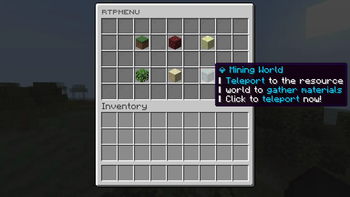
## Features - Fully Customizable: titles, lore, materials, colors - Smart Layouts: automatically adjusts layout based on the number of worlds you have - Intuitive UI: clean, modern interface that makes navigation easy for players - Movetimer: enable or disable MoveTimer independent from WildRTP configuration - Override existing rtp / wild / wildrtp / ... commands - Supports up to 6 worlds
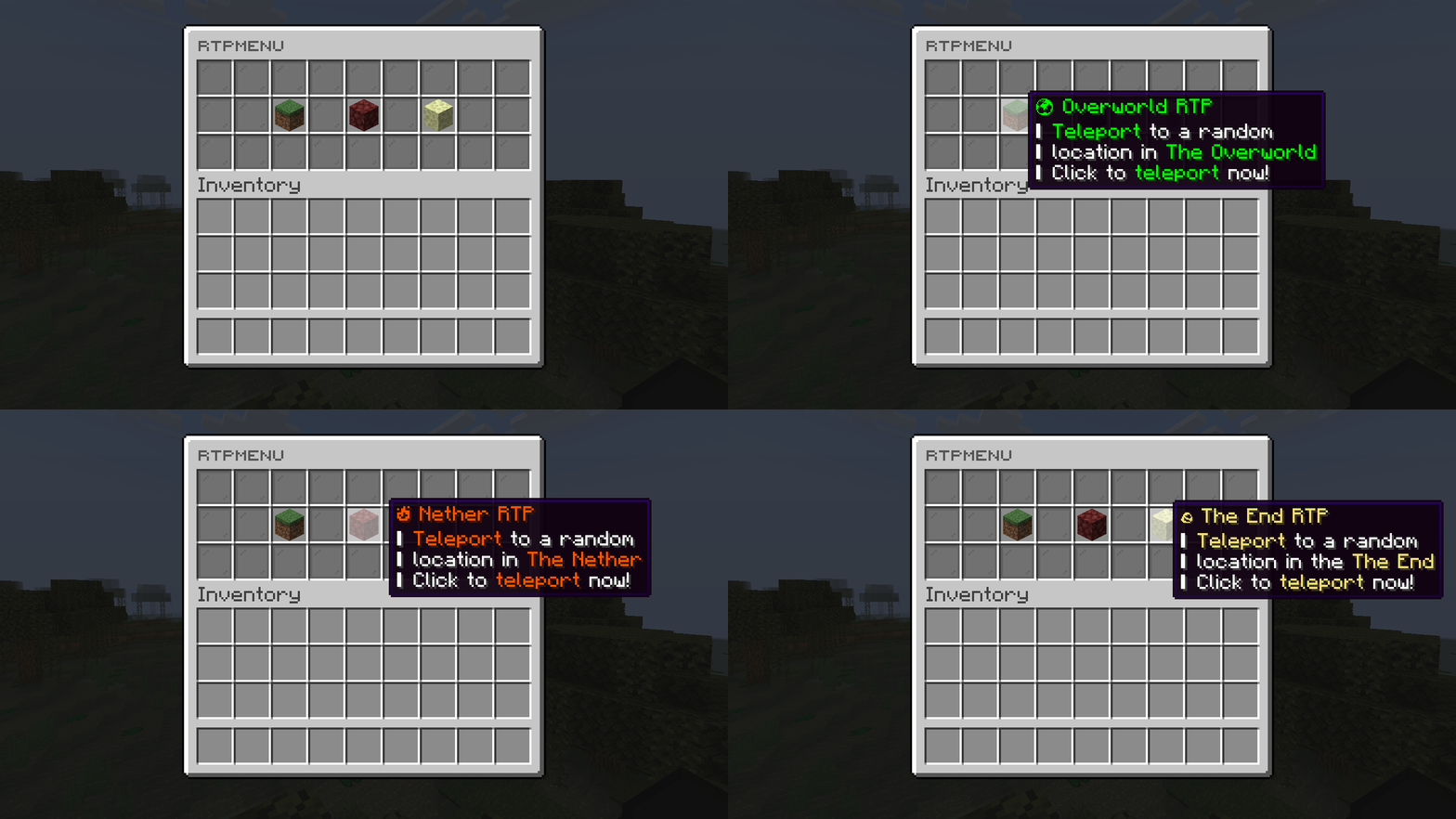
### Example GUI with 3 worlds !(https://cdn.modrinth.com/data/oKFnRLoh/images/1c02607b1de09ed93b8a813af21403ac3f14c9ee.gif)
### Example GUI with 6 worlds !(https://cdn.modrinth.com/data/oKFnRLoh/images/eba520318de51450d81e24c9cae15c557a1b7766.png)
### Commands
- /rtpgui
### Permissions - wildrtp.gui - Allows you to use the GUI (default = true) - wildrtp.gui.admin - Allows reload and check for updates (only op)
Config
``` # WildRTP GUI # by Joni
gui: title: '&8ʀᴛᴘᴍᴇɴᴜ' fill-background: true background-material: GRAY_STAINED_GLASS_PANE
# Worlds to show in the GUI # A maximum of 6 worlds can be shown # The GUI will automatically adjust depending on the number of worlds worlds: world: material: GRASS_BLOCK display-name: <#00FF00>🌍 Overworld RTP lore: - '&f&l| <#00FF00>Teleport &fto a random' - '&f&l| &flocation in <#00FF00>The Overworld' - '&f&l| &fClick to <#00FF00>teleport &fnow!' world_nether: material: NETHERRACK display-name: <#FF5500>🔥 Nether RTP lore: - '&f&l| <#FF5500>Teleport &fto a random' - '&f&l| &flocation in <#FF5500>The Nether' - '&f&l| &fClick to <#FF5500>teleport &fnow!' world_the_end: material: END_STONE display-name: <#F7E07A>🪨 The End RTP lore: - '&f&l| <#F7E07A>Teleport &fto a random' - '&f&l| &flocation in the <#F7E07A>The End' - '&f&l| &fClick to <#F7E07A>teleport &fnow!'
# If true, the /rtp command and their aliases will be overridden override-rtp-command: false # If true, teleportation after clicking will be delayed by the amount of time specified in the WildRTP config movetimer-enabled: false
messages:
no-perm: '&cYou don''t have permission to do that!'
no-console: '&cThis command can''t be executed from the console!'
invalid-usage: '&cUsage: /rtpgui
prefix: '&8[&aRTPGUI&8] &f'
metrics: true check-updates: true notify-updates-on-join: true
# Do not edit below this line config-version: 1
📊 Mod Details
- Game
- Minecraft Plugins
- Author
- LasaJoniHD
- Version
- 1.4
- Downloads
- 342
- Endorsements
- 3
- Category
- adventure
- Created
- 6/2/2026
- Updated
- 8/16/2026
- Game Versions
- 1.18, 1.18.1, 1.18.2, 1.19, 1.19.1
- Tags
- adventure, game-mechanics
🔧 How to Install Minecraft Plugins Mods
Download from Modrinth. Use Prism Launcher or drop into your mods folder.
📖 Full step-by-step install guide for Minecraft Plugins →
Visit the official mod page for specific installation instructions for this mod.
🎮 Need cheat codes or console commands? Check ur gaming wiki for Minecraft Plugins commands, item IDs, and more.
❓ Frequently Asked Questions
Which Minecraft Plugins versions does WildRTP GUI support?
The author lists 1.18, 1.18.1, 1.18.2, 1.19, 1.19.1, 1.19.2. Other versions may work but are untested by the author.
What is the latest version of WildRTP GUI?
Version 1.4, published 2026-08-16 with 342 downloads recorded at the source.
Keep browsing — more Minecraft Plugins mods await