Waypoints
🟡 Updated this year🖼️ Gallery (8 images)
🔍 Analysis
- 👍 0.2% endorsement rate
- 🏆 #20 of 367 adventure mods in this game by downloads
📋 About This Mod
# Waypoints (https://img.shields.io/static/v1?message=Support%20Discord&color=7289da&style=flat-square&logo=discord&logoColor=white&label)](https://discord.gg/4xY9TcHQja) !(https://img.shields.io/modrinth/dt/waypoints?label=Modrinth%20Downloads&style=flat-square) !(https://img.shields.io/spiget/downloads/66647?label=Spigot%20Downloads&style=flat-square) Ever had the problem, that you were on a long trip and can't find your base? You could set a warp with a conventional plugin at your home and simply teleport back. But if you want to keep the survival experience of not being able to teleport like that, this plugin could be just what your server needs! ## Direction Indicators So, instead of just bringing the player back where he started, this plugin shows him the direction he has to walk, so he can explore the world even more. To show the player the direction you can configure multiple direction indicators to guide the player to his destination. ### Bossbar Indicator A compass will be visible at the top of the screen, with a highlighter marking in which direction the waypoint is ### Beacon When the waypoint is in render distance, a beacon beam will appear at the location of the waypoint to make it easier to pinpoint the location of the waypoint. ### Hologram Floating text like in the mods. ### Blinking Block When the player is closer to the waypoint, the beacon will be replaced with a block sequence that will repeat. This is to help him get to the exact location. ### Compass It won't get any simpler than that if the player owns a compass. It will have the waypoint as it's target and points into that direction. ### Actionbar Indicator This is comparable to the compass but doesn't require one. It will show the rough direction with small sections in the action bar of the player. If the player is too far left, the sections in the right will light up and vice versa. ### Particles Particles appear at the feet of the player pointing into the direction of the waypoint ## Player tracking Although disabled by default, (https://codeberg.org/md5lukas/waypoints/src/commit/c90873561f204e3bb20375889f6abff4201f17a2/waypoints/sample_configs/config.yml#L301) adds a menu to the GUI where the player can choose another player to track. Now the compass, actionbar indicator and particles will help guide the player to the tracked player. - Players can choose to hide themselves in the menu to others (if enabled) - Players must show themselves to others in order to track a player (if enabled) - The player that gets tracked receives a notification who started tracking him (if enabled) ## Languages The plugin is shipping translations for the following languages: - English - German - Italian (by marcotech81) - Simplified Chinese (by SnowCutieOwO) - Traditional Chinese (by ItzTheBear) - Brazilian Portuguese (partial, by gaugt980131gg2) - Japanese (by Niboshi201) And if your language is not there, the plugin is fully translatable ## Other notable features - Open the GUI by sneaking and right-clicking with a compass (by default) - Set custom icons for waypoints and folders by clicking on their icon. The item in your main hand will be used - Limit the amount of waypoints and folders a player can have - Customizable teleport prices and price increases the more the player teleports (With Vault support) - Direction indicators customizable - Items in GUI fully customizable - SQLite data storage ## Integrations - Public waypoints are added to: - (https://www.spigotmc.org/resources/dynmap%C2%AE.274/) - (https://github.com/jpenilla/squaremap) - (https://bluemap.bluecolored.de/) - (https://modrinth.com/plugin/pl3xmap) ## Videos DonKolia made a small video series of this plugins functionality where he demonstrates the basic functionality and all the available pointers. It is in Spanish but with English subtitles: (https://www.youtube.com/watch?v=mt3lmGMKZV8&list=PLop1Uc5d4Z6pTJIBRwTFumdL7cInrE7fL) ## Commands `/waypoints` - Opens the GUI `/waypoints select <Name>` - Select an additional waypoint `/waypoints deselectAll` - Deselect all selected waypoints `/waypoints teleport <Name>` - Teleport to waypoints (if allowed) `/waypoints set <Name>` - Create a waypoint only the player himself can see `/waypoints setPublic <Name>` - Create a waypoint visible for everyone `/waypoints setPermission <Permission> <Name>` - Create a waypoint only visible for players with the given permission `/waypoints setTemporary <X> <Y> <Z>` - Create a waypoint that is only visible for the time he is online `/waypoints other <Name>` - View the waypoints of another player `/waypoints statistics` - Look at some rudimentary statistics about the database `/waypoints reload` - Reload the configuration. (`/reload` **is not supported**) ### Scripting `/waypointsscript deselectWaypoint <Player-Name>` - Deselec
# Waypoints
[!(https://img.shields.io/static/v1?message=Support%20Discord&color=7289da&style=flat-square&logo=discord&logoColor=white&label)](https://discord.gg/4xY9TcHQja) !(https://img.shields.io/modrinth/dt/waypoints?label=Modrinth%20Downloads&style=flat-square) !(https://img.shields.io/spiget/downloads/66647?label=Spigot%20Downloads&style=flat-square)
Ever had the problem, that you were on a long trip and can't find your base?
You could set a warp with a conventional plugin at your home and simply teleport back. But if you want to keep the survival experience of not being able to teleport like that, this plugin could be just what your server needs!
## Direction Indicators
So, instead of just bringing the player back where he started, this plugin shows him the direction he has to walk, so he can explore the world even more. To show the player the direction you can configure multiple direction indicators to guide the player to his destination.
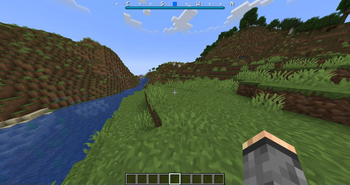
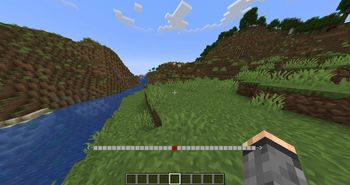
### Bossbar Indicator
A compass will be visible at the top of the screen, with a highlighter marking in which direction the waypoint is
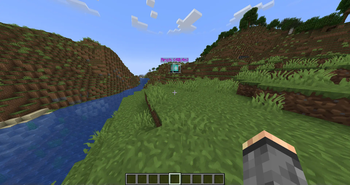
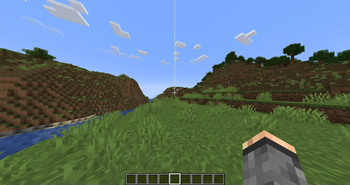
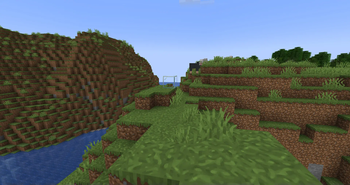
When the waypoint is in render distance, a beacon beam will appear at the location of the waypoint to make it easier to pinpoint the location of the waypoint.
### Hologram
Floating text like in the mods.
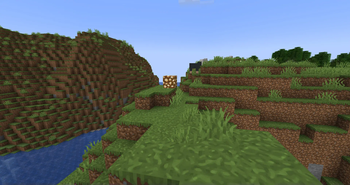
### Blinking Block
When the player is closer to the waypoint, the beacon will be replaced with a block sequence that will repeat. This is to help him get to the exact location.
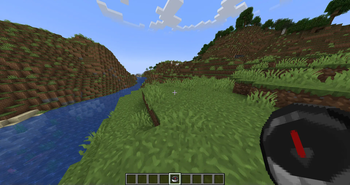
### Compass
It won't get any simpler than that if the player owns a compass. It will have the waypoint as it's target and points into that direction.
### Actionbar Indicator
This is comparable to the compass but doesn't require one. It will show the rough direction with small sections in the action bar of the player. If the player is too far left, the sections in the right will light up and vice versa.
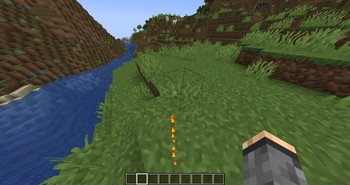
### Particles
Particles appear at the feet of the player pointing into the direction of the waypoint
## Player tracking
Although disabled by default, (https://codeberg.org/md5lukas/waypoints/src/commit/c90873561f204e3bb20375889f6abff4201f17a2/waypoints/sample_configs/config.yml#L301) adds a menu to the GUI where the player can choose another player to track. Now the compass, actionbar indicator and particles will help guide the player to the tracked player.
- Players can choose to hide themselves in the menu to others (if enabled)
- Players must show themselves to others in order to track a player (if enabled)
- The player that gets tracked receives a notification who started tracking him (if enabled)
## Languages The plugin is shipping translations for the following languages: - English - German - Italian (by marcotech81) - Simplified Chinese (by SnowCutieOwO) - Traditional Chinese (by ItzTheBear) - Brazilian Portuguese (partial, by gaugt980131gg2) - Japanese (by Niboshi201)
And if your language is not there, the plugin is fully translatable
## Other notable features
- Open the GUI by sneaking and right-clicking with a compass (by default)
- Set custom icons for waypoints and folders by clicking on their icon. The item in your main hand will be used
- Limit the amount of waypoints and folders a player can have
- Customizable teleport prices and price increases the more the player teleports (With Vault support)
- Direction indicators customizable
- Items in GUI fully customizable
- SQLite data storage
## Integrations
- Public waypoints are added to:
- - (https://www.spigotmc.org/resources/dynmap%C2%AE. 274/)
- - (https://github.com/jpenilla/squaremap)
- - (https://bluemap.bluecolored.de/)
- - (https://modrinth.com/plugin/pl3xmap)
DonKolia made a small video series of this plugins functionality where he demonstrates the basic functionality and all the available pointers. It is in Spanish but with English subtitles: (https://www.youtube.com/watch?v=mt3lmGMKZV8&list=PLop1Uc5d4Z6pTJIBRwTFumdL7cInrE7fL)
## Commands
`/waypoints` - Opens the GUI
`/waypoints select
`/waypoints deselectAll` - Deselect all selected waypoints
`/waypoints teleport
`/waypoints set
`/waypoints setPublic
`/waypoints setPermission
`/waypoints setTemporary
`/waypoints other
`/waypoints statistics` - Look at some rudimentary statistics about the database
`/waypoints reload` - Reload the configuration. (`/reload` is not supported)
### Scripting
`/waypointsscript deselectWaypoint
📊 Mod Details
- Game
- Minecraft Plugins
- Author
- md5lukas
- Version
- 5.0.0
- Downloads
- 77,086
- Endorsements
- 135
- Category
- adventure
- Created
- 12/29/2022
- Updated
- 8/7/2026
- Game Versions
- 1.21.11, 26.1, 26.1.1, 26.1.2, 26.2
- Tags
- adventure, utility
🔧 How to Install Minecraft Plugins Mods
Download from Modrinth. Use Prism Launcher or drop into your mods folder.
📖 Full step-by-step install guide for Minecraft Plugins →
Visit the official mod page for specific installation instructions for this mod.
🎮 Need cheat codes or console commands? Check ur gaming wiki for Minecraft Plugins commands, item IDs, and more.
❓ Frequently Asked Questions
Which Minecraft Plugins versions does Waypoints support?
The author lists 1.21.11, 26.1, 26.1.1, 26.1.2, 26.2. Other versions may work but are untested by the author.
What is the latest version of Waypoints?
Version 5.0.0, published 2026-08-07 with 77,086 downloads recorded at the source.
Keep browsing — more Minecraft Plugins mods await