vScoreboard
🟡 Updated this year🖼️ Gallery (2 images)

🔍 Analysis
- 🏆 #317 of 351 adventure mods in this game by downloads
📋 About This Mod
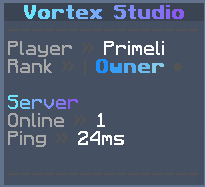
# VScoreboard A modern, lightweight and highly configurable scoreboard plugin for Paper and Folia servers. VScoreboard provides conditional scoreboards, rotating pages, animations, MiniMessage formatting, sprites, an in-game editor and optional placeholder integrations — all inside one universal JAR. ## Features - Multiple prioritized scoreboards - Conditional boards, pages and individual lines - Rotating scoreboard pages - Frame, scrolling and typewriter animations - Smooth animated MiniMessage gradients - Reusable progress bars - Native scoreboard sprites - Custom or hidden right-side score values - Persistent per-player visibility - Selectable scoreboard designs - In-game editor with live previews - Automatic configuration migration and backups - Optional PlaceholderAPI integration - Optional MiniPlaceholders integration - Built-in server and player placeholders - Paper and Folia scheduler support - Scoreboard takeover protection - Smart rendering and component caching - Asynchronous Modrinth update checker - Public Bukkit service API - bStats integration ## Supported Versions One universal JAR supports: - Minecraft 1.21 through 1.21.11 - Minecraft 26.1, 26.1.1, 26.1.2 and 26.2 - Paper - Folia - Paper-based forks such as Purpur Java 21 is required for Minecraft 1.21.x. Minecraft 26.x requires Java 25. ## In-Game Editor Open the editor with: ```text /vscoreboard editor ``` You can use it to: - Create and delete scoreboards - Create and delete pages - Edit scoreboard titles - Add, edit and remove lines - Configure custom score values - Show or hide right-side numbers - Preview boards and pages instantly Destructive actions require confirmation. Every change is validated before saving. The editor writes files atomically and automatically retains timestamped backups. ## Clean Configuration Layout VScoreboard keeps its configuration organized: - `config.yml` — global settings, compatibility and integrations - `scoreboards.yml` — scoreboards, pages and lines - `animations.yml` — animations and progress bars - `messages.yml` — player-facing messages - `players.yml` — persistent player preferences Older configurations are migrated automatically. Custom boards, messages, animations, unknown settings and player preferences are preserved. A timestamped backup is created before every migration. ## Example Scoreboard ```yaml scoreboards: default: title: text: '{animation:title}' refresh-ticks: 4 display-condition: 'true' selectable: true # false hides every right-side number. # true shows classic descending numbers. # Omit this setting to show only configured score values. score-numbers: false pages: player: duration-seconds: 10 condition: 'true' lines: - '<dark_gray>----------------' - '<gray>Player <dark_gray>» <white>%player_name%' - text: '<gray>Health <dark_gray>» <white>%vscoreboard_health%/%vscoreboard_max_health%' refresh-ticks: 10 - text: '<red>⚠ Your health is low!' condition: '%vscoreboard_health%<8' refresh-ticks: 10 - '<gray>World <dark_gray>» <white>%vscoreboard_world%' - '<dark_gray>----------------' server: duration-seconds: 8 condition: 'true' lines: - '<dark_gray>----------------' - text: '<gray>Online' score: '<green>%vscoreboard_online%' - text: '<gray>Ping <dark_gray>» %vscoreboard_ping_color%%vscoreboard_ping%ms' refresh-ticks: 10 - '<gray>Time <dark_gray>» <white>%vscoreboard_time%' - '<dark_gray>----------------' ``` Simple lines can remain plain strings. The expanded format is only required when using conditions, custom score values or individual refresh intervals. ## Animations Insert animations anywhere using: ```text {animation:name} ``` Supported animation types: - `frames` - `scroll` - `typewriter` Example: ```yaml animations: welcome: type: scroll interval-ticks: 2 text: 'Welcome to the server!' style: '<aqua>' width: 20 spacer: ' ' loading: type: typewriter interval-ticks: 3 text: 'Loading...' style: '<green>' pause-ticks: 20 ``` Reusable progress bars can be inserted with: ```text {bar:name} ``` ## Score Values Custom right-side values can be configured per line: ```yaml - text: '<gray>Coins' score: '<gold>%vault_eco_balance_formatted%' ``` Score numbers can also be controlled for an entire scoreboard: ```yaml score-numbers: false ``` This hides every right-side number without deleting configured values. ```yaml score-numbers: true ``` This shows classic descending numbers. Custom line values override generated numbers. Omit the setting to display only explicitly configured `score:` values. ## Conditions Supported comparison operators: - `==` - `!=` - `>=` - `<=` - `>` - `<` Supported logic: - `&&` for AND
# VScoreboard
A modern, lightweight and highly configurable scoreboard plugin for Paper and Folia servers.
VScoreboard provides conditional scoreboards, rotating pages, animations, MiniMessage formatting, sprites, an in-game editor and optional placeholder integrations — all inside one universal JAR.
## Features
- Multiple prioritized scoreboards
- Conditional boards, pages and individual lines
- Rotating scoreboard pages
- Frame, scrolling and typewriter animations
- Smooth animated MiniMessage gradients
- Reusable progress bars
- Native scoreboard sprites
- Custom or hidden right-side score values
- Persistent per-player visibility
- Selectable scoreboard designs
- In-game editor with live previews
- Automatic configuration migration and backups
- Optional PlaceholderAPI integration
- Optional MiniPlaceholders integration
- Built-in server and player placeholders
- Paper and Folia scheduler support
- Scoreboard takeover protection
- Smart rendering and component caching
- Asynchronous Modrinth update checker
- Public Bukkit service API
- bStats integration
## Supported Versions
One universal JAR supports:
- Minecraft 1. 21 through 1. 21. 11
- Minecraft 26. 1, 26. 1. 1, 26. 1. 2 and 26. 2
- Paper
- Folia
- Paper-based forks such as Purpur
Java 21 is required for Minecraft 1. 21.x.
Minecraft 26.x requires Java 25.
## In-Game Editor
Open the editor with:
```text /vscoreboard editor ```
You can use it to:
- Create and delete scoreboards
- Create and delete pages
- Edit scoreboard titles
- Add, edit and remove lines
- Configure custom score values
- Show or hide right-side numbers
- Preview boards and pages instantly
Destructive actions require confirmation.
Every change is validated before saving. The editor writes files atomically and automatically retains timestamped backups.
## Clean Configuration Layout
VScoreboard keeps its configuration organized:
- `config.yml` — global settings, compatibility and integrations
- `scoreboards.yml` — scoreboards, pages and lines
- `animations.yml` — animations and progress bars
- `messages.yml` — player-facing messages
- `players.yml` — persistent player preferences
Older configurations are migrated automatically.
Custom boards, messages, animations, unknown settings and player preferences are preserved. A timestamped backup is created before every migration.
## Example Scoreboard
```yaml scoreboards: default: title: text: '{animation:title}' refresh-ticks: 4
display-condition: 'true' selectable: true
# false hides every right-side number. # true shows classic descending numbers. # Omit this setting to show only configured score values. score-numbers: false
pages:
player:
duration-seconds: 10
condition: 'true'
lines:
- '
- text: '
Health » %vscoreboard_health%/%vscoreboard_max_health%' - refresh-ticks: 10
- text: '
⚠ Your health is low!' - condition: '%vscoreboard_health%<8'
- refresh-ticks: 10
- '
World » %vscoreboard_world%' - - '
----------------'
server:
duration-seconds: 8
condition: 'true'
lines:
- '
- text: '
Online' - score: '
%vscoreboard_online%'
- text: '
Ping » %vscoreboard_ping_color%%vscoreboard_ping%ms' - refresh-ticks: 10
- '
Time » %vscoreboard_time%' - - '
----------------' - ```
Simple lines can remain plain strings. The expanded format is only required when using conditions, custom score values or individual refresh intervals.
## Animations
Insert animations anywhere using:
```text {animation:name} ```
Supported animation types:
- `frames`
- `scroll`
- `typewriter`
```yaml
animations:
welcome:
type: scroll
interval-ticks: 2
text: 'Welcome to the server!'
style: '
loading:
type: typewriter
interval-ticks: 3
text: 'Loading...'
style: '
Reusable progress bars can be inserted with:
```text {bar:name} ```
## Score Values
Custom right-side values can be configured per line:
```yaml
- text: '
Score numbers can also be controlled for an entire scoreboard:
```yaml score-numbers: false ```
This hides every right-side number without deleting configured values.
```yaml score-numbers: true ```
This shows classic descending numbers. Custom line values override generated numbers.
Omit the setting to display only explicitly configured `score:` values.
## Conditions
Supported comparison operators:
- `==`
- `!=`
- `>=`
- `<=`
- `>`
- `<`
Supported logic:
- `&&` for AND
📊 Mod Details
- Game
- Minecraft Plugins
- Author
- Primeli
- Version
- 1.2.0
- Downloads
- 379
- Endorsements
- 0
- Category
- adventure
- Created
- 5/31/2026
- Updated
- 8/5/2026
- Game Versions
- 1.21, 1.21.1, 1.21.2, 1.21.3, 1.21.4
- Tags
- adventure, magic, management
🔧 How to Install Minecraft Plugins Mods
Download from Modrinth. Use Prism Launcher or drop into your mods folder.
📖 Full step-by-step install guide for Minecraft Plugins →
Visit the official mod page for specific installation instructions for this mod.
🎮 Need cheat codes or console commands? Check ur gaming wiki for Minecraft Plugins commands, item IDs, and more.
❓ Frequently Asked Questions
Which Minecraft Plugins versions does vScoreboard support?
The author lists 1.21, 1.21.1, 1.21.2, 1.21.3, 1.21.4, 1.21.5. Other versions may work but are untested by the author.
What is the latest version of vScoreboard?
Version 1.2.0, published 2026-08-05 with 379 downloads recorded at the source.
Keep browsing — more Minecraft Plugins mods await