VoxelDash
🟡 Updated this year🖼️ Gallery (9 images)
🔍 Analysis
- 👍 0.3% endorsement rate
- 🏆 #1279 of 1560 bukkit mods in this game by downloads
📋 About This Mod
<h1 align="center"><img src="https://voxeldash.dev/_ipx/_/img/favicon.png" alt="" width="32" height="32" style="vertical-align: middle;"> VoxelDash</h1> <p align="center">A modern, beautiful web dashboard for managing your Minecraft server <em>(formerly MCDash)</em></p> <p align="center"> <a href="https://github.com/gnmyt/VoxelDash/stargazers"><img src="https://img.shields.io/github/stars/gnmyt/VoxelDash?style=flat-square&logo=github&color=f97316" alt="GitHub Stars"></a> <a href="https://github.com/gnmyt/VoxelDash/network/members"><img src="https://img.shields.io/github/forks/gnmyt/VoxelDash?style=flat-square&logo=github&color=f97316" alt="GitHub Forks"></a> <a href="https://github.com/gnmyt/VoxelDash/issues"><img src="https://img.shields.io/github/issues/gnmyt/VoxelDash?style=flat-square&logo=github" alt="GitHub Issues"></a> <a href="https://github.com/gnmyt/VoxelDash/releases/latest"><img src="https://img.shields.io/github/downloads/gnmyt/VoxelDash/total?style=flat-square&logo=github&color=f97316" alt="Downloads"></a> <a href="LICENSE"><img src="https://img.shields.io/github/license/gnmyt/VoxelDash?style=flat-square" alt="License"></a> </p> <p align="center"> <a href="https://voxeldash.dev">📖 Documentation</a> · <a href="https://github.com/gnmyt/VoxelDash/issues/new?template=bug_report.md">🐛 Report Bug</a> · <a href="https://github.com/gnmyt/VoxelDash/issues/new?template=feature_request.md">✨ Request Feature</a> </p> --- ## Features VoxelDash provides everything you need to manage your Minecraft server from a sleek, modern web interface: | Feature | Description | |---------|-------------| | **Dashboard** | Real-time status with customizable widgets for TPS, memory, CPU, players, and more | | **Players** | See who's online, manage the whitelist, bans, and operators, and edit inventories or profiles | | **File Manager** | Browse, edit, upload, and download server files right in your browser | | **Console** | Live console output and command execution, with optional SSH access | | **Worlds** | Manage every world's time, weather, and difficulty, or create and delete worlds | | **Plugins & Mods** | Install and update plugins and mods from Modrinth, SpigotMC, and CurseForge | | **Backups** | Create, restore, and download backups, manually or on a schedule | | **Schedules** | Automate commands, broadcasts, backups, and restarts | | **MOTD Editor** | Design the message and icon shown in the multiplayer server list | | **Profiling** | Track live performance metrics and find out what's making your server lag | | **Game Rules** | Tweak the game's rules from a searchable list, applied to the running server | | **Server Settings** | Edit `server.properties` through a clean, categorized editor | VoxelDash runs as a plugin or mod on **Spigot, Paper, Fabric, and Forge**, or as a standalone app for **vanilla** servers. You can also run it in front of multiple servers at once with (https://voxeldash.dev/voxeldash-one/introduction). ## Quick Start ### Requirements - Java 17 or higher - A Minecraft server (Spigot, Paper, Fabric, or Vanilla) ### Installation 1. **Download** the latest release from the (https://github.com/gnmyt/VoxelDash/releases/latest) 2. **Install** the plugin/mod on your server: - **Spigot/Paper**: Place the `.jar` file in the `plugins` folder - **Fabric/Forge**: Place the `.jar` file in the `mods` folder - **Vanilla**: Run the standalone `.jar` file 3. **Start** your server and access the dashboard at `http://localhost:7867` 4. **Login** with the credentials shown in the console on first start For detailed installation instructions, check out our (https://voxeldash.dev/getting-started/introduction). ## Tech Stack - **Frontend**: React, TypeScript, Vite, Tailwind CSS, shadcn/ui - **Backend**: Java, integrated with Minecraft server APIs - **Supported Platforms**: Spigot, Paper, Fabric, Forge, Vanilla ## License This project is licensed under the MIT License - see the (LICENSE) file for details. --- <div align="center"> <sub>Built with ❤️ by <a href="https://gnm.dev">GNM</a> and contributors</sub> </div>
 VoxelDash
A modern, beautiful web dashboard for managing your Minecraft server (formerly MCDash)





📖 Documentation · 🐛 Report Bug · ✨ Request Feature
## Features
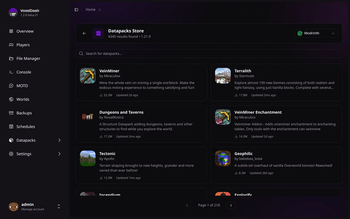
VoxelDash provides everything you need to manage your Minecraft server from a sleek, modern web interface:
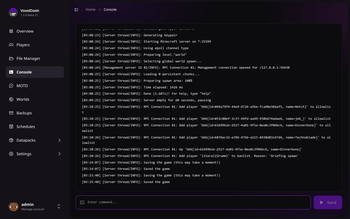
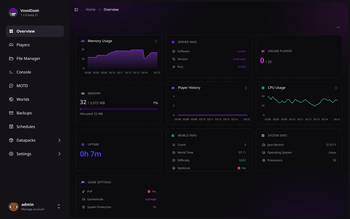
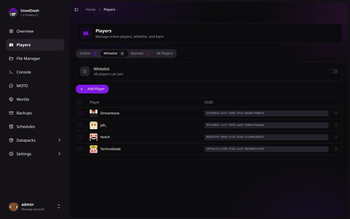
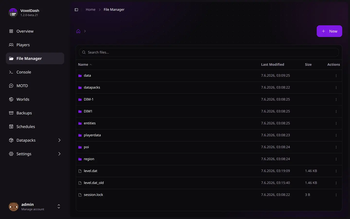
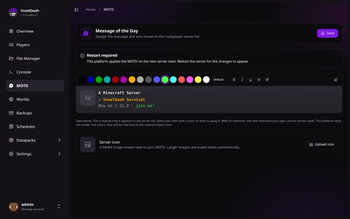
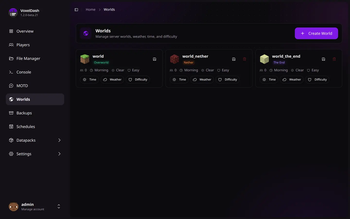
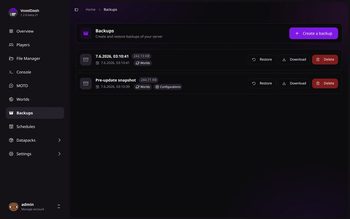
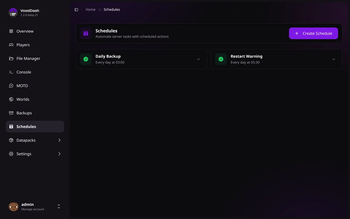
| Feature | Description | |---------|-------------| | Dashboard | Real-time status with customizable widgets for TPS, memory, CPU, players, and more | | Players | See who's online, manage the whitelist, bans, and operators, and edit inventories or profiles | | File Manager | Browse, edit, upload, and download server files right in your browser | | Console | Live console output and command execution, with optional SSH access | | Worlds | Manage every world's time, weather, and difficulty, or create and delete worlds | | Plugins & Mods | Install and update plugins and mods from Modrinth, SpigotMC, and CurseForge | | Backups | Create, restore, and download backups, manually or on a schedule | | Schedules | Automate commands, broadcasts, backups, and restarts | | MOTD Editor | Design the message and icon shown in the multiplayer server list | | Profiling | Track live performance metrics and find out what's making your server lag | | Game Rules | Tweak the game's rules from a searchable list, applied to the running server | | Server Settings | Edit `server.properties` through a clean, categorized editor |
VoxelDash runs as a plugin or mod on Spigot, Paper, Fabric, and Forge, or as a standalone app for vanilla servers. You can also run it in front of multiple servers at once with (https://voxeldash.dev/voxeldash-one/introduction).
## Quick Start
### Requirements
- Java 17 or higher
- A Minecraft server (Spigot, Paper, Fabric, or Vanilla)
### Installation
1. Download the latest release from the (https://github.com/gnmyt/VoxelDash/releases/latest)
2. Install the plugin/mod on your server: - Spigot/Paper: Place the `.jar` file in the `plugins` folder - Fabric/Forge: Place the `.jar` file in the `mods` folder - Vanilla: Run the standalone `.jar` file
3. Start your server and access the dashboard at `http://localhost:7867`
4. Login with the credentials shown in the console on first start
For detailed installation instructions, check out our (https://voxeldash.dev/getting-started/introduction).
## Tech Stack
- Frontend: React, TypeScript, Vite, Tailwind CSS, shadcn/ui
- Backend: Java, integrated with Minecraft server APIs
- Supported Platforms: Spigot, Paper, Fabric, Forge, Vanilla
This project is licensed under the MIT License - see the (LICENSE) file for details.
📊 Mod Details
- Game
- Minecraft Plugins
- Author
- gnm
- Version
- 1.2.1+paper
- Downloads
- 1,429
- Endorsements
- 5
- Category
- bukkit
- Created
- 6/12/2026
- Updated
- 7/27/2026
- Game Versions
- 1.8.9, 1.9.4, 1.10.2, 1.11.2, 1.12.2
- Tags
- management, technology, utility
🔧 How to Install Minecraft Plugins Mods
Download from Modrinth. Use Prism Launcher or drop into your mods folder.
📖 Full step-by-step install guide for Minecraft Plugins →
Visit the official mod page for specific installation instructions for this mod.
🎮 Need cheat codes or console commands? Check ur gaming wiki for Minecraft Plugins commands, item IDs, and more.
❓ Frequently Asked Questions
Which Minecraft Plugins versions does VoxelDash support?
The author lists 1.8.9, 1.9.4, 1.10.2, 1.11.2, 1.12.2, 1.13.2. Other versions may work but are untested by the author.
What is the latest version of VoxelDash?
Version 1.2.1+paper, published 2026-07-27 with 1,429 downloads recorded at the source.
Keep browsing — more Minecraft Plugins mods await