vLink
🟡 Updated this year🖼️ Gallery (2 images)
🔍 Analysis
- 🏆 #100 of 234 management mods in this game by downloads
📋 About This Mod
# vLink vLink is a lightweight Paper and Velocity plugin that allows players to securely link their Minecraft account with Discord. Once linked, Discord roles can automatically be synchronized with LuckPerms groups. Players generate a temporary code in game with `/link` and confirm it on Discord using `/link <code>`. Their Minecraft and Discord accounts are then connected, allowing roles and nicknames to be synchronized automatically. ## Compatibility One universal JAR works on both supported platforms: - Paper 1.21 through 1.21.11 - Paper 26.1, 26.1.1, 26.1.2, and 26.2 - Velocity 3.4.0 and compatible newer 3.x releases - Java 21 for Minecraft 1.21 through 1.21.11 - Java 25 for Minecraft 26.1 and newer ## Features - One universal JAR for Paper and Velocity - Secure account linking with temporary, expiring codes - Discord slash command for code confirmation - Discord role synchronization based on LuckPerms groups - Optional linked-player Discord role - Optional Discord nickname synchronization - Automatic role synchronization when a player joins - Configurable periodic role synchronization - Optional automatic unlink when a member leaves the Discord server - Configurable link-code length, expiration, and command cooldown - Optional Discord log channel for link, unlink, and sync events - Role-change preview before applying changes - Account lookup by player, UUID, Discord ID, or mention - Editable MiniMessage-formatted messages - bStats support for Paper and Velocity ## Commands ### In game - `/link` - Generate a new Discord link code - `/link status` - Show your current link status - `/link sync` - Synchronize your Discord roles - `/link unlink` - Remove your account link - `/link discord` - Show the configured Discord invitation - `/unlink` - Remove your account link - `/discord` - Show the configured Discord invitation - `/vlink reload` - Reload the configuration, links, and Discord bot - `/vlink sync <player|all>` - Synchronize one or all linked accounts - `/vlink unlink <player>` - Remove another player's link - `/vlink status <player>` - Show another player's link status - `/vlink lookup <player|uuid|discord-id|mention>` - Find a linked account - `/vlink preview <player>` - Preview Discord role changes - `/vlink debug` - Check the current setup `/discordlink` is available as an alias for `/vlink`. ### Discord - `/link <code>` - Confirm a Minecraft link code - `/sync` - Synchronize your roles - `/status` - Show your current link status - `/unlink` - Remove your account link ## Installation 1. Download `VLink-1.0.4.jar`. 2. Put the same JAR into the `plugins` folder of Paper or Velocity. 3. Install LuckPerms on the same platform as vLink. 4. Fully restart the server or proxy. 5. Open the generated `config.yml`. 6. Configure the Discord bot token, guild ID, invitation URL, and role mappings. 7. Run `/vlink reload` or restart the server after editing the configuration. The Discord bot requires the **Manage Roles** permission. Its highest Discord role must be placed above every role that vLink should add or remove. ## Configuration ```yaml discord: # Never publish or share your bot token. bot-token: "PUT_TOKEN_HERE" # ID of the Discord server on which the bot is installed. guild-id: "PUT_GUILD_ID_HERE" # Invitation displayed with /discord and /link discord. invite-url: "https://discord.gg/your-server" discord-logs: # Send vLink events to a Discord text channel. enabled: false # Discord channel ID used for logging. channel-id: "PUT_LOG_CHANNEL_ID_HERE" log-link: true log-unlink: true log-sync: true log-sync-failures: true log-discord-leave: true # Currently included language: en language: "en" linking: # Length of generated account-link codes. code-length: 6 # Minutes before an unused link code expires. code-expire-minutes: 10 # Seconds before a player can generate another code. command-cooldown-seconds: 30 # Synchronize Discord roles whenever a player joins. sync-on-join: true # Synchronization interval in minutes. # Set this to 0 to disable periodic synchronization. periodic-sync-minutes: 10 # Remove the account link if the member leaves the Discord server. unlink-on-discord-leave: true roles: # Remove configured Discord roles when the matching # LuckPerms group is no longer assigned. remove-unmapped-managed-roles: true # Remove all roles managed by vLink when an account is unlinked. remove-managed-roles-on-unlink: true # Optional role assigned to every linked Discord member. # Leave empty to disable it. linked-role-id: "PUT_LINKED_ROLE_ID_HERE" # LuckPerms group name: Discord role ID group-role-map: vip: "PUT_VIP_ROLE_ID_HERE" admin: "PUT_ADMIN_ROLE_ID_HERE" nickname-sync: # Synchronize the Discord nickname with the Minecraft name. enabled: false # Available placeholder: {player} format: "{player}"
vLink is a lightweight Paper and Velocity plugin that allows players to securely link their Minecraft account with Discord. Once linked, Discord roles can automatically be synchronized with LuckPerms groups.
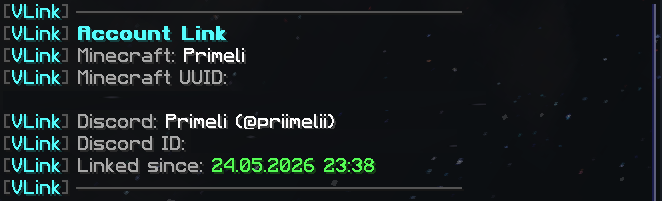
Players generate a temporary code in game with `/link` and confirm it on Discord using `/link `. Their Minecraft and Discord accounts are then connected, allowing roles and nicknames to be synchronized automatically.
## Compatibility
One universal JAR works on both supported platforms:
- Paper 1. 21 through 1. 21. 11
- Paper 26. 1, 26. 1. 1, 26. 1. 2, and 26. 2
- Velocity 3. 4. 0 and compatible newer 3.x releases
- Java 21 for Minecraft 1. 21 through 1. 21. 11
- Java 25 for Minecraft 26. 1 and newer
## Features
- One universal JAR for Paper and Velocity
- Secure account linking with temporary, expiring codes
- Discord slash command for code confirmation
- Discord role synchronization based on LuckPerms groups
- Optional linked-player Discord role
- Optional Discord nickname synchronization
- Automatic role synchronization when a player joins
- Configurable periodic role synchronization
- Optional automatic unlink when a member leaves the Discord server
- Configurable link-code length, expiration, and command cooldown
- Optional Discord log channel for link, unlink, and sync events
- Role-change preview before applying changes
- Account lookup by player, UUID, Discord ID, or mention
- Editable MiniMessage-formatted messages
- bStats support for Paper and Velocity
## Commands
### In game
- `/link` - Generate a new Discord link code
- `/link status` - Show your current link status
- `/link sync` - Synchronize your Discord roles
- `/link unlink` - Remove your account link
- `/link discord` - Show the configured Discord invitation
- `/unlink` - Remove your account link
- `/discord` - Show the configured Discord invitation
- `/vlink reload` - Reload the configuration, links, and Discord bot
- `/vlink sync
- `/vlink unlink
` - Remove another player's link - `/vlink status
` - Show another player's link status - `/vlink lookup
- `/vlink preview
` - Preview Discord role changes - `/vlink debug` - Check the current setup
`/discordlink` is available as an alias for `/vlink`.
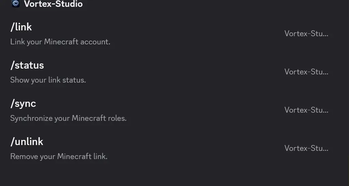
### Discord
- `/link
` - Confirm a Minecraft link code - `/sync` - Synchronize your roles
- `/status` - Show your current link status
- `/unlink` - Remove your account link
## Installation
1. Download `VLink-1. 0. 4.jar`. 2. Put the same JAR into the `plugins` folder of Paper or Velocity. 3. Install LuckPerms on the same platform as vLink. 4. Fully restart the server or proxy. 5. Open the generated `config.yml`. 6. Configure the Discord bot token, guild ID, invitation URL, and role mappings. 7. Run `/vlink reload` or restart the server after editing the configuration.
The Discord bot requires the Manage Roles permission. Its highest Discord role must be placed above every role that vLink should add or remove.
## Configuration
```yaml discord: # Never publish or share your bot token. bot-token: "PUT_TOKEN_HERE"
# ID of the Discord server on which the bot is installed. guild-id: "PUT_GUILD_ID_HERE"
# Invitation displayed with /discord and /link discord. invite-url: "https://discord.gg/your-server"
discord-logs: # Send vLink events to a Discord text channel. enabled: false
# Discord channel ID used for logging. channel-id: "PUT_LOG_CHANNEL_ID_HERE"
log-link: true log-unlink: true log-sync: true log-sync-failures: true log-discord-leave: true
# Currently included language: en language: "en"
linking: # Length of generated account-link codes. code-length: 6
# Minutes before an unused link code expires. code-expire-minutes: 10
# Seconds before a player can generate another code. command-cooldown-seconds: 30
# Synchronize Discord roles whenever a player joins. sync-on-join: true
# Synchronization interval in minutes. # Set this to 0 to disable periodic synchronization. periodic-sync-minutes: 10
# Remove the account link if the member leaves the Discord server. unlink-on-discord-leave: true
roles: # Remove configured Discord roles when the matching # LuckPerms group is no longer assigned. remove-unmapped-managed-roles: true
# Remove all roles managed by vLink when an account is unlinked. remove-managed-roles-on-unlink: true
# Optional role assigned to every linked Discord member. # Leave empty to disable it. linked-role-id: "PUT_LINKED_ROLE_ID_HERE"
# LuckPerms group name: Discord role ID group-role-map: vip: "PUT_VIP_ROLE_ID_HERE" admin: "PUT_ADMIN_ROLE_ID_HERE"
nickname-sync: # Synchronize the Discord nickname with the Minecraft name. enabled: false
# Available placeholder: {player} format: "{player}"
📊 Mod Details
- Game
- Minecraft Plugins
- Author
- Primeli
- Version
- 1.0.4
- Downloads
- 116
- Endorsements
- 0
- Category
- management
- Created
- 5/30/2026
- Updated
- 8/5/2026
- Game Versions
- 1.21, 1.21.1, 1.21.2, 1.21.3, 1.21.4
- Tags
- management, social, technology
🔧 How to Install Minecraft Plugins Mods
Download from Modrinth. Use Prism Launcher or drop into your mods folder.
📖 Full step-by-step install guide for Minecraft Plugins →
Visit the official mod page for specific installation instructions for this mod.
🎮 Need cheat codes or console commands? Check ur gaming wiki for Minecraft Plugins commands, item IDs, and more.
❓ Frequently Asked Questions
Which Minecraft Plugins versions does vLink support?
The author lists 1.21, 1.21.1, 1.21.2, 1.21.3, 1.21.4, 1.21.5. Other versions may work but are untested by the author.
What is the latest version of vLink?
Version 1.0.4, published 2026-08-05 with 116 downloads recorded at the source.
Keep browsing — more Minecraft Plugins mods await