Visual Crafting
🟡 Updated this year🖼️ Gallery (1 images)
🔍 Analysis
- 👍 0.6% endorsement rate
- 🏆 #120 of 367 adventure mods in this game by downloads
📋 About This Mod
# Visual Crafting Visualizes the crafting process ## Compatibility Compatible with Spigot & Paper 1.16.5 - 1.21.9 ## How it works **1.16.5-1.19.3:** The plugin downloads the Minecraft textures directly from Mojang and displays them on invisible maps. Please note that not all items and blocks can be displayed (for example stairs). **1.19.4+:** The plugin utilizes the new item display entities to display the items. All items and blocks are supported, even custom ones from resource packs. ## Visual Crafting compared to other similar plugins Visual Crafting is a lightweight alternative to many other more performance intensive plugins. * Visual Crafting does not store any items in any blocks * Visual Crafting only supports crafting tables (for now) * Visual Crafting utilizes invisible item frames, maps and display entities (completely client side) * Visual Crafting does not utilize armor stands or any server side entities * Visual Crafting is free To sum it all up: Visual Crafting has less features than other similar plugins, but it doesn't cause any lag and it's completely free. ## Installation 1. Download the plugin 2. Drop the plugin into your plugins folder 3. Restart your server 4. (Optional) Configure the plugin (permission etc) It's that simple! On 1.16.5-1.19.3 the first start might take a little while depending on your server hardware since the plugin has to download all of the textures. ## Support Please join my ('https://discord.gg/brb9eYp57E') if you have any questions or if you encounter any bugs. That's the only place where I will be able to help you. ## Images <details> <summary>Images</summary> <img src="https://i.imgur.com/kLYqSFe.png"/> </details> ## Videos <details> <summary>Videos</summary> <p>(Updated version, 1.20.2, display entities)</p> <iframe width="560" height="315" src="https://www.youtube-nocookie.com/embed/FoRYLi5V6rQ" title="YouTube video player" frameborder="0" allow="accelerometer; autoplay; clipboard-write; encrypted-media; gyroscope; picture-in-picture; web-share" allowfullscreen></iframe> <br><br> <p>(Old version, 1.16.5, maps)</p> <iframe width="560" height="315" src="https://www.youtube-nocookie.com/embed/dEABvxvE0Zo" title="YouTube video player" frameborder="0" allow="accelerometer; autoplay; clipboard-write; encrypted-media; gyroscope; picture-in-picture; web-share" allowfullscreen></iframe> </details> ## Donating Want to support my work? Feel free to buy me a coffee :)\ (https://github.com/sponsors/cerus) ## bStats (https://bstats.org/signatures/bukkit/Visual%20Crafting.svg)](https://bstats.org/plugin/bukkit/Visual%20Crafting/14561) This plugin is also available on (https://www.spigotmc.org/resources/100552/).
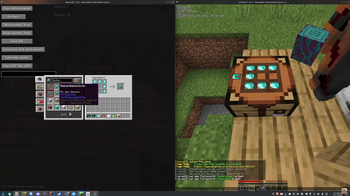
# Visual Crafting Visualizes the crafting process
## Compatibility Compatible with Spigot & Paper 1. 16. 5 - 1. 21. 9
## How it works 1. 16. 5-1. 19. 3: The plugin downloads the Minecraft textures directly from Mojang and displays them on invisible maps. Please note that not all items and blocks can be displayed (for example stairs).
1. 19. 4+: The plugin utilizes the new item display entities to display the items. All items and blocks are supported, even custom ones from resource packs.
## Visual Crafting compared to other similar plugins Visual Crafting is a lightweight alternative to many other more performance intensive plugins.
Visual Crafting does not store any items in any blocks Visual Crafting only supports crafting tables (for now) Visual Crafting utilizes invisible item frames, maps and display entities (completely client side) Visual Crafting does not utilize armor stands or any server side entities * Visual Crafting is free
To sum it all up: Visual Crafting has less features than other similar plugins, but it doesn't cause any lag and it's completely free.
## Installation 1. Download the plugin 2. Drop the plugin into your plugins folder 3. Restart your server 4. (Optional) Configure the plugin (permission etc)
It's that simple! On 1. 16. 5-1. 19. 3 the first start might take a little while depending on your server hardware since the plugin has to download all of the textures.
## Support Please join my ('https://discord.gg/brb9eYp57E') if you have any questions or if you encounter any bugs. That's the only place where I will be able to help you.
## Images
Images

## Videos
(Updated version, 1. 20. 2, display entities)Videos
(Old version, 1. 16. 5, maps)
## Donating Want to support my work? Feel free to buy me a coffee :)\ (https://github.com/sponsors/cerus)
## bStats [!(https://bstats.org/signatures/bukkit/Visual%20Crafting.svg)](https://bstats.org/plugin/bukkit/Visual%20Crafting/14561)
This plugin is also available on (https://www.spigotmc.org/resources/100552/).
📊 Mod Details
- Game
- Minecraft Plugins
- Author
- Cerus
- Version
- 1.4.9
- Downloads
- 7,058
- Endorsements
- 43
- Category
- adventure
- Created
- 3/13/2024
- Updated
- 12/31/2025
- Game Versions
- 1.16, 1.16.1, 1.16.2, 1.16.3, 1.16.4
- Tags
- adventure, game-mechanics, utility
🔧 How to Install Minecraft Plugins Mods
Download from Modrinth. Use Prism Launcher or drop into your mods folder.
📖 Full step-by-step install guide for Minecraft Plugins →
Visit the official mod page for specific installation instructions for this mod.
🎮 Need cheat codes or console commands? Check ur gaming wiki for Minecraft Plugins commands, item IDs, and more.
❓ Frequently Asked Questions
Which Minecraft Plugins versions does Visual Crafting support?
The author lists 1.16, 1.16.1, 1.16.2, 1.16.3, 1.16.4, 1.16.5. Other versions may work but are untested by the author.
What is the latest version of Visual Crafting?
Version 1.4.9, published 2025-12-31 with 7,058 downloads recorded at the source.
Keep browsing — more Minecraft Plugins mods await