VelocityTP
🟡 Updated this year🖼️ Gallery (1 images)
📋 About This Mod
# VelocityTP **跨服传送插件 — 为 Velocity 代理而生** > 一款轻量级的 Velocity 代理端插件,支持跨服搜索玩家并一键传送,深度适配 LuckPerms 权限系统,无需在子服务端安装任何内容。 --- ## 语言 / Language - 🇨🇳 (#简体中文) - 🇺🇸 (#english) --- ## 简体中文 ### 简介 VelocityTP 是一款运行在 **Velocity 代理端** 的插件,提供 `/vctp` 命令让有权限的玩家可以跨服传送到任意在线玩家所在的子服务器。 **核心理念:** 仅代理端安装,子服务端零侵入。 ### 功能特性 | 特性 | 说明 | |------|------| | **跨服传送** | `/vctp <玩家ID>` — 查找全服目标玩家,将你传送到其所在服务器 | | **零侵入** | 只需安装在 Velocity 代理端,子服务端无需安装任何额外插件 | | **权限控制** | 深度集成 LuckPerms,同时支持 Velocity 原生权限系统 | | **中英双语** | 内置简体中文和英文语言包,通过 `config.yml` 一键切换 | | **服务器别名** | 自定义子服务器显示名称,支持 `&` 颜色代码 | | **Tab 补全** | 输入 `/vctp` 后按 Tab 自动补全在线玩家名 | | **别名命令** | `/velocitytp` 同样可用 | ### 命令 | 命令 | 说明 | |------|------| | `/vctp <玩家ID>` | 传送到目标玩家所在的服务器 | | `/velocitytp <玩家ID>` | `/vctp` 的别名 | ### 权限 | 权限节点 | 说明 | |---------|------| | `velocitytp.use` | 允许使用 `/vctp` 命令(基础权限) | | `velocitytp.admin` | 管理员权限 | | `velocitytp.*` | 通配权限 | **LuckPerms 授权示例:** ```bash /lp group default permission set velocitytp.use true /lp user Steve permission set velocitytp.use true ``` ### 配置 #### config.yml ```yaml # 语言设置 language: zh_CN # zh_CN = 简体中文, en_US = English # 服务器别名(支持 & 颜色代码) server-aliases: lobby: "&a登录服" survival: "&b生存服" creative: "&6创造服" minigame: "&d小游戏" ``` #### 语言文件 插件启动后会在 `plugins/velocitytp/lang/` 目录下生成 `zh_CN.yml` 和 `en_US.yml`,你可以直接编辑这些文件修改任意提示文本,支持 `&` 颜色代码。 编辑后重启 Velocity 代理即可生效。 ### 构建 **前置要求:** Java 11+、Maven ```bash git clone <你的仓库地址> cd VelocityTP mvn clean package ``` 生成的 JAR 文件位于 `target/VelocityTP-1.1.0.jar`。 ### 安装 1. 将 JAR 文件放入 Velocity 代理端的 `plugins/` 目录 2. 重启 Velocity 代理 3. 确认控制台输出包含 "VelocityTP v1.1.0" 的启动横幅 4. 使用 LuckPerms 或权限管理工具授权玩家 `velocitytp.use` 权限 5. 在游戏中输入 `/vctp <玩家ID>` 体验跨服传送 ### 兼容性 | 项目 | 要求 | |------|------| | Velocity | 3.0.x ~ 3.3.x | | Java | 11+ | | LuckPerms | 可选(5.4+) | | 子服务端 | 任何版本 / 任何核心,无需安装任何插件 | ### 依赖关系 - **Velocity API** — 必须(代理端自带) - **LuckPerms** — 可选(如有则自动启用权限检查) ### 工作原理 ``` ┌─────────────────────────────────┐ │ Velocity 代理 │ │ ┌───────────────────────────┐ │ │ │ VelocityTP 插件 │ │ │ │ ┌─────┐ ┌────────────┐ │ │ │ │ │/vctp│→│TeleportMgr │ │ │ │ │ └─────┘ │ 查找玩家 │ │ │ │ │ │ 切换服务器 │ │ │ │ │ └─────┬──────┘ │ │ │ └─────────────────┼─────────┘ │ │ │ │ └────────────────────┼────────────┘ │ ┌────────────┼────────────┐ ▼ ▼ ▼ ┌──────┐ ┌──────┐ ┌──────┐ │生存服│ │创造服│ │登录服│ ← 子服务端不需要任何插件 └──────┘ └──────┘ └──────┘ ``` --- ## English ### Introduction VelocityTP is a lightweight plugin for the **Velocity proxy** that enables cross-server teleportation. With the `/vctp` command, authorized players can teleport to any online player's server — no backend server modifications required. **Core philosophy:** Proxy-only installation, zero intrusion on backend servers. ### Features | Feature | Description | |---------|-------------| | **Cross-server teleport** | `/vctp <player>` — find target player across all servers and connect you to their server | | **Zero intrusion** | Install only on the Velocity proxy; no plugins needed on backend servers | | **Permission control** | Deep LuckPerms integration with Velocity native permission fallback | | **Dual language** | Built-in Chinese (Simplified) and English, switchable via `config.yml` | | **Server aliases** | Custom display names for backend servers with `&` color code support | | **Tab completion** | Press Tab after `/vctp` to auto-complete online player names | | **Alias command** | `/velocitytp` works as an alternative | ### Commands | Command | Description | |---------|-------------| | `/vctp <player>` | Teleport to the target player's server | | `/velocitytp <player>` | Alias for `/vctp` | ### Permissions | Node | Description | |------|-------------| | `velocitytp.use` | Allows using `/vctp` (basic permission) | | `velocitytp.admin` | Admin permission | | `velocitytp.*` | Wildcard (all permissions) | **LuckPerms examples:** ```bash /lp group default permission set velocitytp.use true /lp user Steve permission set velocitytp.use true ``` ### Configuration #### config.yml ```yaml # Language setting language: en_US # zh_CN = 简体中文, en_US = English # Server aliases (supports & color codes) server-aliases: lobby: "&aLogin" survival: "&bSurvival" creative: "&6Creative" minigame: "&dMinigame" ``` #### Language files On first startup, the plugin copies `zh_CN.yml` and `en_US.yml` to `plugins/velocitytp/lang/`. You can edit these files directly to customize any message text — `&` color codes are fully supported. Restart the Velocity proxy to apply changes. ### Installation 1. Place the JAR file in your Velocity proxy's `plugins/` directory 2. Restart the Velocity proxy 3. Verify the console shows the "VelocityTP v1.1.0" startup banner 4. Grant players th
# VelocityTP
跨服传送插件 — 为 Velocity 代理而生
> 一款轻量级的 Velocity 代理端插件,支持跨服搜索玩家并一键传送,深度适配 LuckPerms 权限系统,无需在子服务端安装任何内容。
## 语言 / Language
- 🇨🇳 [简体中文](#简体中文)
- 🇺🇸 (#english)
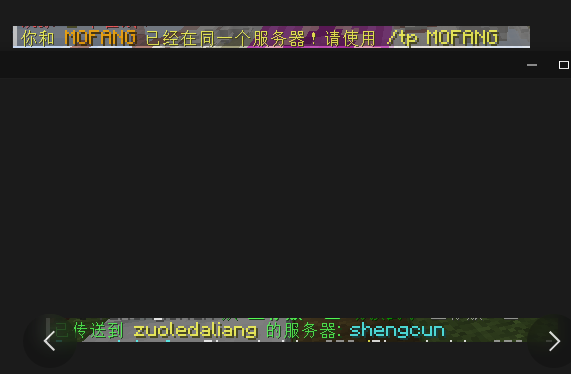
VelocityTP 是一款运行在 Velocity 代理端 的插件,提供 `/vctp` 命令让有权限的玩家可以跨服传送到任意在线玩家所在的子服务器。
核心理念: 仅代理端安装,子服务端零侵入。
| 特性 | 说明 | |------|------| | 跨服传送 | `/vctp <玩家ID>` — 查找全服目标玩家,将你传送到其所在服务器 | | 零侵入 | 只需安装在 Velocity 代理端,子服务端无需安装任何额外插件 | | 权限控制 | 深度集成 LuckPerms,同时支持 Velocity 原生权限系统 | | 中英双语 | 内置简体中文和英文语言包,通过 `config.yml` 一键切换 | | 服务器别名 | 自定义子服务器显示名称,支持 `&` 颜色代码 | | Tab 补全 | 输入 `/vctp` 后按 Tab 自动补全在线玩家名 | | 别名命令 | `/velocitytp` 同样可用 |
| 命令 | 说明 | |------|------| | `/vctp <玩家ID>` | 传送到目标玩家所在的服务器 | | `/velocitytp <玩家ID>` | `/vctp` 的别名 |
| 权限节点 | 说明 | |---------|------| | `velocitytp.use` | 允许使用 `/vctp` 命令(基础权限) | | `velocitytp.admin` | 管理员权限 | | `velocitytp.` | 通配权限 |
LuckPerms 授权示例:
```bash /lp group default permission set velocitytp.use true /lp user Steve permission set velocitytp.use true ```
#### config.yml
```yaml # 语言设置 language: zh_CN # zh_CN = 简体中文, en_US = English
# 服务器别名(支持 & 颜色代码) server-aliases: lobby: "&a登录服" survival: "&b生存服" creative: "&6创造服" minigame: "&d小游戏" ```
插件启动后会在 `plugins/velocitytp/lang/` 目录下生成 `zh_CN.yml` 和 `en_US.yml`,你可以直接编辑这些文件修改任意提示文本,支持 `&` 颜色代码。
编辑后重启 Velocity 代理即可生效。
前置要求: Java 11+、Maven
```bash git clone <你的仓库地址> cd VelocityTP mvn clean package ```
生成的 JAR 文件位于 `target/VelocityTP-1. 1. 0.jar`。
1. 将 JAR 文件放入 Velocity 代理端的 `plugins/` 目录 2. 重启 Velocity 代理 3. 确认控制台输出包含 "VelocityTP v1. 1. 0" 的启动横幅 4. 使用 LuckPerms 或权限管理工具授权玩家 `velocitytp.use` 权限 5. 在游戏中输入 `/vctp <玩家ID>` 体验跨服传送
| 项目 | 要求 | |------|------| | Velocity | 3. 0.x ~ 3. 3.x | | Java | 11+ | | LuckPerms | 可选(5. 4+) | | 子服务端 | 任何版本 / 任何核心,无需安装任何插件 |
- Velocity API — 必须(代理端自带)
- LuckPerms — 可选(如有则自动启用权限检查)
``` ┌─────────────────────────────────┐ │ Velocity 代理 │ │ ┌───────────────────────────┐ │ │ │ VelocityTP 插件 │ │ │ │ ┌─────┐ ┌────────────┐ │ │ │ │ │/vctp│→│TeleportMgr │ │ │ │ │ └─────┘ │ 查找玩家 │ │ │ │ │ │ 切换服务器 │ │ │ │ │ └─────┬──────┘ │ │ │ └─────────────────┼─────────┘ │ │ │ │ └────────────────────┼────────────┘ │ ┌────────────┼────────────┐ ▼ ▼ ▼ ┌──────┐ ┌──────┐ ┌──────┐ │生存服│ │创造服│ │登录服│ ← 子服务端不需要任何插件 └──────┘ └──────┘ └──────┘ ```
### Introduction
VelocityTP is a lightweight plugin for the Velocity proxy that enables cross-server teleportation. With the `/vctp` command, authorized players can teleport to any online player's server — no backend server modifications required.
Core philosophy: Proxy-only installation, zero intrusion on backend servers.
### Features
| Feature | Description |
|---------|-------------|
| Cross-server teleport | `/vctp
### Commands
| Command | Description |
|---------|-------------|
| `/vctp
### Permissions
| Node | Description | |------|-------------| | `velocitytp.use` | Allows using `/vctp` (basic permission) | | `velocitytp.admin` | Admin permission | | `velocitytp.` | Wildcard (all permissions) |
LuckPerms examples:
```bash /lp group default permission set velocitytp.use true /lp user Steve permission set velocitytp.use true ```
### Configuration
#### config.yml
```yaml # Language setting language: en_US # zh_CN = 简体中文, en_US = English
# Server aliases (supports & color codes) server-aliases: lobby: "&aLogin" survival: "&bSurvival" creative: "&6Creative" minigame: "&dMinigame" ```
#### Language files
On first startup, the plugin copies `zh_CN.yml` and `en_US.yml` to `plugins/velocitytp/lang/`. You can edit these files directly to customize any message text — `&` color codes are fully supported.
Restart the Velocity proxy to apply changes.
### Installation
1. Place the JAR file in your Velocity proxy's `plugins/` directory 2. Restart the Velocity proxy 3. Verify the console shows the "VelocityTP v1. 1. 0" startup banner 4. Grant players th
📊 Mod Details
- Game
- Minecraft Plugins
- Author
- LiquidTeam
- Version
- 1.2.0
- Downloads
- 33
- Endorsements
- 0
- Category
- utility
- Created
- 7/25/2026
- Updated
- 7/8/2026
- Game Versions
- 1.7.2, 1.7.3, 1.7.4, 1.7.5, 1.7.6
- Tags
- utility
🔧 How to Install Minecraft Plugins Mods
Download from Modrinth. Use Prism Launcher or drop into your mods folder.
📖 Full step-by-step install guide for Minecraft Plugins →
Visit the official mod page for specific installation instructions for this mod.
🎮 Need cheat codes or console commands? Check ur gaming wiki for Minecraft Plugins commands, item IDs, and more.
❓ Frequently Asked Questions
Which Minecraft Plugins versions does VelocityTP support?
The author lists 1.7.2, 1.7.3, 1.7.4, 1.7.5, 1.7.6, 1.7.7. Other versions may work but are untested by the author.
What is the latest version of VelocityTP?
Version 1.2.0, published 2026-07-08 with 33 downloads recorded at the source.
Keep browsing — more Minecraft Plugins mods await