Velocircon
🟡 Updated this year🖼️ Gallery (2 images)

🔍 Analysis
- 👍 0.7% endorsement rate
- 🏆 #94 of 131 management mods in this game by downloads
📋 About This Mod
[!(https://img.shields.io/modrinth/v/KkmSfl3v?style=for-the-badge)](https://modrinth.com/plugin/velocircon/versions) [!(https://img.shields.io/github/downloads/code-lime/Velocircon/total?style=for-the-badge&label=GitHub)](https://github.com/code-lime/Velocircon/releases) [!(https://img.shields.io/modrinth/dt/KkmSfl3v?style=for-the-badge&color=5da545&label=modrinth)](https://modrinth.com/plugin/velocircon) [!(https://img.shields.io/hangar/dt/velocircon?style=for-the-badge&color=2f4476&label=Hangar)](https://hangar.papermc.io/code-lime/velocircon/versions) [!(https://img.shields.io/github/actions/workflow/status/code-lime/Velocircon/deploy.yml?branch=master&style=for-the-badge)](https://github.com/code-lime/Velocircon/actions)
# Velocircon
Velocircon is a plugin for (https://papermc.io/software/velocity) that adds RCON support, allowing you to connect to your Velocity proxy and execute commands remotely.
Velocircon enables administrators and automation systems to connect to Velocity via the RCON (Remote Console) protocol and securely execute any commands supported by the proxy. This greatly improves management and automation capabilities for Minecraft servers using Velocity as their proxy.
## Features
- Standard RCON protocol support
- Execute any Velocity command via RCON
- Secure password authentication
- Easy setup and integration
## Installation
1. Download the latest Velocircon release. 2. Place the `.jar` file in the `plugins` directory of your Velocity server. 3. Restart the server.
## Configuration
After the first launch, the plugin will generate a configuration file `rcon.yml` in the `plugins/velocircon` directory. You must set a password and enable RCON (`enable: true`), otherwise the plugin will not work!
Default configuration:
```yaml enable: false host: 0. 0. 0. 0 port: 25575 password: PASSWORD colors: true console-output: true permissions: luck-perms: enable: false group: '' regex: enable: false regex: minecraft\.(.) ```
### Environment Variables
Configuration options can also be overridden using environment variables. This is useful when running Velocity in Docker or other container environments.
Environment variables use the following format:
```
VELOCIRCON__
The prefix `VELOCIRCON__` is required. Use double underscores `__` to separate configuration levels. Replace `-` with `_`. Variable names are case-insensitive, but uppercase is recommended.
### Options
- `enable` (`VELOCIRCON__ENABLE`): Set to `true` to activate RCON support.
- `host` (`VELOCIRCON__HOST`): Address to bind the RCON server (default: `0. 0. 0. 0` for all interfaces).
- `port` (`VELOCIRCON__PORT`): Port for RCON connections.
- `password` (`VELOCIRCON__PASSWORD`): Set a strong password for authentication.
- `colors` (`VELOCIRCON__COLORS`): Enables color codes in command output (recommended).
- `console-output` (`VELOCIRCON__CONSOLE_OUTPUT`): Redirects RCON output to the console.
- `permissions`: RCON connection permissions. If all `enable: false` - all permissions are allowed.
- - `luck-perms`: Use (https://modrinth.com/plugin/luckperms) group to control connection permissions.
- - `enable` (`VELOCIRCON__PERMISSIONS__LUCK_PERMS__ENABLE`): Enable usage `LuckPerms` permissions filter.
- - `group` (`VELOCIRCON__PERMISSIONS__LUCK_PERMS__GROUP`): '`*`' or an empty string - all permissions are allowed.
- - `regex`: Use (https://regex101.com) (regular expression) to control connection permissions.
- - `enable` (`VELOCIRCON__PERMISSIONS__REGEX__ENABLE`): Enable usage `Regex` permissions filter.
- - `regex` (`VELOCIRCON__PERMISSIONS__REGEX__REGEX`): `Regex` string.
### Examples
Config file:
```yaml port: 25575 console-output: true permissions: luck-perms: enable: false ```
Environment variables:
```bash VELOCIRCON__PORT=25580 VELOCIRCON__CONSOLE_OUTPUT=false VELOCIRCON__PERMISSIONS__LUCK_PERMS__ENABLE=true ```
Resulting configuration:
```yaml port: 25580 console-output: false permissions: luck-perms: enable: true ```
Environment variables override values from `rcon.yml`.
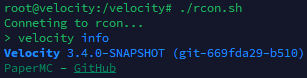
To connect to Velocity via RCON, use any compatible client. We recommend (https://github.com/itzg/rcon-cli) for its flexibility and ease of use.
Example connection command:
```sh
rcon-cli --host
Once connected, you can send any Velocity command as if you were using the Velocity console.
## Requirements
- Java 21 or higher (recommended by Velocity documentation)
- Velocity Proxy
This project is licensed under the GNU General Public License v3. 0. See the (https://github.com/code-lime/Velocircon/blob/master/LICENSE) file for details.
## Feedback & Contributions
Found a bug or want to suggest an improvement? Please open an issue or
📊 Mod Details
- Game
- Minecraft Plugins
- Author
- code-lime
- Version
- 1.0.7
- Downloads
- 1,630
- Endorsements
- 12
- Category
- management
- Created
- 6/28/2025
- Updated
- 7/14/2026
- Game Versions
- 1.8, 1.8.1, 1.8.2, 1.8.3, 1.8.4
- Tags
- management, technology, utility
🔧 How to Install Minecraft Plugins Mods
Download from Modrinth. Use Prism Launcher or drop into your mods folder.
📖 Full step-by-step install guide for Minecraft Plugins →
Visit the official mod page for specific installation instructions for this mod.
🎮 Need cheat codes or console commands? Check ur gaming wiki for Minecraft Plugins commands, item IDs, and more.
❓ Frequently Asked Questions
Which Minecraft Plugins versions does Velocircon support?
The author lists 1.8, 1.8.1, 1.8.2, 1.8.3, 1.8.4, 1.8.5. Other versions may work but are untested by the author.
What is the latest version of Velocircon?
Version 1.0.7, published 2026-07-14 with 1,630 downloads recorded at the source.
Keep browsing — more Minecraft Plugins mods await