TumiTranslator
🟠 Updated over a year ago🖼️ Gallery (3 images)

🔍 Analysis
- 👍 1.0% endorsement rate
- 🏆 #39 of 81 decoration mods in this game by downloads
📋 About This Mod
# TumiTranslator Add rich translations to you Minecraft Server or Proxy ## Installation - Install (https://modrinth.com/plugin/miniplaceholders) - Drag and drop on your plugins folder - Start the server ## Features - Add the translations you want, and use them anywhere on your server. - Support for MiniPlaceholders placeholders. (Full support anywhere for global placeholders; for player placeholders, requires plugins compatible with MiniMessage using the latest version) ## Placeholders In addition to providing translations that can be used anywhere on your server, TumiTranslator also provides placeholders for using your translations. This is the recommended way to use translations, usable in plugins compatible with MiniPlaceholders. - `<tumi_translation:"tumi.welcome">` Returns a translation in the language of the target/executor. If the translation does not exist in the specified language, it will attempt to use the translation in the configured default language. !(https://cdn.modrinth.com/data/SpH1UuKm/images/6dc93e5f95816b0963159d37f1466ef058367c3d.png) - `<tumi_translation_by_locale:"tumi.welcome":ES>` Returns a translation in the specified language. If the translation does not exist in the specified language, it will attempt to use the translation in the default language configured. !(https://cdn.modrinth.com/data/SpH1UuKm/images/3c39bfb4a252aca38ac87559e4394df1d0aa7ea1.png) ## Usage in General Translations The recommended use of TumiTranslator is through its MiniPlaceholders placeholders. But if you want to use them anywhere else, it is possible. Here are some examples. Please note that player placeholders are not yet supported in this way of displaying placeholders. (https://github.com/KyoriPowered/adventure/pull/1300) ### Lang Tag - `<lang:"tumi.welcome":ES>` !(https://cdn.modrinth.com/data/SpH1UuKm/images/b8b08bdee11d9b2d46518eaf6ef15255fb24970c.png) ## Videos #### TumiTranslator with Velocitab (https://img.youtube.com/vi/YSyx6R2_hK0/maxresdefault.jpg)](https://youtu.be/YSyx6R2_hK0) #### TumiTranslator with VCustomBrand (https://img.youtube.com/vi/1Me2Cw_1hHI/maxresdefault.jpg)](https://youtu.be/1Me2Cw_1hHI) ## Support Support is exclusively for those who have purchased the plugin from BuiltByBit or Polymart. You will be given a role on my Discord server with access to an exclusive channel.
# TumiTranslator
Add rich translations to you Minecraft Server or Proxy
## Installation - Install (https://modrinth.com/plugin/miniplaceholders) - Drag and drop on your plugins folder - Start the server
## Features - Add the translations you want, and use them anywhere on your server. - Support for MiniPlaceholders placeholders. (Full support anywhere for global placeholders; for player placeholders, requires plugins compatible with MiniMessage using the latest version)
## Placeholders
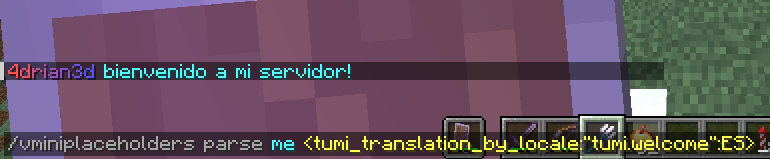
In addition to providing translations that can be used anywhere on your server, TumiTranslator also provides placeholders for using your translations. This is the recommended way to use translations, usable in plugins compatible with MiniPlaceholders.
- `
Returns a translation in the language of the target/executor. If the translation does not exist in the specified language, it will attempt to use the translation in the configured default language.

- `
Returns a translation in the specified language. If the translation does not exist in the specified language, it will attempt to use the translation in the default language configured.

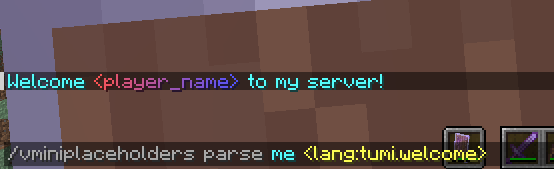
## Usage in General Translations
The recommended use of TumiTranslator is through its MiniPlaceholders placeholders. But if you want to use them anywhere else, it is possible. Here are some examples.
Please note that player placeholders are not yet supported in this way of displaying placeholders. (https://github.com/KyoriPowered/adventure/pull/1300)
### Lang Tag
- `

#### TumiTranslator with Velocitab
[!(https://img.youtube.com/vi/YSyx6R2_hK0/maxresdefault.jpg)](https://youtu.be/YSyx6R2_hK0)
#### TumiTranslator with VCustomBrand
[!(https://img.youtube.com/vi/1Me2Cw_1hHI/maxresdefault.jpg)](https://youtu.be/1Me2Cw_1hHI)
Support is exclusively for those who have purchased the plugin from BuiltByBit or Polymart. You will be given a role on my Discord server with access to an exclusive channel.
📊 Mod Details
- Game
- Minecraft Plugins
- Author
- 4drian3d
- Version
- 2.0.0
- Downloads
- 516
- Endorsements
- 5
- Category
- decoration
- Created
- 11/9/2023
- Updated
- 9/12/2025
- Game Versions
- 1.7.2, 1.7.3, 1.7.4, 1.7.5, 1.7.6
- Tags
- decoration
🔧 How to Install Minecraft Plugins Mods
Download from Modrinth. Use Prism Launcher or drop into your mods folder.
📖 Full step-by-step install guide for Minecraft Plugins →
Visit the official mod page for specific installation instructions for this mod.
🎮 Need cheat codes or console commands? Check ur gaming wiki for Minecraft Plugins commands, item IDs, and more.
❓ Frequently Asked Questions
Which Minecraft Plugins versions does TumiTranslator support?
The author lists 1.7.2, 1.7.3, 1.7.4, 1.7.5, 1.7.6, 1.7.7. Other versions may work but are untested by the author.
What is the latest version of TumiTranslator?
Version 2.0.0, published 2025-09-12 with 516 downloads recorded at the source.
Keep browsing — more Minecraft Plugins mods await