TrimEditor
🟡 Updated this year🖼️ Gallery (2 images)
🔍 Analysis
- 🏆 #881 of 1224 bukkit mods in this game by downloads
📋 About This Mod
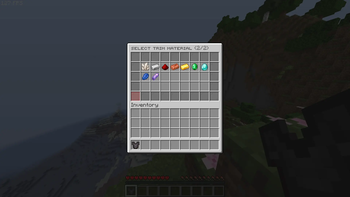
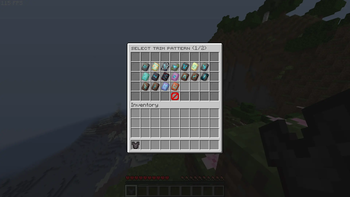
## Overview TrimEditor provides a clean, two-step graphical interface for players to manage Armor Trims without requiring a Smithing Table or template items. It is designed specifically for Minecraft 1.21+ environments with a strict focus on maintaining server performance. **! Not suitable for survival servers. Users can edit without materials or a smithing table** ## Core Features - Two-Step GUI: Separate menus for choosing patterns and materials. - Instant Removal: One-click button to clear trims from armor. - Lag-Free: Pre-cached menus for instant loading without affecting server performance. - Custom Sounds: Configurable audio for clicks, success, and errors. - Vanilla Look: Uses default Minecraft item names and lore ## Commands and Permissions - /trim (or /trimeditor) | trimeditor.use : Opens the customization GUI for the armor piece currently held in the main hand. - /trim reload | trimeditor.admin : Reloads the configuration file and rebuilds the interface cache. ## System Requirements - Server Software: Spigot, Paper, Purpur, or compatible forks - Minecraft Version: 1.21 or higher - Java: Java 21 or higher
## Overview TrimEditor provides a clean, two-step graphical interface for players to manage Armor Trims without requiring a Smithing Table or template items. It is designed specifically for Minecraft 1. 21+ environments with a strict focus on maintaining server performance.
! Not suitable for survival servers. Users can edit without materials or a smithing table
## Core Features
- Two-Step GUI: Separate menus for choosing patterns and materials.
- Instant Removal: One-click button to clear trims from armor.
- Lag-Free: Pre-cached menus for instant loading without affecting server performance.
- Custom Sounds: Configurable audio for clicks, success, and errors.
- Vanilla Look: Uses default Minecraft item names and lore
## Commands and Permissions
- /trim (or /trimeditor) | trimeditor.use : Opens the customization GUI for the armor piece currently held in the main hand.
- /trim reload | trimeditor.admin : Reloads the configuration file and rebuilds the interface cache.
## System Requirements
- Server Software: Spigot, Paper, Purpur, or compatible forks
- Minecraft Version: 1. 21 or higher
- Java: Java 21 or higher
📊 Mod Details
- Game
- Minecraft Plugins
- Author
- lolfusrin6692
- Version
- 1.0
- Downloads
- 97
- Endorsements
- 0
- Category
- bukkit
- Created
- 5/22/2026
- Updated
- 5/18/2026
- Game Versions
- 1.21, 1.21.1, 1.21.2, 1.21.3, 1.21.4
- Tags
- equipment, game-mechanics, utility
🔧 How to Install Minecraft Plugins Mods
Download from Modrinth. Use Prism Launcher or drop into your mods folder.
📖 Full step-by-step install guide for Minecraft Plugins →
Visit the official mod page for specific installation instructions for this mod.
🎮 Need cheat codes or console commands? Check ur gaming wiki for Minecraft Plugins commands, item IDs, and more.
❓ Frequently Asked Questions
Which Minecraft Plugins versions does TrimEditor support?
The author lists 1.21, 1.21.1, 1.21.2, 1.21.3, 1.21.4, 1.21.5. Other versions may work but are untested by the author.
What is the latest version of TrimEditor?
Version 1.0, published 2026-05-18 with 97 downloads recorded at the source.
Keep browsing — more Minecraft Plugins mods await