TorchEgg
🟠 Updated over a year ago🖼️ Gallery (1 images)
🔍 Analysis
- 🏆 #878 of 1080 bukkit mods in this game by downloads
📋 About This Mod
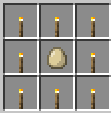
# TorchEgg Plugin ## Overview TorchEgg is a Minecraft plugin that adds a special egg that places torches upon impact. The plugin prioritizes placing torches in dark areas or in a grid pattern beneath the player when the Shift key is held. ## Features - **Special Egg**: Craft a special egg that can be thrown to place torches. - **Dynamic Placement**: Torches are placed in dark areas to enhance visibility. - **Grid Placement**: When holding Shift, torches are placed in a grid pattern directly beneath the player. - **Crafting Recipe**: The special egg can be crafted using torches and a regular egg. ## Installation 1. Download the `TorchEgg` plugin JAR file. 2. Place the JAR file into the `plugins` folder of your Minecraft server. 3. Restart the server or use the `/reload` command. 4. The plugin should now be active, and you can start using the special egg! ## Configuration The plugin can be configured through the `plugin.yml` file. You can modify the plugin's name, version, and description as needed. ## Usage - To craft the special egg, use the following recipe: !(https://cdn.modrinth.com/data/cached_images/c91a8c2d095da3433ecbc95690c5c4a1cb9e6bd4.png) <p align="center"> <a href="https://zpatkyvpatky.xyz" target="_blank"><strong>🌐 Official Website</strong></a> | <a href="https://github.com/patekcz" target="_blank"><strong>💻 GitHub Profile</strong></a> </p> <p align="center"> Built with ❤️ by <strong>patek_cz</strong> </p>
# TorchEgg Plugin
## Overview TorchEgg is a Minecraft plugin that adds a special egg that places torches upon impact. The plugin prioritizes placing torches in dark areas or in a grid pattern beneath the player when the Shift key is held.
## Features - Special Egg: Craft a special egg that can be thrown to place torches. - Dynamic Placement: Torches are placed in dark areas to enhance visibility. - Grid Placement: When holding Shift, torches are placed in a grid pattern directly beneath the player. - Crafting Recipe: The special egg can be crafted using torches and a regular egg.
## Installation 1. Download the `TorchEgg` plugin JAR file. 2. Place the JAR file into the `plugins` folder of your Minecraft server. 3. Restart the server or use the `/reload` command. 4. The plugin should now be active, and you can start using the special egg!
## Configuration The plugin can be configured through the `plugin.yml` file. You can modify the plugin's name, version, and description as needed.
## Usage - To craft the special egg, use the following recipe:
!(https://cdn.modrinth.com/data/cached_images/c91a8c2d095da3433ecbc95690c5c4a1cb9e6bd4.png)
🌐 Official Website | 💻 GitHub Profile
Built with ❤️ by patek_cz
📊 Mod Details
- Game
- Minecraft Plugins
- Author
- patekcz
- Version
- VgLLRp7f
- Downloads
- 39
- Endorsements
- 0
- Category
- bukkit
- Created
- 7/27/2025
- Updated
- 7/13/2025
- Game Versions
- VgLLRp7f
- Tags
- game-mechanics, technology, utility
🔧 How to Install Minecraft Plugins Mods
Download from Modrinth. Use Prism Launcher or drop into your mods folder.
📖 Full step-by-step install guide for Minecraft Plugins →
Visit the official mod page for specific installation instructions for this mod.
🎮 Need cheat codes or console commands? Check ur gaming wiki for Minecraft Plugins commands, item IDs, and more.
❓ Frequently Asked Questions
Which Minecraft Plugins versions does TorchEgg support?
The author lists VgLLRp7f. Other versions may work but are untested by the author.
What is the latest version of TorchEgg?
Version VgLLRp7f, published 2025-07-13 with 39 downloads recorded at the source.
Keep browsing — more Minecraft Plugins mods await