Toby's Camera
🟡 Updated this year🖼️ Gallery (3 images)
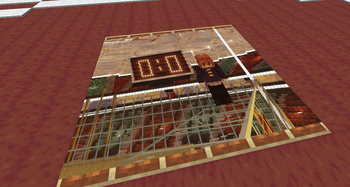
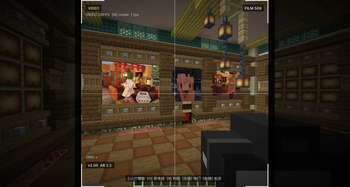
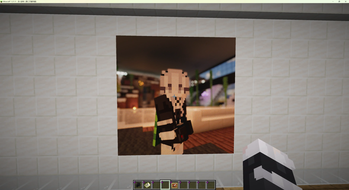
🔍 Analysis
- 🏆 #6 of 30 fabric mods in this game by downloads
📋 About This Mod
# TobysCamera Turn the Minecraft world in front of you into persistent, shareable map photos. Only the **photographer** needs the Fabric client mod. The server runs the Paper/Folia plugin, while finished media is delivered as vanilla `filled_map` items that every player can view, hold, trade, and place in item frames. > Supports Fabric **1.21.11 / 26.1 / 26.2** clients and Paper or Folia **1.21.11+** servers. Keep the client mod and server plugin on the same TobysCamera release. Older clients receive an explicit rejection for unsupported camera packets. ## For players ### Before you start Ask a server administrator for a camera. Cameras work from either the main hand or off hand; right-click one to open the viewfinder. If right-click is occupied by another interaction, use `P` to toggle the viewfinder. The default shutter is the **left mouse button**, not the attack key. Every binding can be changed under **Options → Controls → TobysCamera**. | Default binding | Action | | --- | --- | | Right-click / `P` | Open or close the viewfinder | | Left mouse button | Shutter | | Right mouse button | Close the viewfinder | | `-` / `=` | Zoom out / in | | `G` | Cycle guides: off, rule of thirds, crosshair | | `R` | Open composition controls | ### Take a photo 1. Hold a camera and right-click to open the viewfinder. 2. Adjust the shot with zoom, guides, and the composition panel. The panel supports rotation, aspect ratio, zoom, and guides; use `1:1`, `4:3`, `3:4`, `3:2`, `2:3`, `16:9`, `9:16`, or enter a custom ratio. 3. Press the shutter. The client captures the rendered world and opens a preview. 4. Choose the print size and whether to use Floyd–Steinberg dithering, then select **Use photo**. Select **Retake** to return to the viewfinder instead. 5. Once the server has accepted and saved the upload, it gives you a **photo bag** containing a preview plus photographer, location, and time metadata. Use a photo bag in either of these ways: - **Hold right-click for about one second** in the air to unpack it into its vanilla map tiles. - Right-click an empty item frame. If nearby empty item frames form a rectangle of the required size and orientation, the whole image is placed at once. - Break any frame in that placed group to recover the entire image as one photo bag, rather than dropping separate tiles. ### FAQ **Why does the shutter not work?** Make sure you are still holding an item marked `tobyscamera:camera`, the composition panel is closed, and the camera has enough film—or is film-free. **Do other players need the client mod?** No. They receive and use vanilla map items; only the photographer needs the client mod. --- ## For server administrators ### Install 1. Put `tobyscamera-plugin-<version>.jar` in the `plugins/` directory of a Paper or Folia server and start the server once. 2. Give photographers the Fabric client JAR matching their Minecraft version. 3. Edit `plugins/TobysCamera/config.yml` as needed, then run `/tobyscamera reload`. `/tobyscamera reload` requires `tobyscamera.reload` (OP by default). It reloads limits for later uploads without disturbing stored photos or database connections. ### Give cameras and film TobysCamera reads the **root fields** of an item's `minecraft:custom_data`; it does not read Bukkit PDC. Write `tobyscamera:*` keys directly, and **do not** put them inside `PublicBukkitValues`. The following commands use the default keys and can be run from console or by a permitted player: ```mcfunction # Basic camera: up to a 4×4 map print; starts with no film /give @s minecraft:spyglass # Film: hold it on the cursor and click a camera slot in an inventory to load it /give @s minecraft:paper 64 # Unlimited-film camera /give @s minecraft:spyglass # Single-use magic camera: consumes one camera when a valid photo upload begins; no film required /give @s minecraft:spyglass ``` Loading film stores it in the camera and updates its lore. A photo costs one film per final map tile: a `2×2` print costs four film. If a player's inventory is full, delivered maps drop at their feet; if delivery occurs while they are offline, the server retries when they next join. ### Item components (`minecraft:custom_data`) | Key | Value | Purpose | | --- | --- | --- | | `tobyscamera:camera` | Any value; normally `1b` | **Required.** Identifies an item as a camera. | | `tobyscamera:film` | Any value; normally `1b` | Identifies an item as film that can be loaded into a camera. | | `tobyscamera:max_grid_size` | Positive integer | Maximum side length of photo prints. Defaults to the server's `upload.max-grid-size`; normal cameras are also limited by t
# TobysCamera
Turn the Minecraft world in front of you into persistent, shareable map photos.
Only the photographer needs the Fabric client mod. The server runs the Paper/Folia plugin, while finished media is delivered as vanilla `filled_map` items that every player can view, hold, trade, and place in item frames.
> Supports Fabric 1. 21. 11 / 26. 1 / 26. 2 clients and Paper or Folia 1. 21. 11+ servers.
Keep the client mod and server plugin on the same TobysCamera release. Older clients receive an explicit rejection for unsupported camera packets.
## For players
### Before you start
Ask a server administrator for a camera. Cameras work from either the main hand or off hand; right-click one to open the viewfinder. If right-click is occupied by another interaction, use `P` to toggle the viewfinder.
The default shutter is the left mouse button, not the attack key. Every binding can be changed under Options → Controls → TobysCamera.
| Default binding | Action | | --- | --- | | Right-click / `P` | Open or close the viewfinder | | Left mouse button | Shutter | | Right mouse button | Close the viewfinder | | `-` / `=` | Zoom out / in | | `G` | Cycle guides: off, rule of thirds, crosshair | | `R` | Open composition controls |
### Take a photo
1. Hold a camera and right-click to open the viewfinder. 2. Adjust the shot with zoom, guides, and the composition panel. The panel supports rotation, aspect ratio, zoom, and guides; use `1:1`, `4:3`, `3:4`, `3:2`, `2:3`, `16:9`, `9:16`, or enter a custom ratio. 3. Press the shutter. The client captures the rendered world and opens a preview. 4. Choose the print size and whether to use Floyd–Steinberg dithering, then select Use photo. Select Retake to return to the viewfinder instead. 5. Once the server has accepted and saved the upload, it gives you a photo bag containing a preview plus photographer, location, and time metadata.
Use a photo bag in either of these ways:
- Hold right-click for about one second in the air to unpack it into its vanilla map tiles.
- Right-click an empty item frame. If nearby empty item frames form a rectangle of the required size and orientation, the whole image is placed at once.
- Break any frame in that placed group to recover the entire image as one photo bag, rather than dropping separate tiles.
Why does the shutter not work? Make sure you are still holding an item marked `tobyscamera:camera`, the composition panel is closed, and the camera has enough film—or is film-free.
Do other players need the client mod? No. They receive and use vanilla map items; only the photographer needs the client mod.
## For server administrators
### Install
1. Put `tobyscamera-plugin-
`/tobyscamera reload` requires `tobyscamera.reload` (OP by default). It reloads limits for later uploads without disturbing stored photos or database connections.
### Give cameras and film
TobysCamera reads the root fields of an item's `minecraft:custom_data`; it does not read Bukkit PDC. Write `tobyscamera:*` keys directly, and do not put them inside `PublicBukkitValues`.
The following commands use the default keys and can be run from console or by a permitted player:
```mcfunction # Basic camera: up to a 4×4 map print; starts with no film /give @s minecraft:spyglass
# Film: hold it on the cursor and click a camera slot in an inventory to load it /give @s minecraft:paper 64
# Unlimited-film camera /give @s minecraft:spyglass
# Single-use magic camera: consumes one camera when a valid photo upload begins; no film required /give @s minecraft:spyglass
Loading film stores it in the camera and updates its lore. A photo costs one film per final map tile: a `2×2` print costs four film. If a player's inventory is full, delivered maps drop at their feet; if delivery occurs while they are offline, the server retries when they next join.
### Item components (`minecraft:custom_data`)
| Key | Value | Purpose | | --- | --- | --- | | `tobyscamera:camera` | Any value; normally `1b` | Required. Identifies an item as a camera. | | `tobyscamera:film` | Any value; normally `1b` | Identifies an item as film that can be loaded into a camera. | | `tobyscamera:max_grid_size` | Positive integer | Maximum side length of photo prints. Defaults to the server's `upload.max-grid-size`; normal cameras are also limited by t
📊 Mod Details
- Game
- Minecraft Plugins
- Author
- unrealtoby
- Version
- 0.2.10+build.22+plugin
- Downloads
- 306
- Endorsements
- 0
- Category
- fabric
- Created
- 7/21/2026
- Updated
- 8/13/2026
- Game Versions
- 1.21.11
- Tags
- utility
🔧 How to Install Minecraft Plugins Mods
Download from Modrinth. Use Prism Launcher or drop into your mods folder.
📖 Full step-by-step install guide for Minecraft Plugins →
Visit the official mod page for specific installation instructions for this mod.
🎮 Need cheat codes or console commands? Check ur gaming wiki for Minecraft Plugins commands, item IDs, and more.
❓ Frequently Asked Questions
Which Minecraft Plugins versions does Toby's Camera support?
The author lists 1.21.11. Other versions may work but are untested by the author.
What is the latest version of Toby's Camera?
Version 0.2.10+build.22+plugin, published 2026-08-13 with 306 downloads recorded at the source.
Keep browsing — more Minecraft Plugins mods await