TimedMMOItems
🟠 Updated over a year ago🖼️ Gallery (2 images)
🔍 Analysis
- 👍 0.5% endorsement rate
- 🏆 #1214 of 1560 bukkit mods in this game by downloads
📋 About This Mod
A ('https://www.spigotmc.org/resources/mmoitems-premium.39267/')extension that adds 2 new stats for creating expirable items. **Note:** - MMOItems is a premium plugin that requires purchase - Don't ask for support from MMOItems for any questions/bugs relating to this extension. In that case, please contact me! !(https://i.imgur.com/HeXEDo2.png) ## New Stats ## Expiry Period A duration representing how long the item will last (in seconds). This duration is relative to the first time the player obtains the item. For example: to set 30 days: 30 * 24 * 60 * 60 = 2592000 seconds ## Expiry Date The absolute expiry date since the Unix epoch (in milliseconds) **You should only care about the first stat which is Expiry Period.** All items will be automatically checked and the second stat will be added when necessary. ## **Expired items handle** * Default: Remove the item * Replace the item with one or multiple other items (could be specific to a certain item, or a certain item category) * Disable item removal. However, such items remain unusable ## **Setup** To display the stat in item lore, add the following to language/lore-format.yml (in MMOItems config folder) - '#expiry-period#' - '#expiry-date#' Read more: https://gitlab.com/phoenix-dvpmt/mmoitems/-/wikis/Lore-Formats/ ## **Command** ``` /ti (alias: /tmi, /timeditems, /timedmmoitems) /ti reload: reload the config ``` ## **FAQ** **1. The item does not become expired** * You might have bypass permission *timeditems.bypass* unless the bypass permission is disabled from the config * Re-check the item, since it might not have the stat yet **2. How do I observe the plugin activity?** * Raise the debug level in the config, from 0 to 3 (0 = disabled) **3. How does the extension work exactly?** * If Expiry Date exists, the plugin will check if the item is out of date and remove if necessary. The item could be replaced if there is item replacement settings. Even if the item remains, it is no longer usable. * If Expiry Period exists, the plugin will convert it to Expiry Date based on the current time. In other words, expiry date = current time + expiry period. Thus, the plugin knows the absolute expiry date for checking and removal. **4. Why there is no expiry information in the lore?** * You have not changed the lore template yet (see above) **5. Can I change the lore and the date format?** * You can change the lore of each stat along with the date format from the config * To validate or preview the date format: http://www.sdfonlinetester.info/ **6. How does the plugin affect the performance?** * The check task runs in a fixed interval defined by the config option item-check-interval (in seconds) * The plugin would try to skip non-MMOItems * Inventory update is performed only if there is at least an item change * Raise item-check-interval is recommended to avoid performance impact. As a trade-off, a short delay in expiry time is totally acceptable. **7. How to disable the check in certain worlds?** * LuckPerms support contextual permission. It is possible to grant the bypass permission to a certain world. Remember to enable bypass permission in the config as well. ## Support Join my ('https://discord.gg/HRAEKapRwx')server for plugin support Give me a five-star review if this plugin is helpful. Thanks!
A ('https://www.spigotmc.org/resources/mmoitems-premium. 39267/')extension that adds 2 new stats for creating expirable items.
!(https://i.imgur.com/HeXEDo2.png)
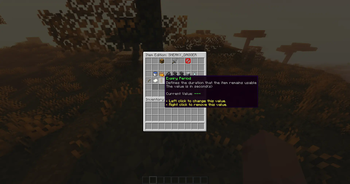
## New Stats ## Expiry Period A duration representing how long the item will last (in seconds). This duration is relative to the first time the player obtains the item. For example: to set 30 days: 30 24 60 60 = 2592000 seconds
## Expiry Date The absolute expiry date since the Unix epoch (in milliseconds)
You should only care about the first stat which is Expiry Period. All items will be automatically checked and the second stat will be added when necessary.
## Expired items handle
Default: Remove the item Replace the item with one or multiple other items (could be specific to a certain item, or a certain item category) Disable item removal. However, such items remain unusable
## Setup To display the stat in item lore, add the following to language/lore-format.yml (in MMOItems config folder)
- '#expiry-period#'
- - '#expiry-date#'
Read more: https://gitlab.com/phoenix-dvpmt/mmoitems/-/wikis/Lore-Formats/
## Command
``` /ti (alias: /tmi, /timeditems, /timedmmoitems) /ti reload: reload the config ```
## FAQ 1. The item does not become expired
You might have bypass permission timeditems.bypass unless the bypass permission is disabled from the config Re-check the item, since it might not have the stat yet
2. How do I observe the plugin activity?
Raise the debug level in the config, from 0 to 3 (0 = disabled)
3. How does the extension work exactly?
If Expiry Date exists, the plugin will check if the item is out of date and remove if necessary. The item could be replaced if there is item replacement settings. Even if the item remains, it is no longer usable. If Expiry Period exists, the plugin will convert it to Expiry Date based on the current time. In other words, expiry date = current time + expiry period. Thus, the plugin knows the absolute expiry date for checking and removal.
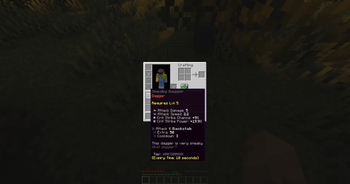
4. Why there is no expiry information in the lore?
You have not changed the lore template yet (see above)
5. Can I change the lore and the date format?
You can change the lore of each stat along with the date format from the config To validate or preview the date format: http://www.sdfonlinetester.info/
6. How does the plugin affect the performance?
The check task runs in a fixed interval defined by the config option item-check-interval (in seconds) The plugin would try to skip non-MMOItems Inventory update is performed only if there is at least an item change Raise item-check-interval is recommended to avoid performance impact. As a trade-off, a short delay in expiry time is totally acceptable.
7. How to disable the check in certain worlds?
* LuckPerms support contextual permission. It is possible to grant the bypass permission to a certain world. Remember to enable bypass permission in the config as well.
Join my ('https://discord.gg/HRAEKapRwx')server for plugin support
Give me a five-star review if this plugin is helpful. Thanks!
📊 Mod Details
- Game
- Minecraft Plugins
- Author
- anhcraft
- Version
- 1.0.8
- Downloads
- 1,552
- Endorsements
- 8
- Category
- bukkit
- Created
- 4/20/2023
- Updated
- 1/13/2025
- Game Versions
- 1.14, 1.14.1, 1.14.2, 1.14.3, 1.14.4
- Tags
- game-mechanics, utility
🔧 How to Install Minecraft Plugins Mods
Download from Modrinth. Use Prism Launcher or drop into your mods folder.
📖 Full step-by-step install guide for Minecraft Plugins →
Visit the official mod page for specific installation instructions for this mod.
🎮 Need cheat codes or console commands? Check ur gaming wiki for Minecraft Plugins commands, item IDs, and more.
❓ Frequently Asked Questions
Which Minecraft Plugins versions does TimedMMOItems support?
The author lists 1.14, 1.14.1, 1.14.2, 1.14.3, 1.14.4, 1.15. Other versions may work but are untested by the author.
What is the latest version of TimedMMOItems?
Version 1.0.8, published 2025-01-13 with 1,552 downloads recorded at the source.
Keep browsing — more Minecraft Plugins mods await