TigerReports
🟠 Updated over a year ago🖼️ Gallery (5 images)

🔍 Analysis
- 👍 0.6% endorsement rate
- 🏆 #122 of 131 management mods in this game by downloads
📋 About This Mod
# TigerReports by MrTigreroux **1.7+ Spigot** plugin\ **MySQL** & **BungeeCord** support\ **Vault** chat prefixes and suffixes support\ **Discord** support by installing (https://modrinth.com/plugin/tigerreportssupports) plugin ## Description TigerReports is a highly configurable and detailed plugin to manage player reports. It works with a simple command `/report` which registers many data that is displayed in a staff GUI (a chest). ## Operation Players can report online and offline players (it depends on the config) with a cooldown and a minimum amount of characters. If they don't specify any reason, a GUI (chest) is opened to select one of the defaults (configurable) reasons.\ When a report is sent, online staff is alerted by a clickable message that opens a menu.\ This menu allows to: - **Teleport** to current and older (during the report) location of the reporter and the reported players. - **Punish** if it's an abusive report with a cooldown of configured time (the report is marked as false when this punishment is used). - See **advanced data** like gamemode, health, effects, and more of the reported player. - Mark the **report status** as: Waiting, In progress, Important or Done. - **Archive** the report (removed from the main menu but kept in the database). - **Delete** the report definitively. - Write and see **comments** from the staff on the report. - See **messages history of participants** of the report posted before the report. When a staff marks a report as Done, he can leave an appreciation between: true, uncertain and false.\ The report is displayed in the main menu until an advanced staff archives or deletes it. ## Pictures **Reason menu:**\ !(https://cdn.modrinth.com/data/cached_images/99fe9271900bf1b6996be5a10fc813d1a8bd82eb.png) **Report menu:**\ !(https://cdn.modrinth.com/data/cached_images/69dcdb0eebcad031b49ac8031cf51265188a06c4.png) **Comments menu:**\ !(https://cdn.modrinth.com/data/cached_images/2e3fde45c37954fe5ceab1500dd6112609cffbf6.png) ## Config The plugin can be configured in config.yml file.\ You can see a list of all parameters that can be modified and a description of what they do (https://github.com/MrTigreroux/TigerReports/wiki/Config).\ The default config.yml settings are (https://raw.githubusercontent.com/MrTigreroux/TigerReports/master/src/main/resources/config.yml). ## Messages Messages are by **default in French** but all can be modified in messages.yml file. **Why?** Because I'm French I don't want the default messages of the plugin to have bad english but I nevertheless wrote a base of english below if you don't have the time/motivation to translate them by yourself.\ They are updated after all new versions. If you run a 1.16+ Spigot server, you can set hex colors in messages.yml file with `&#FFFFFF` or `&x&F&F&F&F&F&F` format for #FFFFFF hex color with `&` set for (https://github.com/MrTigreroux/TigerReports/blob/f2a7d0c3ba5ea85a3e2da2d3bdd06e8ab80b1855/src/main/resources/config.yml#L6) in config.yml file. **Important:** If you use Minecraft **1.8 or less**, you must encode messages.yml file with **ANSI**, else you must encode it with **UTF-8**.\ If messages are not changed, it means that you encoded with wrong format. **Also**, you can't put a comment (`#Message`) at first line of the file. If you do it messages will simply not be implemented. ### Update your messages If you recently updated TigerReports to the latest version, you can update your messages (in messages.yml file) with this online tool:\ (https://cdn.modrinth.com/data/cached_images/841f99b50382f8f139d4de95dc3612b5d229aed3.png)](https://mrtigreroux.github.io/plugins/tigerreports) ### Default messages Click on your language below, then press `CTRL` and `A` keys to select all the messages and then copy/paste them (`CTRL` and `C` then `CTRL` and `V`).\ *(thanks to people who shared these translations, their pseudo is at the top of the file)* (https://raw.githubusercontent.com/MrTigreroux/TigerReports/master/default-messages/english.yml) (https://raw.githubusercontent.com/MrTigreroux/TigerReports/master/default-messages/french.yml) (https://raw.githubusercontent.com/MrTigreroux/TigerReports/master/default-messages/spanish.yml) (https://raw.githubusercontent.com/MrTigreroux/TigerReports/master/default-messages/chinese.yml) (https://raw.githubusercontent.com/MrTigreroux/TigerReports/master/default-messages/russian.yml) (https://raw.githubusercontent.com/MrTigreroux/TigerReports/master/default-messages/vietnamese.yml) (https://raw.githubusercontent.com/MrTigreroux/TigerReports/master/default-messages/dutch.yml) (https://raw.githubusercontent.com/MrTigreroux/TigerReports/master/default-messages/polish.yml) (https://raw.githubusercontent.com/MrTigreroux/TigerReports/
# TigerReports by MrTigreroux 1. 7+ Spigot plugin\ MySQL & BungeeCord support\ Vault chat prefixes and suffixes support\ Discord support by installing (https://modrinth.com/plugin/tigerreportssupports) plugin
## Description TigerReports is a highly configurable and detailed plugin to manage player reports. It works with a simple command `/report` which registers many data that is displayed in a staff GUI (a chest).
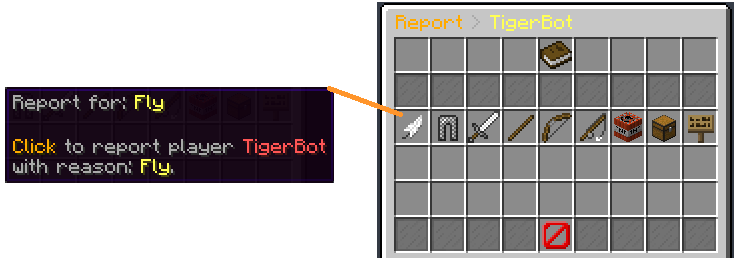
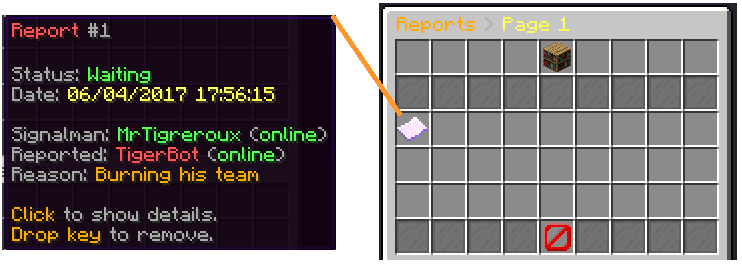
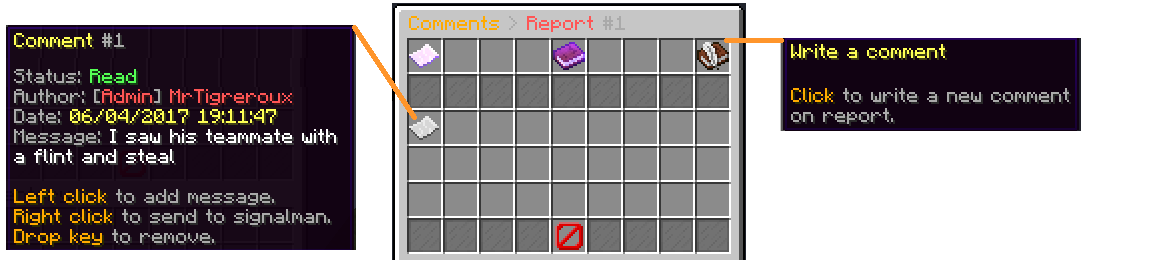
## Operation Players can report online and offline players (it depends on the config) with a cooldown and a minimum amount of characters. If they don't specify any reason, a GUI (chest) is opened to select one of the defaults (configurable) reasons.\ When a report is sent, online staff is alerted by a clickable message that opens a menu.\ This menu allows to: - Teleport to current and older (during the report) location of the reporter and the reported players. - Punish if it's an abusive report with a cooldown of configured time (the report is marked as false when this punishment is used). - See advanced data like gamemode, health, effects, and more of the reported player. - Mark the report status as: Waiting, In progress, Important or Done. - Archive the report (removed from the main menu but kept in the database). - Delete the report definitively. - Write and see comments from the staff on the report. - See messages history of participants of the report posted before the report.
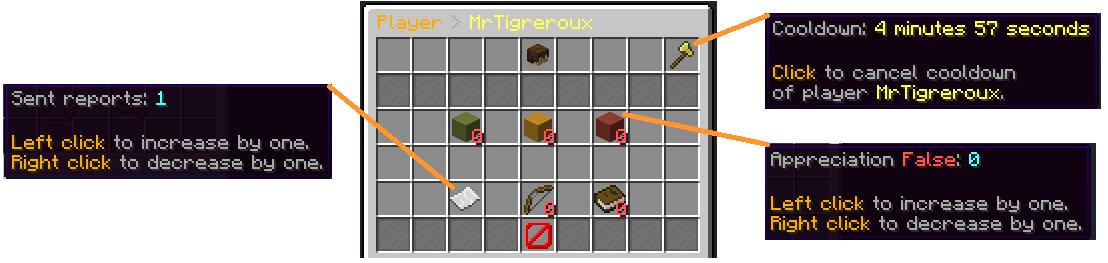
When a staff marks a report as Done, he can leave an appreciation between: true, uncertain and false.\ The report is displayed in the main menu until an advanced staff archives or deletes it.
## Pictures
Reason menu:\ !(https://cdn.modrinth.com/data/cached_images/99fe9271900bf1b6996be5a10fc813d1a8bd82eb.png)
Report menu:\ !(https://cdn.modrinth.com/data/cached_images/69dcdb0eebcad031b49ac8031cf51265188a06c4.png)
Comments menu:\ !(https://cdn.modrinth.com/data/cached_images/2e3fde45c37954fe5ceab1500dd6112609cffbf6.png)
## Config The plugin can be configured in config.yml file.\ You can see a list of all parameters that can be modified and a description of what they do (https://github.com/MrTigreroux/TigerReports/wiki/Config).\ The default config.yml settings are (https://raw.githubusercontent.com/MrTigreroux/TigerReports/master/src/main/resources/config.yml).
## Messages Messages are by default in French but all can be modified in messages.yml file.
Why? Because I'm French I don't want the default messages of the plugin to have bad english but I nevertheless wrote a base of english below if you don't have the time/motivation to translate them by yourself.\ They are updated after all new versions.
If you run a 1. 16+ Spigot server, you can set hex colors in messages.yml file with `&#FFFFFF` or `&x&F&F&F&F&F&F` format for #FFFFFF hex color with `&` set for (https://github.com/MrTigreroux/TigerReports/blob/f2a7d0c3ba5ea85a3e2da2d3bdd06e8ab80b1855/src/main/resources/config.yml#L6) in config.yml file.
Also, you can't put a comment (`#Message`) at first line of the file. If you do it messages will simply not be implemented.
### Update your messages If you recently updated TigerReports to the latest version, you can update your messages (in messages.yml file) with this online tool:\ [!(https://cdn.modrinth.com/data/cached_images/841f99b50382f8f139d4de95dc3612b5d229aed3.png)](https://mrtigreroux.github.io/plugins/tigerreports)
### Default messages Click on your language below, then press `CTRL` and `A` keys to select all the messages and then copy/paste them (`CTRL` and `C` then `CTRL` and `V`).\ (thanks to people who shared these translations, their pseudo is at the top of the file)
(https://raw.githubusercontent.com/MrTigreroux/TigerReports/master/default-messages/english.yml)
(https://raw.githubusercontent.com/MrTigreroux/TigerReports/master/default-messages/french.yml)
(https://raw.githubusercontent.com/MrTigreroux/TigerReports/master/default-messages/spanish.yml)
[中文](https://raw.githubusercontent.com/MrTigreroux/TigerReports/master/default-messages/chinese.yml)
[Русский](https://raw.githubusercontent.com/MrTigreroux/TigerReports/master/default-messages/russian.yml)
(https://raw.githubusercontent.com/MrTigreroux/TigerReports/master/default-messages/vietnamese.yml)
(https://raw.githubusercontent.com/MrTigreroux/TigerReports/master/default-messages/dutch.yml)
(https://raw.githubusercontent.com/MrTigreroux/TigerReports/master/default-messages/polish.yml)
(https://raw.githubusercontent.com/MrTigreroux/TigerReports/
📊 Mod Details
- Game
- Minecraft Plugins
- Author
- MrTigreroux
- Version
- 5.3.5
- Downloads
- 1,194
- Endorsements
- 7
- Category
- management
- Created
- 11/27/2024
- Updated
- 11/26/2024
- Game Versions
- 1.7.2, 1.7.3, 1.7.4, 1.7.5, 1.7.6
- Tags
- management, storage, utility
🔧 How to Install Minecraft Plugins Mods
Download from Modrinth. Use Prism Launcher or drop into your mods folder.
📖 Full step-by-step install guide for Minecraft Plugins →
Visit the official mod page for specific installation instructions for this mod.
🎮 Need cheat codes or console commands? Check ur gaming wiki for Minecraft Plugins commands, item IDs, and more.
❓ Frequently Asked Questions
Which Minecraft Plugins versions does TigerReports support?
The author lists 1.7.2, 1.7.3, 1.7.4, 1.7.5, 1.7.6, 1.7.7. Other versions may work but are untested by the author.
What is the latest version of TigerReports?
Version 5.3.5, published 2024-11-26 with 1,194 downloads recorded at the source.
Keep browsing — more Minecraft Plugins mods await