Terraformer
🟠 Updated over a year ago🖼️ Gallery (3 images)
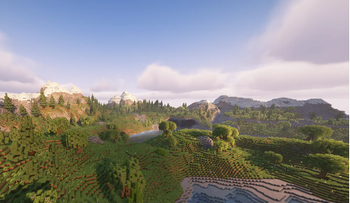
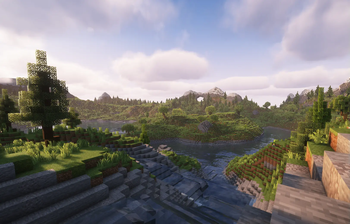
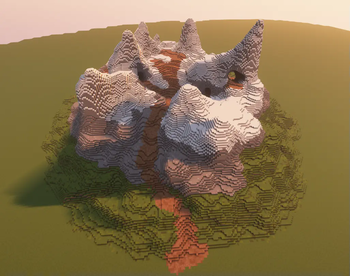
🔍 Analysis
- 👍 1.1% endorsement rate — high engagement, a strong quality signal
- 🏆 #91 of 131 management mods in this game by downloads
📋 About This Mod
# Terraformer - Minecraft World Editing Plugin - _Join the Discord server, to see the current progress on the mod!_ (https://discord.gg/FPPJsk3QJN) - **I will come up with videos on how to abuse this plugin as much as you can, the logic each brush has, tutorials and such once I have a version I'm happy with.** - _I was annoyed of how the current mods work, so I wanted to create an all in one terraforming tool for minecraft builders. My focus is on making this tool as easy to use as possible, as well as extremely powerfull and with no limitations. I wish to implement a wide range of new features, including customizable brushes, procedural generation and advanced material application tools, so stay updated!_ ## Contact - Questions - Discord: ruskizeu - Or join the Discord server! (https://discord.gg/FPPJsk3QJN) - Issues - (https://github.com/flcristian/terraformer/issues) ## Commands - `/terraformer start` or `/tf start` - Start terraforming mode - `/terraformer stop` or `/tf stop` - Stop terraforming mode - `/terraformer undo` or `/tf undo` - Undo last modification - `/terraformer redo` or `/tf redo` - Redo last modification - `/terraformer brush <type>` or `/tf b <type>` - Set brush type - `/terraformer size <1-9>` or `/tf s <1-9>` - Set brush size - `/terraformer depth <1-20>` or `/tf d <1-20>` - Set brush depth (for Paint/Rise/Dig brushes) - `/terraformer materials <materials>` or `/tf m <materials>` - Set brush materials - `/terraformer materialmode <mode>` or `/tf mm <mode>` - Set material mode - `/terraformer materialmodes` - Show all material modes - `/terraformer brushes` - Show all brush types - `/terraformer mask` - Set the mask materials - `/terraformer randomheight` - Toggle random height mode for foliage brush - `/terraform randomrotation` - Toggle random rotation for schematic brush - `/terraform schematic list` - See all available schematics - `/terraform schematic load <schematics>` - Load specified schematics - `/terraform blockupdates` - Toggles block updates when brushing - `/terraform minheight <height>` - Set the minimum height for paint brush - `/terraform maxheight <height>` - Set the maximum height for paint brush - Using the `-f` flag for brush size and depth forces that value to be set. - Example: `/tf s 20 -f` - Sets the brush size to 20 ## Brushes ### Basic Brushes - **Ball** - Creates a spherical shape - **Erase** - Erase the blocks in a spherical area - **Smooth** - Smooths terrain by averaging nearby blocks - **Erode** - Erodes terrain by removing protruding blocks - **Extrude** - Extrudes terrain outward based on surrounding blocks - **Rise** - Raises terrain by specified depth - **Dig** - Removes blocks down to specified depth - **Foliage** - Places foliage - **Schematic** - Places the schematic at the target block ### Paint Brushes - **Paint Top** - Paints blocks from top down - **Paint Surface** - Paints only surface blocks - **Paint Wall** - Paints vertical surfaces - **Paint Bottom** - Paints blocks from bottom up ## Material Modes ### Random Mode - Randomly selects materials based on specified percentages - Format: `/tf m 70%stone,30%dirt` - Materials must add up to 100% ### Layer Mode - Places materials in layers - Order of materials determines layer order from bottom to top - Format: `/tf m stone,dirt,grass_block` ### Gradient Mode - Creates smooth transitions between materials - Position in list determines gradient position (0% to 100%) - Format: `/tf m white_concrete,gray_concrete,black_concrete` - Best used with color-compatible blocks ## Usage Examples ### 1. Basic Sphere Brush ``` /tf start /tf b ball /tf s 5 /tf m stone ``` ### 2. Gradient Wall ``` /tf b paintwall /tf mm gradient /tf d 10 /tf m white_concrete,light_blue_concrete,blue_concrete ``` ### 3. Random Terrain ``` /tf b ball /tf mm random /tf m 50%stone,30%dirt,20%grass_block ``` ## Brush Settings Menu Access the brush settings menu by right-clicking with the brush tool. The menu allows you to: - Change brush size (1-9) - Change brush depth (1-20) for applicable brushes - Select brush type - Change material mode - Add/remove materials - Adjust material percentages ## Permissions - **terraformer.use** - Access to basic commands (default: true) - **terraformer.mode** - Permission to enter terraform mode (default: op) ## License This project is licensed under the **Terraformer Public Use License (TPUL)**. You are free to use, modify, and distribute the software, as long as you: - Provide proper credit to the original author. - Do not use the software for commercial purposes. - Do not claim ownership or authorship of the software or its derivatives. For more details, see the (./LICENSE.txt) file in this repository.
# Terraformer - Minecraft World Editing Plugin
- _Join the Discord server, to see the current progress on the mod!_ (https://discord.gg/FPPJsk3QJN)
- I will come up with videos on how to abuse this plugin as much as you can, the logic each brush has, tutorials and such once I have a version I'm happy with.
- _I was annoyed of how the current mods work, so I wanted to create an all in one terraforming tool for minecraft builders.
- My focus is on making this tool as easy to use as possible, as well as extremely powerfull and with no limitations.
- I wish to implement a wide range of new features, including customizable brushes, procedural generation and advanced material application tools, so stay updated!_
- Questions - Discord: ruskizeu
- - Or join the Discord server! (https://discord.gg/FPPJsk3QJN)
- Issues - (https://github.com/flcristian/terraformer/issues)
## Commands
- `/terraformer start` or `/tf start` - Start terraforming mode
- `/terraformer stop` or `/tf stop` - Stop terraforming mode
- `/terraformer undo` or `/tf undo` - Undo last modification
- `/terraformer redo` or `/tf redo` - Redo last modification
- `/terraformer brush
` or `/tf b ` - Set brush type - `/terraformer size <1-9>` or `/tf s <1-9>` - Set brush size
- `/terraformer depth <1-20>` or `/tf d <1-20>` - Set brush depth (for Paint/Rise/Dig brushes)
- `/terraformer materials
` or `/tf m ` - Set brush materials - `/terraformer materialmode
` or `/tf mm ` - Set material mode - `/terraformer materialmodes` - Show all material modes
- `/terraformer brushes` - Show all brush types
- `/terraformer mask` - Set the mask materials
- `/terraformer randomheight` - Toggle random height mode for foliage brush
- `/terraform randomrotation` - Toggle random rotation for schematic brush
- `/terraform schematic list` - See all available schematics
- `/terraform schematic load
` - Load specified schematics - `/terraform blockupdates` - Toggles block updates when brushing
- `/terraform minheight
` - Set the minimum height for paint brush - `/terraform maxheight
` - Set the maximum height for paint brush
- Using the `-f` flag for brush size and depth forces that value to be set.
- Example: `/tf s 20 -f` - Sets the brush size to 20
### Basic Brushes - Ball - Creates a spherical shape - Erase - Erase the blocks in a spherical area - Smooth - Smooths terrain by averaging nearby blocks - Erode - Erodes terrain by removing protruding blocks - Extrude - Extrudes terrain outward based on surrounding blocks - Rise - Raises terrain by specified depth - Dig - Removes blocks down to specified depth - Foliage - Places foliage - Schematic - Places the schematic at the target block
### Paint Brushes - Paint Top - Paints blocks from top down - Paint Surface - Paints only surface blocks - Paint Wall - Paints vertical surfaces - Paint Bottom - Paints blocks from bottom up
## Material Modes
### Random Mode - Randomly selects materials based on specified percentages - Format: `/tf m 70%stone,30%dirt` - Materials must add up to 100%
### Layer Mode - Places materials in layers - Order of materials determines layer order from bottom to top - Format: `/tf m stone,dirt,grass_block`
### Gradient Mode - Creates smooth transitions between materials - Position in list determines gradient position (0% to 100%) - Format: `/tf m white_concrete,gray_concrete,black_concrete` - Best used with color-compatible blocks
## Usage Examples
### 1. Basic Sphere Brush ``` /tf start /tf b ball /tf s 5 /tf m stone ```
### 2. Gradient Wall ``` /tf b paintwall /tf mm gradient /tf d 10 /tf m white_concrete,light_blue_concrete,blue_concrete ```
### 3. Random Terrain ``` /tf b ball /tf mm random /tf m 50%stone,30%dirt,20%grass_block ```
## Brush Settings Menu
Access the brush settings menu by right-clicking with the brush tool. The menu allows you to:
- Change brush size (1-9)
- Change brush depth (1-20) for applicable brushes
- Select brush type
- Change material mode
- Add/remove materials
- Adjust material percentages
## Permissions
- terraformer.use - Access to basic commands (default: true)
- terraformer.mode - Permission to enter terraform mode (default: op)
This project is licensed under the Terraformer Public Use License (TPUL).
You are free to use, modify, and distribute the software, as long as you: - Provide proper credit to the original author. - Do not use the software for commercial purposes. - Do not claim ownership or authorship of the software or its derivatives.
For more details, see the (./LICENSE.txt) file in this repository.
📊 Mod Details
- Game
- Minecraft Plugins
- Author
- flcristian
- Version
- 1.6.0
- Downloads
- 1,715
- Endorsements
- 19
- Category
- management
- Created
- 1/7/2025
- Updated
- 1/18/2025
- Game Versions
- 1.21.4
- Tags
- management, technology, utility
🔧 How to Install Minecraft Plugins Mods
Download from Modrinth. Use Prism Launcher or drop into your mods folder.
📖 Full step-by-step install guide for Minecraft Plugins →
Visit the official mod page for specific installation instructions for this mod.
🎮 Need cheat codes or console commands? Check ur gaming wiki for Minecraft Plugins commands, item IDs, and more.
❓ Frequently Asked Questions
Which Minecraft Plugins versions does Terraformer support?
The author lists 1.21.4. Other versions may work but are untested by the author.
What is the latest version of Terraformer?
Version 1.6.0, published 2025-01-18 with 1,715 downloads recorded at the source.
Keep browsing — more Minecraft Plugins mods await