TeamX
🟡 Updated this year🖼️ Gallery (3 images)
🔍 Analysis
- 🏆 #138 of 331 adventure mods in this game by downloads
📋 About This Mod
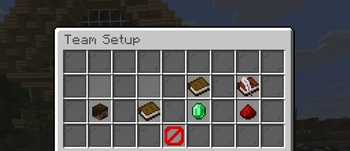
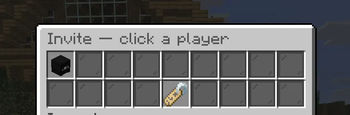
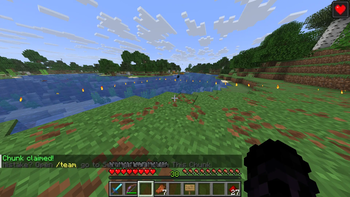
# TeamX TeamX is a GUI-first teams and land claiming plugin for Paper servers, built to feel simple and modern for both Java and Bedrock players. Instead of relying heavily on chat commands, almost everything is handled through clean menus and forms. For most players, the experience is simple: - `/team` opens the TeamX menu - `/team claim` claims the chunk you are standing in If your server uses Floodgate, Bedrock players automatically receive native mobile-friendly forms, while Java players use chest-style GUIs. --- ## Why TeamX - GUI-first team management - Native Bedrock-friendly forms through Floodgate - Team land claiming - Team homes - Alliance system - Team shortcut signs - Storage locking with signs - Per-world support for Multiverse-style servers --- ## Features - Create and manage teams through intuitive GUIs - Invite players, assign roles, and transfer leadership - Claim land for your team - Set custom team tags - Toggle friendly fire - Set and teleport to team homes - Create alliances with other teams - Lock storage using signs - Use `` signs as quick-access points inside your base --- ## Bedrock Support TeamX was designed to work seamlessly with Bedrock players. With Floodgate installed: - Bedrock players receive native popup forms - Menus are easier to use on phones and tablets - Java and Bedrock players share the same team system without extra setup --- ## How Players Use It ### Normal Player Flow 1. Run `/team` 2. Create a team or accept an invite 3. Use the GUI to manage your team 4. Use `/team claim` to claim land --- ### Claiming Land - Stand in the chunk you want to claim - Run `/team claim` - Only team leaders can claim land --- ### Team Signs Players can place a sign inside their claimed land and type: ```text team ``` TeamX automatically converts it into a `` sign. When used: - Java players standing in their own land open team info directly - Bedrock players standing in their own land open the main TeamX menu - Other players see read-only information about the team that owns the land --- ### Locking Storage To lock supported storage, hold shift and place a sign on it and close. do not write anything on the sign. TeamX automatically converts it into a sign: ```text PlayerOne PlayerTwo ``` Supported storage: - Chest - Trapped Chest - Barrel - Furnace - Blast Furnace - Smoker Doors are intentionally **not** lockable. --- ## Commands ### Player Commands #### `/team` Opens the TeamX GUI. #### `/team claim` Claims the chunk you are standing in for your team. --- ### Admin & Staff Commands #### `/team unclaim` Unclaims the current chunk. #### `/team unclaim all` Unclaims all land owned by the team. #### `/team claim spawn` Claims protected spawn land. #### `/team unclaim spawn` Removes protected spawn land. #### `/team region create <name> <spawn|structure|pvpfree|safezone>` Creates an admin region from the current wand selection. #### `/team region delete <name>` Deletes an admin region. #### `/team region info <name>` Displays information about an admin region. #### `/team region list` Lists all admin regions. #### `/teamadmin <subcommand>` Admin progression commands for XP, levels, and claims. #### `/wand` Gives the wooden shovel used for region selections. #### `/claim` Shortcut command for spawn claim actions. #### `/teamx reload` Reloads TeamX configuration and GUI files. --- ## Permissions ### Player Permissions #### `teamx.team` Access to the TeamX GUI and basic team features. Default: `true` #### `teamx.claim` Access to `/team claim`. Default: `true` --- ### Admin Permissions #### `teamx.spawn.wand` Use the wooden shovel selection tool. Default: `op` #### `teamx.spawn.claim` Claim protected spawn land. Default: `op` #### `teamx.spawn.unclaim` Remove protected spawn land. Default: `op` #### `teamx.region.admin` Manage admin regions using `/team region ...` Default: `op` #### `teamx.admin` Full TeamX admin access, including region and spawn management. Default: `op` --- ## Optional Integrations ### Floodgate Highly recommended for Bedrock support. Used for: - Bedrock player detection - Native Bedrock popup forms --- ### LuckPerms Optional support for syncing: - Team metadata - Team prefixes --- ## Per-World Team Support TeamX supports isolated teams per world. Example configuration: ```yaml teams: realm-mode: per-world ``` This allows players to belong to different teams in different worlds, making it ideal for: - Survival worlds - Creative worlds - Minigames - Multi-world server networks --- ## Public Shop Signs In Spawn If your server uses EssentialsX or another sign-shop plugin, public shop signs can be allowed inside protected spawn and admin regions. Example configuration: ```yaml protection: public-sign-headers: - "" - "" - "" - "" - "" ``` Additional sign headers can be added later without
TeamX is a GUI-first teams and land claiming plugin for Paper servers, built to feel simple and modern for both Java and Bedrock players.
Instead of relying heavily on chat commands, almost everything is handled through clean menus and forms.
For most players, the experience is simple:
- `/team` opens the TeamX menu
- `/team claim` claims the chunk you are standing in
If your server uses Floodgate, Bedrock players automatically receive native mobile-friendly forms, while Java players use chest-style GUIs.
## Why TeamX
- GUI-first team management
- Native Bedrock-friendly forms through Floodgate
- Team land claiming
- Team homes
- Alliance system
- Team shortcut signs
- Storage locking with signs
- Per-world support for Multiverse-style servers
## Features
- Create and manage teams through intuitive GUIs
- Invite players, assign roles, and transfer leadership
- Claim land for your team
- Set custom team tags
- Toggle friendly fire
- Set and teleport to team homes
- Create alliances with other teams
- Lock storage using signs
- Use `` signs as quick-access points inside your base
## Bedrock Support
TeamX was designed to work seamlessly with Bedrock players.
With Floodgate installed:
- Bedrock players receive native popup forms
- Menus are easier to use on phones and tablets
- Java and Bedrock players share the same team system without extra setup
## How Players Use It
### Normal Player Flow
1. Run `/team` 2. Create a team or accept an invite 3. Use the GUI to manage your team 4. Use `/team claim` to claim land
### Claiming Land
- Stand in the chunk you want to claim
- Run `/team claim`
- Only team leaders can claim land
### Team Signs
Players can place a sign inside their claimed land and type:
```text team ```
TeamX automatically converts it into a `` sign.
- Java players standing in their own land open team info directly
- Bedrock players standing in their own land open the main TeamX menu
- Other players see read-only information about the team that owns the land
### Locking Storage
To lock supported storage, hold shift and place a sign on it and close. do not write anything on the sign.
TeamX automatically converts it into a sign:
PlayerOne PlayerTwo ```
Supported storage:
- Chest
- Trapped Chest
- Barrel
- Furnace
- Blast Furnace
- Smoker
Doors are intentionally not lockable.
## Commands
### Player Commands
#### `/team` Opens the TeamX GUI.
#### `/team claim` Claims the chunk you are standing in for your team.
### Admin & Staff Commands
#### `/team unclaim` Unclaims the current chunk.
#### `/team unclaim all` Unclaims all land owned by the team.
#### `/team claim spawn` Claims protected spawn land.
#### `/team unclaim spawn` Removes protected spawn land.
#### `/team region create
#### `/team region delete
#### `/team region info
#### `/team region list` Lists all admin regions.
#### `/teamadmin
#### `/wand` Gives the wooden shovel used for region selections.
#### `/claim` Shortcut command for spawn claim actions.
#### `/teamx reload` Reloads TeamX configuration and GUI files.
## Permissions
### Player Permissions
#### `teamx.team` Access to the TeamX GUI and basic team features. Default: `true`
#### `teamx.claim` Access to `/team claim`. Default: `true`
### Admin Permissions
#### `teamx.spawn.wand` Use the wooden shovel selection tool. Default: `op`
#### `teamx.spawn.claim` Claim protected spawn land. Default: `op`
#### `teamx.spawn.unclaim` Remove protected spawn land. Default: `op`
#### `teamx.region.admin` Manage admin regions using `/team region ...` Default: `op`
#### `teamx.admin` Full TeamX admin access, including region and spawn management. Default: `op`
## Optional Integrations
### Floodgate
Highly recommended for Bedrock support.
- Bedrock player detection
- Native Bedrock popup forms
### LuckPerms
Optional support for syncing:
- Team metadata
- Team prefixes
## Per-World Team Support
TeamX supports isolated teams per world.
Example configuration:
```yaml teams: realm-mode: per-world ```
This allows players to belong to different teams in different worlds, making it ideal for:
- Survival worlds
- Creative worlds
- Minigames
- Multi-world server networks
## Public Shop Signs In Spawn
If your server uses EssentialsX or another sign-shop plugin, public shop signs can be allowed inside protected spawn and admin regions.
Example configuration:
```yaml protection: public-sign-headers: - "" - "" - "" - "" - "" ```
Additional sign headers can be added later without
📊 Mod Details
- Game
- Minecraft Plugins
- Author
- loganhigh
- Version
- 1.0
- Downloads
- 59
- Endorsements
- 0
- Category
- adventure
- Created
- 4/29/2026
- Updated
- 4/19/2026
- Game Versions
- 1.21, 1.21.1, 1.21.2, 1.21.3, 1.21.4
- Tags
- adventure, equipment, social
🔧 How to Install Minecraft Plugins Mods
Download from Modrinth. Use Prism Launcher or drop into your mods folder.
📖 Full step-by-step install guide for Minecraft Plugins →
Visit the official mod page for specific installation instructions for this mod.
🎮 Need cheat codes or console commands? Check ur gaming wiki for Minecraft Plugins commands, item IDs, and more.
❓ Frequently Asked Questions
Which Minecraft Plugins versions does TeamX support?
The author lists 1.21, 1.21.1, 1.21.2, 1.21.3, 1.21.4, 1.21.5. Other versions may work but are untested by the author.
What is the latest version of TeamX?
Version 1.0, published 2026-04-19 with 59 downloads recorded at the source.
Keep browsing — more Minecraft Plugins mods await