TeamStorage
🟡 Updated this year🖼️ Gallery (3 images)
🔍 Analysis
- 🏆 #58 of 222 paper mods in this game by downloads
📋 About This Mod
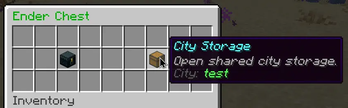
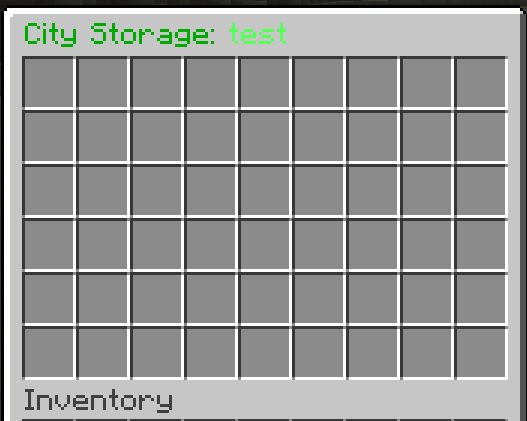
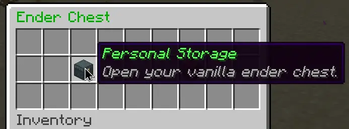
# TeamStorage **TeamStorage** is a Paper/Purpur plugin that adds shared city storage integrated directly into Minecraft ender chests. When a city member opens an ender chest, they can choose between their personal ender chest and the shared storage of their city. Players who do not belong to a city keep the standard vanilla behavior. ## Features - Shared storage for every city - Personal ender chests remain unchanged - 9–54 configurable storage slots - Real-time synchronization between city members - Reliable SQLite data storage - Automatic and immediate inventory saving - Detailed item deposit, withdrawal, and access logs - Administrative city management - Configurable Russian and English messages - Customizable GUI items, sounds, titles, and model data - Optional colored city tags in the player list - Local city chat using `@message` - Persistent city-chat mode - Administrative city-chat spy - Legacy CityStorage data migration ## City Management Cities are created and managed by server administrators: - `/city create <name> <tag>` - `/city delete <name>` - `/city add <player> <city>` - `/city remove <player>` - `/city info <city>` - `/city list` - `/city tag <city> <tag>` - `/city tagcolor <city> <color|#hex>` Each player can belong to only one city. Adding a player to another city automatically transfers them from their previous city. A city cannot be deleted while its shared storage contains items. ## Storage Commands - `/teamstorage toggle` — enable or disable the storage selection menu - `/teamstorage open ` — open city storage as an administrator - `/citystorage` remains available as a legacy alias. Players cannot open shared storage through commands. Regular access is provided only through an ender chest. ## City Chat Prefix a message with `@` to send it only to members of your city: ```text @Hello, city! ``` Use /citychat or /cc to toggle persistent city-chat mode. If a player does not belong to a city, the @ character is removed and the message is sent to global chat. ## Player List Tags TeamStorage can display a colored city tag before each player's name: ```text Player ``` This feature does not use scoreboard teams and can be disabled completely: ```text tab: enabled: false ``` Disable it when TAB or another plugin should have full control over player-list names. ## Requirements - Paper or Purpur 26.2 - Java 25 or newer
# TeamStorage
TeamStorage is a Paper/Purpur plugin that adds shared city storage integrated directly into Minecraft ender chests.
When a city member opens an ender chest, they can choose between their personal ender chest and the shared storage of their city. Players who do not belong to a city keep the standard vanilla behavior.
## Features
- Shared storage for every city
- Personal ender chests remain unchanged
- 9–54 configurable storage slots
- Real-time synchronization between city members
- Reliable SQLite data storage
- Automatic and immediate inventory saving
- Detailed item deposit, withdrawal, and access logs
- Administrative city management
- Configurable Russian and English messages
- Customizable GUI items, sounds, titles, and model data
- Optional colored city tags in the player list
- Local city chat using `@message`
- Persistent city-chat mode
- Administrative city-chat spy
- Legacy CityStorage data migration
## City Management
Cities are created and managed by server administrators:
- `/city create
` - `/city delete
` - `/city add
` - `/city remove
` - `/city info
` - `/city list`
- `/city tag
` - `/city tagcolor
Each player can belong to only one city. Adding a player to another city automatically transfers them from their previous city.
A city cannot be deleted while its shared storage contains items.
## Storage Commands
- `/teamstorage toggle` — enable or disable the storage selection menu
- `/teamstorage open ` — open city storage as an administrator
- `/citystorage` remains available as a legacy alias.
Players cannot open shared storage through commands. Regular access is provided only through an ender chest.
## City Chat
Prefix a message with `@` to send it only to members of your city:
```text @Hello, city! ``` Use /citychat or /cc to toggle persistent city-chat mode. If a player does not belong to a city, the @ character is removed and the message is sent to global chat.
## Player List Tags TeamStorage can display a colored city tag before each player's name: ```text Player ``` This feature does not use scoreboard teams and can be disabled completely: ```text tab: enabled: false ``` Disable it when TAB or another plugin should have full control over player-list names.
## Requirements - Paper or Purpur 26. 2 - Java 25 or newer
📊 Mod Details
- Game
- Minecraft Plugins
- Author
- Syntaxis
- Version
- 1.0.0
- Downloads
- 26
- Endorsements
- 1
- Category
- paper
- Created
- 7/2/2026
- Updated
- 6/25/2026
- Game Versions
- 26.2
- Tags
- social, storage, utility
🔧 How to Install Minecraft Plugins Mods
Download from Modrinth. Use Prism Launcher or drop into your mods folder.
📖 Full step-by-step install guide for Minecraft Plugins →
Visit the official mod page for specific installation instructions for this mod.
🎮 Need cheat codes or console commands? Check ur gaming wiki for Minecraft Plugins commands, item IDs, and more.
❓ Frequently Asked Questions
Which Minecraft Plugins versions does TeamStorage support?
The author lists 26.2. Other versions may work but are untested by the author.
What is the latest version of TeamStorage?
Version 1.0.0, published 2026-06-25 with 26 downloads recorded at the source.
Keep browsing — more Minecraft Plugins mods await