SyncShield
🟡 Updated this year🖼️ Gallery (8 images)
🔍 Analysis
- 🏆 #1183 of 1224 bukkit mods in this game by downloads
📋 About This Mod
!(https://cdn.modrinth.com/data/cached_images/ba73569c8d389a375931a17eb87a688333e1ea28.png)
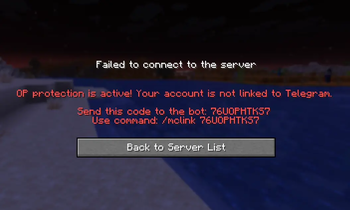
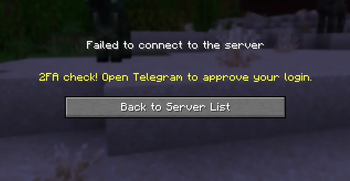
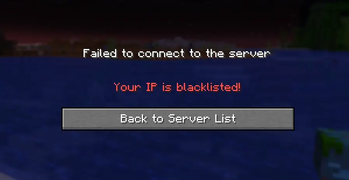
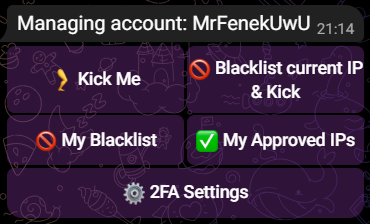
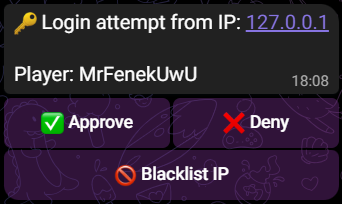
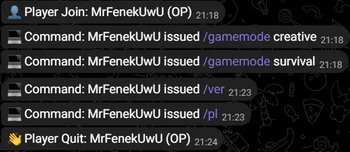
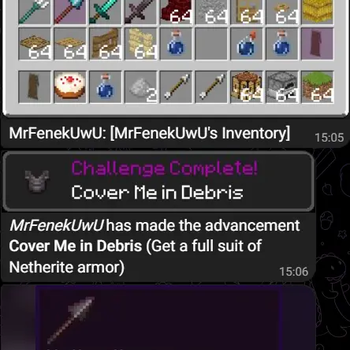
Overview SyncShield adds 2FA verification to Minecraft logins via Telegram and/or Discord, blocks unverified joins, and lets admins approve logins via interactive buttons. Both Telegram and Discord bots are completely modular and optional — you can use Telegram only, Discord only, or both simultaneously. It also provides Telegram & Discord ↔ Minecraft chat sync, cross-platform ticket and report systems, and 3D image rendering of inventories, items, ender chests, written books, and advancements using the Monocraft pixel font with full Russian/English localization.
Advantages
- Modular Architecture: Independent toggles (`telegram-enabled` & `discord-enabled`) for Telegram and Discord integrations.
- Strong 2FA Protection: Enforces 2FA for OPs and optionally for linked non-OP players.
- Compact 6-Character Codes: Instant account linking with 6-character codes (`A3F9X2`) via `/mclink `, `/start `, or direct chat.
- Case-Insensitive Entry: Linking accepts codes in both uppercase and lowercase (`a3f9x2` / `A3F9X2`).
- Unified Auto-Owner & Admin Assignment: Linking the first OP account automatically assigns `owner-id` and populates `admin-ids` / `discord-admin-ids`.
- Automatic Config Migration: Includes `config-version` with automatic, safe migration from older configurations (`config__backup.yml`).
- Monocraft Font & RU/EN Localization: High-definition pixel rendering using `Monocraft.ttf` with automatic Russian translations for enchantments, lore descriptions, durability, and book pages.
- Full customization - Every message is customizable with `English` and `Russian` locales out-of-the-box.
- Cross-Platform Ticket & Report System: In-game `/ticket` and `/report` commands with Telegram & Discord interactive buttons (`Claim` / `Close`), targeted thread replies, `/ticket chat
Quick Setup 1. Put `syncshield-.jar` into your server's `plugins/` folder and start the server once. 2. Edit `config.yml` with your Telegram `bot-token` and/or Discord `discord-bot-token`. 3. Edit `config.yml` `telegram-enabled` & `discord-enabled` values. 3. Run `/syncshield reload` or restart the server. 4. In-game, run `/syncshield link` to generate your 6-character link code. 5. Send your code (`/mclink` or just text message) to the Telegram or Discord bot to link your account and receive admin access.
Commands
Minecraft Commands
- `/syncshield link` (Alias: `/ss link`)
- Generates a 6-character one-time code to link your Minecraft account to Telegram/Discord.
- `/syncshield settings
- Sets your personal 2FA protection mode.
- `/syncshield reload`
- Reloads `config.yml` and message files. Automatically migrates older config versions. Requires `syncshield.admin`.
- `/syncshield config
` - Sets a configuration value directly from in-game console or chat. Requires `syncshield.admin`.
- `/syncshield debug rebake-textures`
- Forces a fresh bake of 3D block and item textures, use only when encountering rendering errors or updating to a newer Minecraft version. Requires `syncshield.debug`.
- `/ticket
` - Opens a support ticket with administrators. Syncs to Telegram and Discord.
- `/ticket chat
` - Sends a chat message into your active ticket thread in Telegram and Discord.
- `/ticket close`
- Closes your active support ticket.
- `/report
` - Reports a player to administrators. Syncs to Telegram and Discord.
Telegram Commands
- `/start`
- Displays the main interactive menu with quick action buttons.
- `/mclink
` - Links your Telegram account using the code from `/syncshield link`.
- `/players`
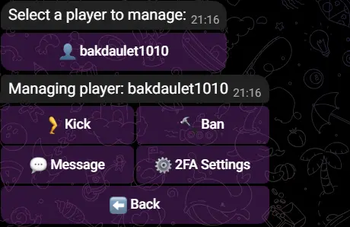
- Lists online players with quick admin management options (Admins only).
- `/settings`
- Opens 2FA mode configuration menu (Admins only).
- `/rcon
` - Executes a server console command (Admins only, when `rcon-enabled: true`).
Discord Commands
- `/mclink
` - Links your Discord account using the code from `/syncshield link`.
- `/rcon
` - Executes a server console command (Requires a role configured in `discord-admin-roles`).
Permissions
| Permission | Description | Default | | :--- | :--- | :--- | | `syncshield.use` | Allows linking account via `/syncshield link` | `true` | | `syncshield.ticket` | Allows opening tickets via `/ticket` | `true` | | `syncshield.report` | Allo
📊 Mod Details
- Game
- Minecraft Plugins
- Author
- mrfenek
- Version
- 1.4.0
- Downloads
- 80
- Endorsements
- 1
- Category
- bukkit
- Created
- 3/19/2026
- Updated
- 7/27/2026
- Game Versions
- 1.16, 1.16.1, 1.16.2, 1.16.3, 1.16.4
- Tags
- game-mechanics, management, utility
🔧 How to Install Minecraft Plugins Mods
Download from Modrinth. Use Prism Launcher or drop into your mods folder.
📖 Full step-by-step install guide for Minecraft Plugins →
Visit the official mod page for specific installation instructions for this mod.
🎮 Need cheat codes or console commands? Check ur gaming wiki for Minecraft Plugins commands, item IDs, and more.
❓ Frequently Asked Questions
Which Minecraft Plugins versions does SyncShield support?
The author lists 1.16, 1.16.1, 1.16.2, 1.16.3, 1.16.4, 1.16.5. Other versions may work but are untested by the author.
What is the latest version of SyncShield?
Version 1.4.0, published 2026-07-27 with 80 downloads recorded at the source.
Keep browsing — more Minecraft Plugins mods await