SweetInventory
🟡 Updated this year🖼️ Gallery (1 images)
🔍 Analysis
- 🏆 #912 of 1224 bukkit mods in this game by downloads
📋 About This Mod
# SweetInventory A Minecraft Menu Plugin > Default configurations are in Chinese. Check (https://github.com/mcio-dev/localization) repository for English or other language. > And I am sorry about that the wiki is only Chinese available right now. In the future, we may translate it to English. ## Introduction A menu plugin built based on the (https://plugins.mcio.dev/elopers/base/gui/) menu module. It uses an intuitive layout format similar to the example below: ```yaml inventory: - 'ooooooooo' - 'upppppppd' - 'ooooooooo' # "o" means frame icon # "u" means "up", aka previous-page button # "d" means "down", aka next-page button # "p" means page content ``` Icons can have "display conditions", "click conditions", "click actions", and more. It supports various click types such as Left Click, Right Click, Shift + Left Click, Shift + Right Click, Q, and Ctrl + Q. For more details, see the documentation on (https://plugins.mcio.dev/docs/inventory/intro). ## Features + Uses a more intuitive layout design + Supports pagination, allowing a single menu to display multiple pages of content + Supports registering custom commands for menus, effective immediately after reloading + Supports detecting file save operations and automatically reloading menus upon saving + Rich condition and display priority mechanisms to satisfy simple use cases + Supports expressions in conditions such as `%vault_eco_balance% >= 100` ## Commands The root command is `/sweetinventory`, with aliases `/sinv`, `/si`, or `/menu` Parameters wrapped in `<>` are required, and parameters wrapped in `` are optional. | Command | Description | Permission | | --- | --- | --- | | `/menu open <menu>` | Opens the specified menu. Requires permission to open the menu | `sweet.inventory.open` | | `/menu open <menu> - ` | Opens the specified menu. Requires permission to open the menu | `sweet.inventory.open` | | `/menu open <menu> <player> ` | Opens the specified menu for a player. The target player does not need permission to open the menu | `sweet.inventory.open.other` | | `/menu list` | View the list of menus | `sweet.inventory.list` | | `/menu reload` | Reload the plugin configuration files | OP/Console | Opening a menu requires the permission `sweet.inventory.open.menu.<menu>`
# SweetInventory A Minecraft Menu Plugin
> Default configurations are in Chinese. Check (https://github.com/mcio-dev/localization) repository for English or other language. > And I am sorry about that the wiki is only Chinese available right now. In the future, we may translate it to English.
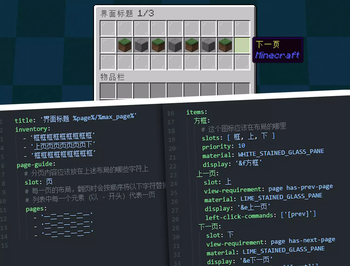
## Introduction A menu plugin built based on the (https://plugins.mcio.dev/elopers/base/gui/) menu module. It uses an intuitive layout format similar to the example below:
```yaml inventory: - 'ooooooooo' - 'upppppppd' - 'ooooooooo' # "o" means frame icon # "u" means "up", aka previous-page button # "d" means "down", aka next-page button # "p" means page content ```
Icons can have "display conditions", "click conditions", "click actions", and more. It supports various click types such as Left Click, Right Click, Shift + Left Click, Shift + Right Click, Q, and Ctrl + Q.
For more details, see the documentation on (https://plugins.mcio.dev/docs/inventory/intro).
## Features + Uses a more intuitive layout design + Supports pagination, allowing a single menu to display multiple pages of content + Supports registering custom commands for menus, effective immediately after reloading + Supports detecting file save operations and automatically reloading menus upon saving + Rich condition and display priority mechanisms to satisfy simple use cases + Supports expressions in conditions such as `%vault_eco_balance% >= 100`
## Commands
The root command is `/sweetinventory`, with aliases `/sinv`, `/si`, or `/menu` Parameters wrapped in `<>` are required, and parameters wrapped in `[]` are optional.
| Command | Description | Permission | | --- | --- | --- | | `/menu open
📊 Mod Details
- Game
- Minecraft Plugins
- Author
- MrXiaoM
- Version
- 1.0.6
- Downloads
- 95
- Endorsements
- 0
- Category
- bukkit
- Created
- 5/15/2026
- Updated
- 7/30/2026
- Game Versions
- 1.8, 1.8.1, 1.8.2, 1.8.3, 1.8.4
- Tags
- game-mechanics, utility
🔧 How to Install Minecraft Plugins Mods
Download from Modrinth. Use Prism Launcher or drop into your mods folder.
📖 Full step-by-step install guide for Minecraft Plugins →
Visit the official mod page for specific installation instructions for this mod.
🎮 Need cheat codes or console commands? Check ur gaming wiki for Minecraft Plugins commands, item IDs, and more.
❓ Frequently Asked Questions
Which Minecraft Plugins versions does SweetInventory support?
The author lists 1.8, 1.8.1, 1.8.2, 1.8.3, 1.8.4, 1.8.5. Other versions may work but are untested by the author.
What is the latest version of SweetInventory?
Version 1.0.6, published 2026-07-30 with 95 downloads recorded at the source.
Keep browsing — more Minecraft Plugins mods await