Status4Discord
🟢 Updated this month🖼️ Gallery (5 images)

🔍 Analysis
- 👍 0.6% endorsement rate
- 🏆 #1092 of 1560 bukkit mods in this game by downloads
📋 About This Mod
A discord bot, showing the current status of your server as embed, activity and more.
# Status4Discord
Status4Discord is a dynamic Discord bot for Minecraft servers that provides real-time server stats through embeds and activities. It effortlessly connects your Minecraft server to Discord, keeping your community in the loop and engaged with information ranging from TPS to player counts.
## Getting started https://github.com/LasaJoniHD/Status4DiscordMC/wiki/Setup
## Commands ### Minecraft ``/status4discord reload`` reload the config
``/status4discord invite`` invite the discord bot
``/status4discord info`` info about this plugin
``/status4discord help`` all commands ### Discord ``@YourDiscordBot setembed`` set the embed textchannel
``@YourDiscordBot setlogs`` set the logs textchannel
## Permissions ### Minecraft + ``status4mc.admin`` Use /status4discord reload and /status4discord invite ### Discord + Permission. ADMINISTRATOR
## Config
Show config
``` # _____ _ _ _ _ _____ _ _ # / ____| | | | | || | | __ \(_) | | # | (___ | |_ __ _| |_ _ _ ___| || |_| | | |_ ___ ___ ___ _ __ __| | # \___ \| __/ _` | __| | | / __|__ _| | | | / __|/ __/ _ \| '__/ _` | # ____) | || (_| | |_| |_| \__ \ | | | |__| | \__ \ (_| (_) | | | (_| | # |_____/ \__\__,_|\__|\__,_|___/ |_| |_____/|_|___/\___\___/|_| \__,_| # # Thank you for using Status4Discord by Joni # To setup Status4Discord, please visit https://github.com/LasaJoniHD/Status4DiscordMC/wiki/Setup
# _____ ___ _ _____ _ _ # |_ _/ _ \| |/ / __| \| | # | || (_) | ' <| _|| .` | # |_| \___/|_|\_\___|_|\_| # # Please paste your discord bot token here token: ""
# _ ___ _____ _____ _____ _______ __ # /_\ / __|_ _|_ _\ \ / /_ _|_ _\ \ / / # / _ \ (__ | | | | \ V / | | | | \ V / # /_/ \_\___| |_| |___| \_/ |___| |_| |_| # # Available Activities: # PLAYING, WATCHING, LISTENING, CUSTOM_STATUS, COMPETING # Available Status: # ONLINE, IDLE, DO_NOT_DISTURB, INVISIBLE, OFFLINE # You can use PlaceholderAPI if installed (only placeholders that do not require a player). # Find placeholders included in Status4Discord at https://github.com/LasaJoniHD/Status4DiscordMC/wiki/Placeholders. activity: "PLAYING %online_players% / %max_players% Players" status-activity: "ONLINE" update-activity: 30 # in seconds
# Activities for server start server-starting-activity: "CUSTOM_STATUS Server is starting..." server-starting-status: "IDLE"
# ServerIP # will replace internal Placeholder %serverip% # -------------------------------------------------------------------------------------------------------------------- # 'serverIP' sets the server IP shown in activity and in the embed. # If in server.properties, it will obtain the IP that the server is bound to; if not set, it will display "not set." serverIP: "server.properties"
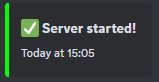
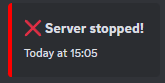
# _ ___ ___ ___ # | | / _ \ / __/ __| # | |_| (_) | (_ \__ \ # |____\___/ \___|___/ # # If enabled, the bot will send a message when the server starts/stops in the specified logs channel. # If you don't know how to obtain the textChannelID and have admin privileges, # simply send a message in Discord in the channel like this: @MentionYourDiscordBot setlogs. logs: enabled: true textChannelID: "" start: color: "GREEN" message: ":white_check_mark: Server started!" stop: color: "RED" message: ":x: Server stopped!"
# ___ __ __ ___ ___ ___ # | __| \/ | _ ) __| \ # | _|| |\/| | _ \ _|| |) | # |___|_| |_|___/___|___/ # # If enabled, the bot will send a status embed in the specified channel; this embed will be updated every few seconds. # If you don't know how to obtain the textChannelID and have admin privileges, # simply send a message in Discord in the channel like this: # @MentionYourDiscordBot setembed. embed: enabled: true textChannelID: "" update: 15 # in seconds
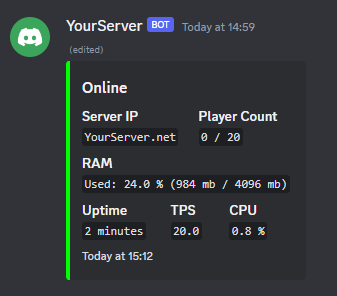
online: title: "Online" color: "GREEN" # supports any java.awt. Color enum name (e.g. `RED`, `BLUE`, etc.) or a hex code (e.g. `#FF0000` for red)
timestamp: true
footer: text: "Uptime: %uptime%"
fields: - name: "Server IP" value: "%serverip%" inline: true
- name: "Player Count"
- value: "%online_players% / %max_players%"
- inline: true
- name: "RAM"
- value: "Used: %usedram_percentage% % (%usedram% mb / %maxram% mb)"
- inline: false
- name: "Uptime"
- value: "%uptime%"
- inline: true
- name: "TPS"
- value: "%tps%"
- inline: true
- name: "CPU"
- value: "%cpu% %"
- inline: true
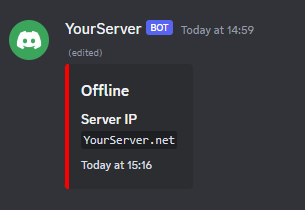
offline: title: "Offline" color: "RED"
fields: - name: "Server IP" value: "%serverip%" inline: true
# Do not touch if you don't know what this setting does embedMessageID: "" debug: false config-version: 4
## Examples
Activity
!(https://cdn.modrin
📊 Mod Details
- Game
- Minecraft Plugins
- Author
- LasaJoniHD
- Version
- 26.2
- Downloads
- 1,795
- Endorsements
- 11
- Category
- bukkit
- Created
- 1/22/2024
- Updated
- 9/9/2026
- Game Versions
- 1.18, 1.18.1, 1.18.2, 1.19, 1.19.1
- Tags
- management, social, utility
🔧 How to Install Minecraft Plugins Mods
Download from Modrinth. Use Prism Launcher or drop into your mods folder.
📖 Full step-by-step install guide for Minecraft Plugins →
Visit the official mod page for specific installation instructions for this mod.
🎮 Need cheat codes or console commands? Check ur gaming wiki for Minecraft Plugins commands, item IDs, and more.
❓ Frequently Asked Questions
Which Minecraft Plugins versions does Status4Discord support?
The author lists 1.18, 1.18.1, 1.18.2, 1.19, 1.19.1, 1.19.2. Other versions may work but are untested by the author.
What is the latest version of Status4Discord?
Version 26.2, published 2026-09-09 with 1,795 downloads recorded at the source.
Keep browsing — more Minecraft Plugins mods await