sSugarDrop
🟡 Updated this year🖼️ Gallery (6 images)


🔍 Analysis
- 🏆 #704 of 1080 bukkit mods in this game by downloads
📋 About This Mod
# 🍬 sSugarDrop | The Ultimate Party Plugin Transform your Minecraft server into a nonstop celebration with **sSugarDrop** — a customizable piñata event plugin for Paper servers. Create interactive party events where players can hit a piñata, break it, and receive custom rewards with holograms, animations, sounds, particles, Discord reminders, and a complete visual editor. --- # ✨ Features * 🎉 Fully customizable piñata events * 🎁 Reward editor GUI with item chances * 📦 Multiple reward pages support * 🌎 Multiple piñatas/drops support * 💎 Complete visual editor with submenus * 🎨 Drag & drop piñata material editor * 🔄 Reset buttons for editor sections * 🪄 Custom holograms with PlaceholderAPI support * 🎆 Custom effects with particles and sounds * 🔔 Discord webhook reminders before events * ⏰ Configurable reminder time * ⚡ Lightweight and optimized * 🧹 Cleanup tools for old or stuck holograms * 🛠️ YAML-based configuration system * 🔁 Hot reload support --- # 🎮 Main Commands > Requires Administrator or OP permissions. ## Piñata Management * `/ssugardrop create <name>` Creates a new piñata/drop. * `/ssugardrop delete <name>` Deletes an existing piñata/drop. * `/ssugardrop setlocation <name>` Sets the piñata location to the block you are looking at. * `/ssugardrop edit <name>` Opens the visual editor and rewards menu. * `/ssugardrop list` Displays all created drops. * `/ssugardrop force <name/all>` Force starts one drop or all drops. * `/ssugardrop reset <name/all>` Resets daily event limits. * `/ssugardrop fire <name> <amount>` Manually launches rewards from a drop. * `/ssugardrop reload` Reloads plugin files, drops, effects, language files, holograms, and Discord settings. * `/ssugardrop cleanup all` Cleans old holograms and regenerates active displays. * `/ssugardrop hardcleanup` Removes stuck or legacy plugin entities. --- # 🎁 Visual Reward Editor Managing rewards has never been easier. Use: ```bash /ssugardrop edit <name> ``` Inside the editor you can: * ➕ Add rewards by placing items directly into the GUI * 📄 Manage rewards with multiple pages * 🎲 Configure custom drop chances * ⚙️ Edit event settings through visual submenus * 🎨 Change the piñata material with a selector or drag & drop * 🔢 Adjust numeric values using GUI buttons * 🔄 Reset sections back to default values * 💎 Create unique event experiences for your players --- # ⚙️ Configuration When a piñata is created, the plugin automatically generates a configuration file for it. Each piñata/drop can be customized through the visual editor or YAML files. ## Event Settings ```yml config: enabled: true display_name: "My Drop" interval_minutes: 60 max_daily_events: 3 needed_players: 10 required_hits: 25 broadcast_message: "" ``` You can customize: * Event name * Automatic event interval * Minimum players required * Required hits to break the piñata * Daily event limits * Start broadcast messages --- ## Piñata Settings ```yml pinata: material: DRAGON_EGG scale: 1.0 hitbox_width: 1.25 hitbox_height: 1.25 ``` You can customize: * Piñata material * Visual size * Interaction hitbox width * Interaction hitbox height --- ## Animation Settings ```yml animation: spin_speed: 0.095 bob_speed: 0.115 bob_height: 0.28 swing_radius: 0.13 wobble: 0.22 scale_pulse: 0.035 ``` You can customize: * Rotation speed * Floating speed * Floating height * Swing movement * Wobble effect * Scale pulse effect --- ## Launch Settings ```yml launch_settings: float_height: 3.0 final_rise_height: 4.0 final_rise_ticks: 20 spread_radius: 3.0 amount_to_drop: 20 ``` You can customize: * Number of rewards launched * Reward scatter radius * Piñata floating height * Final rise animation height * Final rise animation duration --- # 🔔 Discord Webhook Reminders sSugarDrop now includes a patched Discord webhook reminder system for **v2.2.2**. You can send an automatic Discord embed before a SugarDrop event starts. ## Example Discord Config ```yml discord: enabled: true webhook_url: "YOUR_DISCORD_WEBHOOK_HERE" send_reminder: true notify_before_seconds: 60 send_on_start: false send_on_complete: false reminder_embed: title: "📦 DROP IN %time% | %drop_name%" description: | **Attention adventurers!** The drop event **%drop_name%** will start in **%time%**. Get ready for the reward rain. 📍 **Location:** `%world%` - color: 65450 footer: "sSugarDrop - Powered by SpectStudio" image_url: "" ``` ## Discord Placeholders * `%drop_name%` - Shows the SugarDrop event name * `%world%` - Shows the event world * `%x%` - Shows the X coordinate * `%y%` - Shows the Y coordinate * `%z%` - Shows the Z coordinate * `%time%` - Shows the remaining time before the event starts --- # 🪄 Hologram Support sSugarDrop supports customizable holograms with internal placeholders and PlaceholderAPI su
# 🍬 sSugarDrop | The Ultimate Party Plugin
Transform your Minecraft server into a nonstop celebration with sSugarDrop — a customizable piñata event plugin for Paper servers.
Create interactive party events where players can hit a piñata, break it, and receive custom rewards with holograms, animations, sounds, particles, Discord reminders, and a complete visual editor.
# ✨ Features
🎉 Fully customizable piñata events 🎁 Reward editor GUI with item chances 📦 Multiple reward pages support 🌎 Multiple piñatas/drops support 💎 Complete visual editor with submenus 🎨 Drag & drop piñata material editor 🔄 Reset buttons for editor sections 🪄 Custom holograms with PlaceholderAPI support 🎆 Custom effects with particles and sounds 🔔 Discord webhook reminders before events ⏰ Configurable reminder time ⚡ Lightweight and optimized 🧹 Cleanup tools for old or stuck holograms 🛠️ YAML-based configuration system 🔁 Hot reload support
# 🎮 Main Commands
> Requires Administrator or OP permissions.
## Piñata Management
`/ssugardrop create
`/ssugardrop delete `
Deletes an existing piñata/drop.
`/ssugardrop setlocation
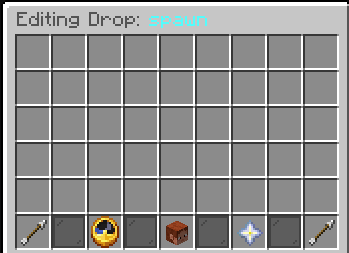
`/ssugardrop edit `
Opens the visual editor and rewards menu.
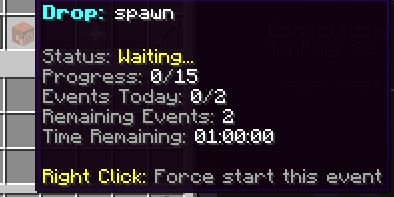
`/ssugardrop list` Displays all created drops.
`/ssugardrop force `
Force starts one drop or all drops.
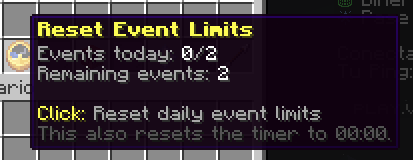
`/ssugardrop reset
`/ssugardrop fire `
Manually launches rewards from a drop.
`/ssugardrop reload` Reloads plugin files, drops, effects, language files, holograms, and Discord settings.
`/ssugardrop cleanup all` Cleans old holograms and regenerates active displays.
`/ssugardrop hardcleanup` Removes stuck or legacy plugin entities.
# 🎁 Visual Reward Editor
Managing rewards has never been easier.
```bash
/ssugardrop edit
Inside the editor you can:
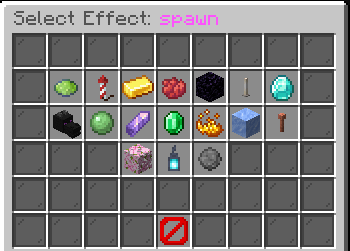
➕ Add rewards by placing items directly into the GUI 📄 Manage rewards with multiple pages 🎲 Configure custom drop chances ⚙️ Edit event settings through visual submenus 🎨 Change the piñata material with a selector or drag & drop 🔢 Adjust numeric values using GUI buttons 🔄 Reset sections back to default values 💎 Create unique event experiences for your players
# ⚙️ Configuration
When a piñata is created, the plugin automatically generates a configuration file for it.
Each piñata/drop can be customized through the visual editor or YAML files.
## Event Settings
```yml config: enabled: true display_name: "My Drop" interval_minutes: 60 max_daily_events: 3 needed_players: 10 required_hits: 25 broadcast_message: "" ```
You can customize:
Event name Automatic event interval Minimum players required Required hits to break the piñata Daily event limits Start broadcast messages
## Piñata Settings
```yml pinata: material: DRAGON_EGG scale: 1. 0 hitbox_width: 1. 25 hitbox_height: 1. 25 ```
You can customize:
Piñata material Visual size Interaction hitbox width Interaction hitbox height
## Animation Settings
```yml animation: spin_speed: 0. 095 bob_speed: 0. 115 bob_height: 0. 28 swing_radius: 0. 13 wobble: 0. 22 scale_pulse: 0. 035 ```
You can customize:
Rotation speed Floating speed Floating height Swing movement Wobble effect Scale pulse effect
## Launch Settings
```yml launch_settings: float_height: 3. 0 final_rise_height: 4. 0 final_rise_ticks: 20 spread_radius: 3. 0 amount_to_drop: 20 ```
You can customize:
Number of rewards launched Reward scatter radius Piñata floating height Final rise animation height Final rise animation duration
# 🔔 Discord Webhook Reminders
sSugarDrop now includes a patched Discord webhook reminder system for v2. 2. 2.
You can send an automatic Discord embed before a SugarDrop event starts.
## Example Discord Config
```yml discord: enabled: true webhook_url: "YOUR_DISCORD_WEBHOOK_HERE"
send_reminder: true notify_before_seconds: 60
send_on_start: false send_on_complete: false
reminder_embed: title: "📦 DROP IN %time% | %drop_name%" description: | Attention adventurers!
The drop event %drop_name% will start in %time%. Get ready for the reward rain.
📍 Location: `%world%` - color: 65450 footer: "sSugarDrop - Powered by SpectStudio" image_url: "" ```
## Discord Placeholders
`%drop_name%` - Shows the SugarDrop event name `%world%` - Shows the event world `%x%` - Shows the X coordinate `%y%` - Shows the Y coordinate `%z%` - Shows the Z coordinate * `%time%` - Shows the remaining time before the event starts
# 🪄 Hologram Support
sSugarDrop supports customizable holograms with internal placeholders and PlaceholderAPI su
📊 Mod Details
- Game
- Minecraft Plugins
- Author
- s4turn0
- Version
- 2.2.2
- Downloads
- 48
- Endorsements
- 0
- Category
- bukkit
- Created
- 2/2/2026
- Updated
- 5/29/2026
- Game Versions
- 1.20, 1.20.1, 1.20.2, 1.20.3, 1.20.4
- Tags
- decoration, magic, utility
🔧 How to Install Minecraft Plugins Mods
Download from Modrinth. Use Prism Launcher or drop into your mods folder.
📖 Full step-by-step install guide for Minecraft Plugins →
Visit the official mod page for specific installation instructions for this mod.
🎮 Need cheat codes or console commands? Check ur gaming wiki for Minecraft Plugins commands, item IDs, and more.
❓ Frequently Asked Questions
Which Minecraft Plugins versions does sSugarDrop support?
The author lists 1.20, 1.20.1, 1.20.2, 1.20.3, 1.20.4, 1.20.5. Other versions may work but are untested by the author.
What is the latest version of sSugarDrop?
Version 2.2.2, published 2026-05-29 with 48 downloads recorded at the source.
Keep browsing — more Minecraft Plugins mods await