SQLiteConnectMC
🟡 Updated this year🖼️ Gallery (2 images)
🔍 Analysis
- 🏆 #200 of 1080 bukkit mods in this game by downloads
📋 About This Mod
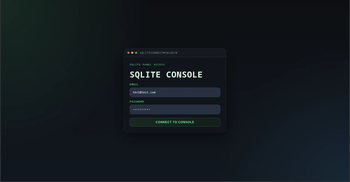
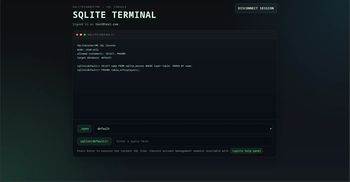
# SQLiteConnectMC A simple plugin that lets you integrate any SQLite DB with your Minecraft server and lets you execute all sorts of queries. See (https://github.com/coredex-source/SQLiteConnectMC/blob/main/To-Do.md) for plugin progress. | Supported Platforms | | --- | |Bukkit| |Spigot| |Paper| |Purpur| |Folia| |Canvas| The platforms stated above have been tested to work with the plugin. Any forks of the above platforms ***should*** also work. ## IMPORTANT NOTE - The SRVBase releases are not the usual panel and console releases. The SRVBase releases expose a Postgresql connection and considers any added database to the config as a schema. - Please refer to the SRVBase (https://github.com/coredex-source/SQLiteConnectMC/blob/srv-base/README.md) file or the (https://github.com/coredex-source/SQLiteConnectMC/blob/srv-base/doc.md) file. **_The SRVBase releases require more technical knowledge to use, only use them if you know what you are doing._** ## Features - **In-Game Queries**: Execute queries instantly with `/sqlite query <query>`. - **Multiple Databases**: Configure several SQLite files and switch between them in-game. - **Secure Web Panel**: Run a simple login-protected query console with session cookies and CSRF checks. - **Mode Switching**: Expose console/player commands, the web panel, or both through config. - **Configurable Row Limit**: Keep the default 50-row cap or set `query.row-limit` to `-1` for unlimited results. - **Async and Highly Performant**: Database tasks run asynchronously to keep your server ticking perfectly. - **Fail-Safe**: Read-only and read-write modes and be configured in the config, default is read-only to prevent any overrides. ## Installation 1. Download the latest jar file. 2. Drop it into your server's `plugins/` folder. 3. Restart your server. 4. Open the `plugins/SQLiteConnectMC/config.yml` that gets generated and add the databases you want to inspect. Older config files are migrated automatically and backed up as `config.v<old-version>.bak.yml`. 5. Set `access.mode` to `CONSOLE_PLAYER`, `WEB_PANEL`, or `BOTH`, and adjust `query.row-limit` if you want something other than the default 50 rows. 6. If you want the panel, create a login with `/sqlite panel mail add <mail> pass set <pass>`. 7. Run `/sqlitereload` to apply config changes and start or restart the panel. ## Commands - `/sqlite query <query>` - Run a query safely on the selected database. - `/sqlite list tables` - List all tables in the selected database. - `/sqlite list databases` - List all configured databases. - `/sqlite select database <name>` - Switch the selected database. - `/sqlite help panel` - Show the panel status, URL, and account command usage. - `/sqlite panel mail add <mail> pass set <pass>` - Create or reset a web panel login. - `/sqlite help` - Displays an in-game help menu. - `/sqlitereload` - Reload the config and reconnect to the database. ## Permissions - `sqliteconnectmc.admin` : Required for all commands (Defaults to Server Operators). ## Documentation For more details on configuration, please check the (https://github.com/coredex-source/SQLiteConnectMC/blob/main/doc.md) file!
# SQLiteConnectMC
A simple plugin that lets you integrate any SQLite DB with your Minecraft server and lets you execute all sorts of queries.
See (https://github.com/coredex-source/SQLiteConnectMC/blob/main/To-Do.md) for plugin progress.
| Supported Platforms | | --- | |Bukkit| |Spigot| |Paper| |Purpur| |Folia| |Canvas|
The platforms stated above have been tested to work with the plugin. Any forks of the above platforms should also work.
## IMPORTANT NOTE - The SRVBase releases are not the usual panel and console releases. The SRVBase releases expose a Postgresql connection and considers any added database to the config as a schema. - Please refer to the SRVBase (https://github.com/coredex-source/SQLiteConnectMC/blob/srv-base/README.md) file or the (https://github.com/coredex-source/SQLiteConnectMC/blob/srv-base/doc.md) file.
_The SRVBase releases require more technical knowledge to use, only use them if you know what you are doing._
## Features
- In-Game Queries: Execute queries instantly with `/sqlite query
## Installation
1. Download the latest jar file.
2. Drop it into your server's `plugins/` folder.
3. Restart your server.
4. Open the `plugins/SQLiteConnectMC/config.yml` that gets generated and add the databases you want to inspect. Older config files are migrated automatically and backed up as `config.v
## Commands
- `/sqlite query
## Permissions - `sqliteconnectmc.admin` : Required for all commands (Defaults to Server Operators).
## Documentation For more details on configuration, please check the (https://github.com/coredex-source/SQLiteConnectMC/blob/main/doc.md) file!
📊 Mod Details
- Game
- Minecraft Plugins
- Author
- Dueris
- Version
- srvbase-0.1.1
- Downloads
- 69
- Endorsements
- 0
- Category
- bukkit
- Created
- 5/7/2026
- Updated
- 5/1/2026
- Game Versions
- 1.21, 1.21.1, 1.21.2, 1.21.3, 1.21.4
- Tags
- storage, technology, utility
🔧 How to Install Minecraft Plugins Mods
Download from Modrinth. Use Prism Launcher or drop into your mods folder.
📖 Full step-by-step install guide for Minecraft Plugins →
Visit the official mod page for specific installation instructions for this mod.
🎮 Need cheat codes or console commands? Check ur gaming wiki for Minecraft Plugins commands, item IDs, and more.
❓ Frequently Asked Questions
Which Minecraft Plugins versions does SQLiteConnectMC support?
The author lists 1.21, 1.21.1, 1.21.2, 1.21.3, 1.21.4, 1.21.5. Other versions may work but are untested by the author.
What is the latest version of SQLiteConnectMC?
Version srvbase-0.1.1, published 2026-05-01 with 69 downloads recorded at the source.
Keep browsing — more Minecraft Plugins mods await