SpyDeathMessages
🟡 Updated this year🖼️ Gallery (2 images)
🔍 Analysis
- 🏆 #966 of 1224 bukkit mods in this game by downloads
📋 About This Mod
# SpyDeathMessages An advanced, fully customisable death messages plugin for Minecraft servers running **Spigot / Paper 1.21+**. Replaces the vanilla death message with your own styled chat lines, action bar messages, titles, and subtitles — with full **hex colour** and **Minecraft colour code** support. (https://cdn.modrinth.com/data/cached_images/b6a8613305c7a7d68abbf1d9fab01d39bb48ecc3_0.webp) ](https://www.gtxgaming.co.uk/) --- ## Features - Two death message types: **killed by player** and **died** (any other cause) - Four independent delivery channels per message: **chat**, **action bar**, **title**, **subtitle** - Every channel can be turned on or off individually in the config - Multiple messages per type — one is **chosen at random** each time - Full **hex colour** support (`#ff1313`) alongside legacy **& colour codes** (`&c`) - **Per-player toggle** — each player decides whether they want to see death messages - Player preference **persists across server restarts** - Three broadcast modes: **global**, **world-only**, or **radius** - Configurable title animation timings - Option to cancel the vanilla death message - Tab-complete on all commands --- ## Installation 1. Download `SpyDeathMessages.jar` 2. Place it in your server's `plugins/` folder 3. Start or restart the server 4. The plugin will generate `plugins/SpyDeathMessages/config.yml` automatically 5. Edit the config to your liking, then run `/dm reload` --- ## Commands | Command | Who can use it | What it does | |---|---|---| | `/dm toggle` | Every player | Turns death messages on or off **for yourself only** | | `/dm reload` | Admins (op) | Reloads `config.yml` without restarting the server | | `/dm help` | Everyone | Shows the help list in chat | > Alias: `/deathmessages` works the same as `/dm` --- ## Permissions | Permission | Default | Description | |---|---|---| | `spydm.admin` | OP | Grants access to all admin commands (includes `spydm.reload`) | | `spydm.reload` | OP | Allows reloading the config with `/dm reload` | > `/dm toggle` requires **no permission** — it is available to every player by default. --- ## Per-Player Toggle Any player can run `/dm toggle` to hide death messages from their own screen. - **Default state:** messages are visible (opted in) - After running `/dm toggle`: messages are hidden (opted out) - Running `/dm toggle` again: messages become visible again (opted back in) - The choice is **saved to disk** (`opted_out.txt` inside the plugin folder) so it survives server restarts > The player who died always appears in the message for others — the toggle only controls whether *you* see messages on your screen. --- ## Configuration (`config.yml`) ### Settings ```yaml settings: # Prefix shown in plugin feedback messages prefix: "#a8a8a8 " # Hide the vanilla Minecraft death message? cancel_vanilla_message: true # Who receives death messages: # global - all online players # world - only players in the same world # radius - only players within broadcast_radius blocks broadcast_mode: global broadcast_radius: 100 # Title animation (in ticks, 20 ticks = 1 second) title_fade_in: 10 title_stay: 60 title_fade_out: 10 ``` --- ### Message Types There are **two message types** in the config: | Key | When it triggers | |---|---| | `killed` | A player is killed by another player (melee or projectile) | | `died` | A player dies from any other cause (fall, fire, lava, void, mob, etc.) | --- ### Message Structure Each message type follows this structure: ```yaml messages: killed: # or: died module: chat: enabled: true # show in chat? true/false message: - "Line one" # if multiple lines, one is picked at random - "Line two" actionbar: enabled: true # show in action bar? true/false message: - "Action bar text" title: enabled: false # show as big title? true/false message: - "Title text" subtitle: enabled: false # show as subtitle below title? true/false message: - "Subtitle text" ``` Set `enabled: false` on any channel to completely disable it. Set `enabled: true` to activate it. --- ### Placeholders Use these inside any message string: | Placeholder | Replaced with | |---|---| | `%victim%` | Name of the player who died | | `%attacker%` | Name of the player who killed them | | `%weapon%` | Name of the item the killer was holding | | `%world%` | Name of the world the death happened in | > `%attacker%` and `%weapon%` are only filled for `killed` messages. They will be empty for `died` messages. --- ### Colour Codes You can use **both formats** anywhere in messages: **Hex colours:** ``` #ff1313 → red #00a4fc → blue #a8a8a8 → grey #ffcc00 → gold ``` **Legacy & codes:** ``` &a → green &c → red &b → aqua &e → yel
# SpyDeathMessages
An advanced, fully customisable death messages plugin for Minecraft servers running Spigot / Paper 1. 21+.
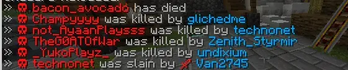
Replaces the vanilla death message with your own styled chat lines, action bar messages, titles, and subtitles — with full hex colour and Minecraft colour code support.
[ !(https://cdn.modrinth.com/data/cached_images/b6a8613305c7a7d68abbf1d9fab01d39bb48ecc3_0.webp) ](https://www.gtxgaming.co.uk/) ---
## Features
- Two death message types: killed by player and died (any other cause)
- Four independent delivery channels per message: chat, action bar, title, subtitle
- Every channel can be turned on or off individually in the config
- Multiple messages per type — one is chosen at random each time
- Full hex colour support (`#ff1313`) alongside legacy & colour codes (`&c`)
- Per-player toggle — each player decides whether they want to see death messages
- Player preference persists across server restarts
- Three broadcast modes: global, world-only, or radius
- Configurable title animation timings
- Option to cancel the vanilla death message
- Tab-complete on all commands
## Installation
1. Download `SpyDeathMessages.jar` 2. Place it in your server's `plugins/` folder 3. Start or restart the server 4. The plugin will generate `plugins/SpyDeathMessages/config.yml` automatically 5. Edit the config to your liking, then run `/dm reload`
## Commands
| Command | Who can use it | What it does | |---|---|---| | `/dm toggle` | Every player | Turns death messages on or off for yourself only | | `/dm reload` | Admins (op) | Reloads `config.yml` without restarting the server | | `/dm help` | Everyone | Shows the help list in chat |
> Alias: `/deathmessages` works the same as `/dm`
## Permissions
| Permission | Default | Description | |---|---|---| | `spydm.admin` | OP | Grants access to all admin commands (includes `spydm.reload`) | | `spydm.reload` | OP | Allows reloading the config with `/dm reload` |
> `/dm toggle` requires no permission — it is available to every player by default.
## Per-Player Toggle
Any player can run `/dm toggle` to hide death messages from their own screen.
- Default state: messages are visible (opted in)
- After running `/dm toggle`: messages are hidden (opted out)
- Running `/dm toggle` again: messages become visible again (opted back in)
- The choice is saved to disk (`opted_out.txt` inside the plugin folder) so it survives server restarts
> The player who died always appears in the message for others — the toggle only controls whether you see messages on your screen.
## Configuration (`config.yml`)
### Settings
```yaml settings: # Prefix shown in plugin feedback messages prefix: "#a8a8a8[#00a4fcDeathMsg#a8a8a8] "
# Hide the vanilla Minecraft death message? cancel_vanilla_message: true
# Who receives death messages: # global - all online players # world - only players in the same world # radius - only players within broadcast_radius blocks broadcast_mode: global broadcast_radius: 100
# Title animation (in ticks, 20 ticks = 1 second) title_fade_in: 10 title_stay: 60 title_fade_out: 10 ```
### Message Types
There are two message types in the config:
| Key | When it triggers | |---|---| | `killed` | A player is killed by another player (melee or projectile) | | `died` | A player dies from any other cause (fall, fire, lava, void, mob, etc.) |
### Message Structure
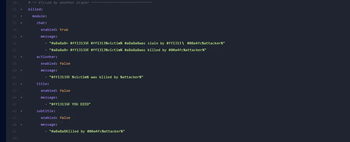
Each message type follows this structure:
```yaml messages: killed: # or: died module: chat: enabled: true # show in chat? true/false message: - "Line one" # if multiple lines, one is picked at random - "Line two" actionbar: enabled: true # show in action bar? true/false message: - "Action bar text" title: enabled: false # show as big title? true/false message: - "Title text" subtitle: enabled: false # show as subtitle below title? true/false message: - "Subtitle text" ```
Set `enabled: false` on any channel to completely disable it. Set `enabled: true` to activate it.
### Placeholders
Use these inside any message string:
| Placeholder | Replaced with | |---|---| | `%victim%` | Name of the player who died | | `%attacker%` | Name of the player who killed them | | `%weapon%` | Name of the item the killer was holding | | `%world%` | Name of the world the death happened in |
> `%attacker%` and `%weapon%` are only filled for `killed` messages. They will be empty for `died` messages.
### Colour Codes
You can use both formats anywhere in messages:
Hex colours: ``` #ff1313 → red #00a4fc → blue #a8a8a8 → grey #ffcc00 → gold ```
Legacy & codes: ``` &a → green &c → red &b → aqua &e → yel
📊 Mod Details
- Game
- Minecraft Plugins
- Author
- YourSenior
- Version
- 1.0.0
- Downloads
- 91
- Endorsements
- 0
- Category
- bukkit
- Created
- 5/11/2026
- Updated
- 5/7/2026
- Game Versions
- 1.21, 1.21.1, 1.21.2, 1.21.3, 1.21.4
- Tags
- management
🔧 How to Install Minecraft Plugins Mods
Download from Modrinth. Use Prism Launcher or drop into your mods folder.
📖 Full step-by-step install guide for Minecraft Plugins →
Visit the official mod page for specific installation instructions for this mod.
🎮 Need cheat codes or console commands? Check ur gaming wiki for Minecraft Plugins commands, item IDs, and more.
❓ Frequently Asked Questions
Which Minecraft Plugins versions does SpyDeathMessages support?
The author lists 1.21, 1.21.1, 1.21.2, 1.21.3, 1.21.4, 1.21.5. Other versions may work but are untested by the author.
What is the latest version of SpyDeathMessages?
Version 1.0.0, published 2026-05-07 with 91 downloads recorded at the source.
Keep browsing — more Minecraft Plugins mods await