SpiritChat
🟡 Updated this year🖼️ Gallery (1 images)
🔍 Analysis
- 🏆 #39 of 62 decoration mods in this game by downloads
📋 About This Mod
# SpiritChat | Beta **SpiritChat** is a new-generation chat formatting plugin for Paper servers, built to make chat setup simple, flexible, and easy to grow with your server. The current beta focuses on reliable chat formatting fundamentals: static formats, LuckPerms group formats, chat item display, PlaceholderAPI support, update notifications, and reloadable configuration. SpiritChat is planned to grow into a broader chat and staff communication suite, but the beta keeps the active feature set focused so each piece can stabilize before more systems are added. ## Beta Status SpiritChat is new and still in beta. That means: - Some planned features are not available yet - Bugs may exist in edge cases or unusual plugin setups - Configuration and behavior may change before a stable release - Feedback and reproducible bug reports are especially useful For production servers, test SpiritChat in a staging environment before rolling configuration changes out to players. ## At a Glance - Static server-wide chat formatting - LuckPerms group-based chat formatting - Held item display in chat with `{i}` and `{item}` - PlaceholderAPI support in chat formats - Configurable update notifications - Simple reload command for applying config changes ## Dependencies - **Paper** - required server platform ## Optional Dependencies - **(https://luckperms.net/)** - group-based chat formatting - **(https://www.spigotmc.org/resources/placeholderapi.6245/)** - placeholder integration ## Main Features ### Chat Formatting Use a static format for one consistent server-wide chat style, or configure group-specific formats for LuckPerms groups. <details> <summary>Default Format Examples</summary> Static format: ```txt <gray>%username%</gray> <dark_gray>></dark_gray> <white>%message%</white> ``` Group formats: ```txt default: <gray>%username%</gray> <dark_gray>></dark_gray> <white>%message%</white> admin: <red></red> <white>%username%</white> <dark_gray>></dark_gray> <red>%message%</red> ``` </details> Group formatting follows LuckPerms group weights. When static formatting is disabled, SpiritChat checks a player's inherited LuckPerms groups from highest weight to lowest weight and uses the first configured group format it finds. If `default` is being used instead of `admin`, make sure the `admin` group has a higher LuckPerms weight than `default`. ### Chat Item Display Players with the configured permission can show their held item in chat by using item placeholders. ```txt {i} {item} ``` ### Update Notifications SpiritChat can check for newer releases and notify the console and players with the update notification permission. ## Commands ```txt /spiritchat /spiritchat reload ``` ## Permissions ```txt spiritchat.admin spiritchat.updates spiritchat.chat-colors spiritchat.chat-item ``` ## Planned Content SpiritChat is intended to become an all-in-one chat management solution. Planned systems include: - Social system - Private messages - Private message toggle - Social spy - Player ignoring - Staff chat - Multi-server staff chat support - Limited BungeeCord/Velocity support - Redis-backed network support - Staff join, leave, and server-switch notifications - Server monitoring notifications for shutdowns, startups, and lag events Planned features are not guaranteed in the current beta and may change as the plugin develops. ## Notes SpiritChat is designed for Paper servers. Because this is a beta, keep backups of your configuration and test changes before using them on a live server.
# SpiritChat | Beta
SpiritChat is a new-generation chat formatting plugin for Paper servers, built to make chat setup simple, flexible, and easy to grow with your server.
The current beta focuses on reliable chat formatting fundamentals: static formats, LuckPerms group formats, chat item display, PlaceholderAPI support, update notifications, and reloadable configuration. SpiritChat is planned to grow into a broader chat and staff communication suite, but the beta keeps the active feature set focused so each piece can stabilize before more systems are added.
## Beta Status
SpiritChat is new and still in beta. That means:
- Some planned features are not available yet
- Bugs may exist in edge cases or unusual plugin setups
- Configuration and behavior may change before a stable release
- Feedback and reproducible bug reports are especially useful
For production servers, test SpiritChat in a staging environment before rolling configuration changes out to players.
## At a Glance
- Static server-wide chat formatting
- LuckPerms group-based chat formatting
- Held item display in chat with `{i}` and `{item}`
- PlaceholderAPI support in chat formats
- Configurable update notifications
- Simple reload command for applying config changes
## Dependencies
- Paper - required server platform
## Optional Dependencies
- (https://luckperms.net/)** - group-based chat formatting
- (https://www.spigotmc.org/resources/placeholderapi. 6245/)** - placeholder integration
## Main Features
### Chat Formatting
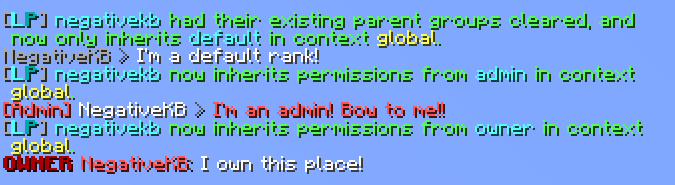
Use a static format for one consistent server-wide chat style, or configure group-specific formats for LuckPerms groups.
Default Format Examples
Static format:
```txt
Group formats:
```txt
default:
Group formatting follows LuckPerms group weights. When static formatting is disabled, SpiritChat checks a player's inherited LuckPerms groups from highest weight to lowest weight and uses the first configured group format it finds. If `default` is being used instead of `admin`, make sure the `admin` group has a higher LuckPerms weight than `default`.
### Chat Item Display
Players with the configured permission can show their held item in chat by using item placeholders.
```txt {i} {item} ```
### Update Notifications
SpiritChat can check for newer releases and notify the console and players with the update notification permission.
## Commands
```txt /spiritchat /spiritchat reload ```
## Permissions
```txt spiritchat.admin spiritchat.updates spiritchat.chat-colors spiritchat.chat-item ```
## Planned Content
SpiritChat is intended to become an all-in-one chat management solution. Planned systems include:
- Social system
- Private messages
- Private message toggle
- Social spy
- Player ignoring
- Staff chat
- Multi-server staff chat support
- Limited BungeeCord/Velocity support
- Redis-backed network support
- Staff join, leave, and server-switch notifications
- Server monitoring notifications for shutdowns, startups, and lag events
Planned features are not guaranteed in the current beta and may change as the plugin develops.
SpiritChat is designed for Paper servers. Because this is a beta, keep backups of your configuration and test changes before using them on a live server.
📊 Mod Details
- Game
- Minecraft Plugins
- Author
- ericlmao
- Version
- SpiritChat-2074a7c
- Downloads
- 216
- Endorsements
- 2
- Category
- decoration
- Created
- 2/19/2025
- Updated
- 7/9/2026
- Game Versions
- 1.21, 1.21.1, 1.21.2, 1.21.3, 1.21.4
- Tags
- decoration, management, social
🔧 How to Install Minecraft Plugins Mods
Download from Modrinth. Use Prism Launcher or drop into your mods folder.
📖 Full step-by-step install guide for Minecraft Plugins →
Visit the official mod page for specific installation instructions for this mod.
🎮 Need cheat codes or console commands? Check ur gaming wiki for Minecraft Plugins commands, item IDs, and more.
❓ Frequently Asked Questions
Which Minecraft Plugins versions does SpiritChat support?
The author lists 1.21, 1.21.1, 1.21.2, 1.21.3, 1.21.4, 1.21.5. Other versions may work but are untested by the author.
What is the latest version of SpiritChat?
Version SpiritChat-2074a7c, published 2026-07-09 with 216 downloads recorded at the source.
Keep browsing — more Minecraft Plugins mods await