Spectra Audio
🟡 Updated this year🖼️ Gallery (3 images)

🔍 Analysis
- 🏆 #53 of 59 decoration mods in this game by downloads
📋 About This Mod
*** # 🎶 Spectra Audio **Spectra Audio** is a high-performance, real-time audio analysis and 3D visualization engine designed for the next generation of Minecraft servers. It bridges the gap between high-fidelity audio processing and the Minecraft world, allowing server owners to create immersive musical experiences, live concerts, and rhythmic environments without requiring any client-side mods. By utilizing a dedicated **FFT (Fast Fourier Transform)** engine and a custom **OpenAL** playback system, Spectra analyzes every beat, frequency, and jump in your audio to translate them into stunning block and particle animations. ### 📺 Video Showcase <iframe width="560" height="315" src="https://www.youtube-nocookie.com/embed/716Mbhf3KGs" title="Reproductor de videos de YouTube" frameborder="0" allow="accelerometer; autoplay; clipboard-write; encrypted-media; gyroscope; picture-in-picture; web-share" allowfullscreen></iframe> ### 🚀 Key Features * **Real-Time Audio Analysis:** High-performance frequency tracking (Bass, Snare, and Hat detection) with customizable attack/decay smoothing for fluid animations. * **Dynamic Resource Pack Hosting:** Built-in HTTP server that automatically compiles and serves a Resource Pack to players. Import a new `.ogg` file, and players receive it instantly—**no server restarts required**. * **3D World-Space Visualizers:** A robust "Preset" system allowing you to create complex shapes (Tornados, Helixes, Rings, Waves) that react to specific frequency bands. * **Intelligent Rendering Modes:** * **Static:** Perfect for stages and fixed structures. * **Player-Centric:** Visualizers that follow players while walking or flying with Elytras. * **Web-Based Dashboard:** A built-in web interface to monitor the audio spectrum, track "Hit Streaks," and control engine volume remotely. * **Asynchronous Engine:** The audio processing and analysis are decoupled from the main server thread, ensuring that high-intensity music does not impact your TPS. ### 🛠️ How it Works 1. **Import:** Drop an `.ogg` file into the import folder and use `/spectra import`. The plugin handles the hashing, packaging, and hosting of the file. 2. **Process:** The engine decodes the audio and runs a real-time FFT analyzer to extract "Reactive Signals." 3. **Visualize:** The `VisualizerManager` takes these signals and updates blocks and particles in the world based on your chosen preset. ### 📋 Compatibility & Requirements Spectra Audio is built to push the boundaries of modern server environments: * **Software:** Fully compatible with **Folia**. * **Minecraft Version:** Supports Minecraft **26.1.2** . * **Java Version:** **Java 25**. --- ### 💻 Commands & Usage | Command | Description | | :--- | :--- | | `/spectra import <file.ogg> <id>` | Registers a new audio file and updates the resource pack. | | `/spectra removesound <id>` | Deletes a sound, updates the pack, or unloads it if empty. | | `/spectra play <id>` | Starts audio playback for all players with active visuals. | | `/spectra stop` | Stops the current audio and terminates all active visualizers. | | `/spectra sync <duration>` | Adjust the timing of the song you are on. | | `/spectra visuals create <preset> ` | Launches a reactive 3D visualizer at your location. | | `/spectra visuals stop ` | Stops a specific visualizer or all if no ID is provided. | | `/spectra reload` | Hot-reloads configuration, thresholds, and pack state. | ### ⚙️ Installation Note Ensure the ports defined in your `config.yml` (default 8080 for the pack server and 8081 for the web visualizer) are open on your host's firewall to allow player connections. *** **Spectra Audio** turns your server into a living, breathing music visualizer. Whether you are hosting a digital festival or enhancing a lobby, Spectra provides the tools to make your world dance.
# 🎶 Spectra Audio
Spectra Audio is a high-performance, real-time audio analysis and 3D visualization engine designed for the next generation of Minecraft servers. It bridges the gap between high-fidelity audio processing and the Minecraft world, allowing server owners to create immersive musical experiences, live concerts, and rhythmic environments without requiring any client-side mods.
By utilizing a dedicated FFT (Fast Fourier Transform) engine and a custom OpenAL playback system, Spectra analyzes every beat, frequency, and jump in your audio to translate them into stunning block and particle animations.
### 📺 Video Showcase
### 🚀 Key Features
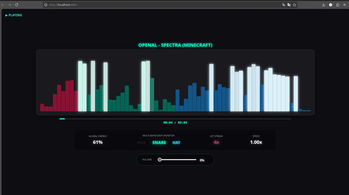
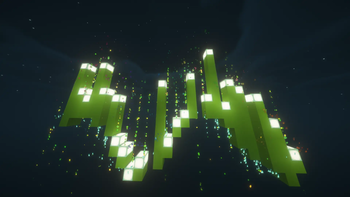
Real-Time Audio Analysis: High-performance frequency tracking (Bass, Snare, and Hat detection) with customizable attack/decay smoothing for fluid animations. Dynamic Resource Pack Hosting: Built-in HTTP server that automatically compiles and serves a Resource Pack to players. Import a new `.ogg` file, and players receive it instantly—no server restarts required. 3D World-Space Visualizers: A robust "Preset" system allowing you to create complex shapes (Tornados, Helixes, Rings, Waves) that react to specific frequency bands. Intelligent Rendering Modes: Static: Perfect for stages and fixed structures. Player-Centric: Visualizers that follow players while walking or flying with Elytras. Web-Based Dashboard: A built-in web interface to monitor the audio spectrum, track "Hit Streaks," and control engine volume remotely. Asynchronous Engine: The audio processing and analysis are decoupled from the main server thread, ensuring that high-intensity music does not impact your TPS.
### 🛠️ How it Works
1. Import: Drop an `.ogg` file into the import folder and use `/spectra import`. The plugin handles the hashing, packaging, and hosting of the file. 2. Process: The engine decodes the audio and runs a real-time FFT analyzer to extract "Reactive Signals." 3. Visualize: The `VisualizerManager` takes these signals and updates blocks and particles in the world based on your chosen preset.
### 📋 Compatibility & Requirements
Spectra Audio is built to push the boundaries of modern server environments:
Software: Fully compatible with Folia. Minecraft Version: Supports Minecraft 26. 1. 2 . Java Version: Java 25.
### 💻 Commands & Usage
| Command | Description |
| :--- | :--- |
| `/spectra import
### ⚙️ Installation Note Ensure the ports defined in your `config.yml` (default 8080 for the pack server and 8081 for the web visualizer) are open on your host's firewall to allow player connections.
Spectra Audio* turns your server into a living, breathing music visualizer. Whether you are hosting a digital festival or enhancing a lobby, Spectra provides the tools to make your world dance.
📊 Mod Details
- Game
- Minecraft Plugins
- Author
- Duk3lo
- Version
- 1.0.0
- Downloads
- 87
- Endorsements
- 4
- Category
- decoration
- Created
- 6/16/2026
- Updated
- 6/13/2026
- Game Versions
- 26.1.2
- Tags
- decoration, magic, utility
🔧 How to Install Minecraft Plugins Mods
Download from Modrinth. Use Prism Launcher or drop into your mods folder.
📖 Full step-by-step install guide for Minecraft Plugins →
Visit the official mod page for specific installation instructions for this mod.
🎮 Need cheat codes or console commands? Check ur gaming wiki for Minecraft Plugins commands, item IDs, and more.
❓ Frequently Asked Questions
Which Minecraft Plugins versions does Spectra Audio support?
The author lists 26.1.2. Other versions may work but are untested by the author.
What is the latest version of Spectra Audio?
Version 1.0.0, published 2026-06-13 with 87 downloads recorded at the source.
Keep browsing — more Minecraft Plugins mods await