SpawnStash
🟡 Updated this year🖼️ Gallery (4 images)


🔍 Analysis
- 🏆 #368 of 1317 bukkit mods in this game by downloads
📋 About This Mod
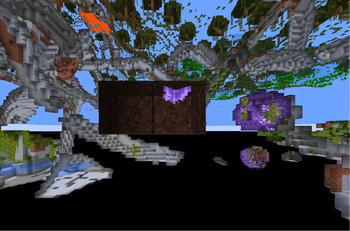
# SpawnStash ### **The most advanced customizable stash plugin for Minecraft servers.** Spawn Stash allows you to spawn custom .schem files so you can spawn and ban esp hackes and x ray hackes with more Features comming soon! --- ## 🚀 Features * 📦 Spawn any stash with a simple command. * 🏗️ Import unlimited `.schem` files. * ↩️ Instantly undo the last spawned stash. * ⚡ Optimized for high-performance servers. * 🔧 Fully configurable. * 🌍 Supports unlimited stash designs. * 🛡️ Safe and reliable block restoration. --- ## 📥 Installation 1. Download the latest version of SpawnStash. 2. Place the plugin inside your server's `plugins` folder. 3. Restart 4. Configure the plugin if desired. 5. Drop your `.schem` files into the `schematics` folder. 6. You're ready to spawn stashes. --- ## 📦 Using Custom Schematics SpawnStash supports any WorldEdit-compatible schematic. Simply place your `.schem` files inside: ```text plugins/SpawnStash/schematics/ ``` Then spawn them with: ```text /spawnstash <name of your schematic .schem> /spawnstash Spawner /spawnstash Richbase ``` ## One of the stashes: (Spawner) !(https://cdn.modrinth.com/data/cached_images/a7f53bbfe957d752df34f7a78f87d115344ca33b.jpeg) (make a support ticket for the .schem file) There is no limit to the number of stash designs you can create. --- ## 💻 Commands ```text /spawnstash <name> ``` Spawns the specified schematic. ```text /spawnstash undo ``` Restores all blocks changed by the last spawned stash. --- ## ⚙️ Configuration SpawnStash was built to be easy to configure. Customize nearly every aspect of the plugin including: * Spawn behavior * Messages * Schematic folder * Permissions * Undo system * Performance settings No complicated setup required. --- ## 💡 Why SpawnStash? Most stash plugins only offer basic functionality. SpawnStash was designed with customization and server performance in mind. * Import any schematic * Lightweight and optimized * Fast block placement * Reliable undo system * Clean configuration * Built for production servers * Regular updates Whether you're running a small private SMP or a large public network, SpawnStash provides everything you need to create exciting loot events with minimal effort. --- ## 🔧 Compatibility SpawnStash is compatible with modern Paper-based servers and supports WorldEdit schematic (`.schem`) files. Recommended for: * Paper * Bukkit * Sponge --- ## 🐞 Reporting Issues Found a bug or have a feature request? Please make a support ticket in my discord: * Server version * SpawnStash version * Console errors (if any) * Steps to reproduce the issue This helps us resolve problems as quickly as possible. --- ## ❓What do i need so the plugin works? You just need one plugin yes one * Link the the plugin: (https://modrinth.com/plugin/worldedit) * Download it in your version and drop it into the Plugin folder * Restart your server and boom it works
# SpawnStash
### The most advanced customizable stash plugin for Minecraft servers.
Spawn Stash allows you to spawn custom .schem files so you can spawn and ban esp hackes and x ray hackes with more Features comming soon!
## 🚀 Features
📦 Spawn any stash with a simple command. 🏗️ Import unlimited `.schem` files. ↩️ Instantly undo the last spawned stash. ⚡ Optimized for high-performance servers. 🔧 Fully configurable. 🌍 Supports unlimited stash designs. 🛡️ Safe and reliable block restoration.
## 📥 Installation
1. Download the latest version of SpawnStash. 2. Place the plugin inside your server's `plugins` folder. 3. Restart 4. Configure the plugin if desired. 5. Drop your `.schem` files into the `schematics` folder. 6. You're ready to spawn stashes.
## 📦 Using Custom Schematics
SpawnStash supports any WorldEdit-compatible schematic.
Simply place your `.schem` files inside:
```text plugins/SpawnStash/schematics/ ```
Then spawn them with:
```text
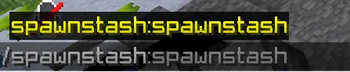
/spawnstash
(make a support ticket for the .schem file)
There is no limit to the number of stash designs you can create.
## 💻 Commands
```text
/spawnstash
Spawns the specified schematic.
```text /spawnstash undo ```
Restores all blocks changed by the last spawned stash.
## ⚙️ Configuration
SpawnStash was built to be easy to configure.
Customize nearly every aspect of the plugin including:
Spawn behavior Messages Schematic folder Permissions Undo system Performance settings
No complicated setup required.
## 💡 Why SpawnStash?
Most stash plugins only offer basic functionality.
SpawnStash was designed with customization and server performance in mind.
Import any schematic Lightweight and optimized Fast block placement Reliable undo system Clean configuration Built for production servers Regular updates
Whether you're running a small private SMP or a large public network, SpawnStash provides everything you need to create exciting loot events with minimal effort.
## 🔧 Compatibility
SpawnStash is compatible with modern Paper-based servers and supports WorldEdit schematic (`.schem`) files.
Recommended for:
Paper Bukkit Sponge
## 🐞 Reporting Issues
Found a bug or have a feature request?
Please make a support ticket in my discord:
Server version SpawnStash version Console errors (if any) Steps to reproduce the issue
This helps us resolve problems as quickly as possible.
## ❓What do i need so the plugin works?
You just need one plugin yes one
Link the the plugin: [World Edit](https://modrinth.com/plugin/worldedit) Download it in your version and drop it into the Plugin folder Restart your server and boom it works
📊 Mod Details
- Game
- Minecraft Plugins
- Author
- KarmaSpace
- Version
- 2.0.0
- Downloads
- 290
- Endorsements
- 2
- Category
- bukkit
- Created
- 7/25/2026
- Updated
- 7/30/2026
- Game Versions
- 1.21, 1.21.1, 1.21.2, 1.21.3, 1.21.4
- Tags
- optimization, storage, utility
🔧 How to Install Minecraft Plugins Mods
Download from Modrinth. Use Prism Launcher or drop into your mods folder.
📖 Full step-by-step install guide for Minecraft Plugins →
Visit the official mod page for specific installation instructions for this mod.
🎮 Need cheat codes or console commands? Check ur gaming wiki for Minecraft Plugins commands, item IDs, and more.
❓ Frequently Asked Questions
Which Minecraft Plugins versions does SpawnStash support?
The author lists 1.21, 1.21.1, 1.21.2, 1.21.3, 1.21.4, 1.21.5. Other versions may work but are untested by the author.
What is the latest version of SpawnStash?
Version 2.0.0, published 2026-07-30 with 290 downloads recorded at the source.
Keep browsing — more Minecraft Plugins mods await