SMPShield
🟠 Updated over a year ago🖼️ Gallery (2 images)
🔍 Analysis
- 🏆 #116 of 235 management mods in this game by downloads
📋 About This Mod
# **SMPShield: Your Minecraft Server Monitoring Solution** ## **Overview** SMPShield is an innovative plugin designed for Minecraft servers that provides real-time monitoring of critical server statistics through an easy-to-use API. Whether you're a server owner, developer, or community manager, SMPShield empowers you to gain insights into your server's performance and manage it efficiently. ## **Key Features** - **Real-Time Server Statistics**: Access vital information about your server’s performance, including: - **CPU Usage**: Monitor how much CPU your server is consuming, helping you identify performance bottlenecks. - **RAM Usage**: Track both allocated and used memory, ensuring your server runs smoothly without memory leaks. - **TPS (Ticks Per Second)**: Get real-time TPS updates to ensure your players experience lag-free gameplay. - **Online Player Information**: Retrieve a list of online players, including their usernames and unique IDs. ## **How It Works** SMPShield creates a local HTTP server on your Minecraft server, which exposes various API endpoints. These endpoints allow you to fetch real-time data in JSON format. The plugin is lightweight and doesn’t add significant overhead to your server’s performance. ## **API Endpoints** - **/status**: Returns a JSON object with current server statistics: ```json { "tps": 20.14, "cpu_usage": 3.50, "total_memory": 12902400000, "free_memory": 11632963584, "players_online": 0 } ``` - **/players**: Returns a list of currently online players: ```json ``` ## **Installation and Configuration** 📜 **How to Use SMPShield:** 1. Download the SMPShield plugin from the provided link (available on our Discord server). 2. Upload the JAR file to your Minecraft server's plugins directory. 3. Restart your server to activate the plugin. 4. Configure the `config.yml` file to set your desired API port. You can specify the port number to suit your server's configuration. 5. Restart your server twice after configuring `config.yml`. ## **Accessing the API** Once the plugin is installed and the server is running, you can access the API endpoints using the server’s IP and the specified port. For example: - To get server status, visit: `http://<your-server-ip>:<port>/status` - To get the list of online players, visit: `http://<your-server-ip>:<port>/players` ## **Integration with Discord and Websites** SMPShield is particularly beneficial for developers looking to create bots for Discord or integrate server stats into their websites. With the available API, you can: - Build Discord bots that announce server performance metrics to your community. - Create web dashboards that display live server stats, enhancing your server's engagement and transparency. ## **Support and Community** For support, feature requests, or to share feedback, join our Discord community: (https://discord.gg/UUaNzfZyc6) ## **Conclusion** SMPShield is an essential tool for any Minecraft server owner who wants to optimize their server's performance and provide a better experience for players. With its straightforward API and real-time data, you'll have everything you need to monitor and manage your server efficiently. # join discord : (https://discord.gg/UUaNzfZyc6)
# SMPShield: Your Minecraft Server Monitoring Solution
## Overview SMPShield is an innovative plugin designed for Minecraft servers that provides real-time monitoring of critical server statistics through an easy-to-use API. Whether you're a server owner, developer, or community manager, SMPShield empowers you to gain insights into your server's performance and manage it efficiently.
## Key Features - Real-Time Server Statistics: Access vital information about your server’s performance, including: - CPU Usage: Monitor how much CPU your server is consuming, helping you identify performance bottlenecks. - RAM Usage: Track both allocated and used memory, ensuring your server runs smoothly without memory leaks. - TPS (Ticks Per Second): Get real-time TPS updates to ensure your players experience lag-free gameplay. - Online Player Information: Retrieve a list of online players, including their usernames and unique IDs.
## How It Works SMPShield creates a local HTTP server on your Minecraft server, which exposes various API endpoints. These endpoints allow you to fetch real-time data in JSON format. The plugin is lightweight and doesn’t add significant overhead to your server’s performance.
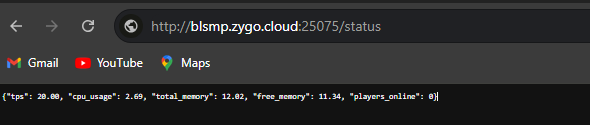
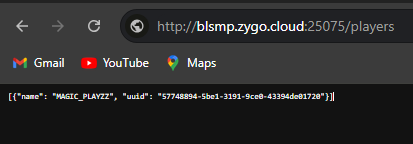
## API Endpoints - /status: Returns a JSON object with current server statistics: ```json { "tps": 20. 14, "cpu_usage": 3. 50, "total_memory": 12902400000, "free_memory": 11632963584, "players_online": 0 } ``` - /players: Returns a list of currently online players: ```json [ {"name": "Player1", "uuid": "123e4567-e89b-12d3-a456-426614174000"}, {"name": "Player2", "uuid": "123e4567-e89b-12d3-a456-426614174001"} ] ```
## Installation and Configuration 📜 How to Use SMPShield: 1. Download the SMPShield plugin from the provided link (available on our Discord server). 2. Upload the JAR file to your Minecraft server's plugins directory. 3. Restart your server to activate the plugin. 4. Configure the `config.yml` file to set your desired API port. You can specify the port number to suit your server's configuration. 5. Restart your server twice after configuring `config.yml`.
## Accessing the API
Once the plugin is installed and the server is running, you can access the API endpoints using the server’s IP and the specified port. For example:
- To get server status, visit: `http://
## Integration with Discord and Websites SMPShield is particularly beneficial for developers looking to create bots for Discord or integrate server stats into their websites. With the available API, you can: - Build Discord bots that announce server performance metrics to your community. - Create web dashboards that display live server stats, enhancing your server's engagement and transparency.
## Support and Community For support, feature requests, or to share feedback, join our Discord community: (https://discord.gg/UUaNzfZyc6)
## Conclusion SMPShield is an essential tool for any Minecraft server owner who wants to optimize their server's performance and provide a better experience for players. With its straightforward API and real-time data, you'll have everything you need to monitor and manage your server efficiently.
# join discord : (https://discord.gg/UUaNzfZyc6)
📊 Mod Details
- Game
- Minecraft Plugins
- Author
- 403_Forbidden
- Version
- 1.0
- Downloads
- 240
- Endorsements
- 0
- Category
- management
- Created
- 10/19/2024
- Updated
- 10/19/2024
- Game Versions
- 1.21
- Tags
- management, technology, utility
🔧 How to Install Minecraft Plugins Mods
Download from Modrinth. Use Prism Launcher or drop into your mods folder.
📖 Full step-by-step install guide for Minecraft Plugins →
Visit the official mod page for specific installation instructions for this mod.
🎮 Need cheat codes or console commands? Check ur gaming wiki for Minecraft Plugins commands, item IDs, and more.
❓ Frequently Asked Questions
Which Minecraft Plugins versions does SMPShield support?
The author lists 1.21. Other versions may work but are untested by the author.
What is the latest version of SMPShield?
Version 1.0, published 2024-10-19 with 240 downloads recorded at the source.
Keep browsing — more Minecraft Plugins mods await