SMP Essentials plugin
🟡 Updated this year🖼️ Gallery (2 images)
🔍 Analysis
- 👍 0.2% endorsement rate
- 🏆 #39 of 171 management mods in this game by downloads
📋 About This Mod
# ✨ SMP Essentials **SMP Essentials** is a powerful all-in-one **Minecraft Paper plugin** made for server owners who want full control over their SMP without needing tons of separate plugins. It gives you clean GUI menus, configurable gameplay restrictions, SMP start tools, PvP protection, world border systems, item limits, cooldowns, enchant controls, and end-game event tools in one polished package. --- ## ✅ Built For SMP Servers SMP Essentials is designed to help owners create a balanced, fair, and easy-to-manage SMP experience. Whether you are starting a private SMP, public survival server, event SMP, lifesteal-style server, or competitive end-game SMP, this plugin gives you the tools to control the most important gameplay rules directly from config or in-game GUI. --- ## 🖥️ Premium In-Game GUI Use: ```text /smp menu ``` to open the main **SMP Essentials** control panel. The GUI includes: - ✅ Clean 54-slot layout - ✅ Glass pane styling - ✅ No italic item names or lore - ✅ Clear status indicators - ✅ Green/red toggle states - ✅ Confirmation menus for dangerous actions - ✅ Fast admin control without editing files every time You can toggle major SMP rules directly in-game. --- ## 🚫 Item Restrictions SMP Essentials can block common overpowered SMP items and gear. You can toggle: - 🛡️ Netherite armor - ⚔️ Netherite tools - 🔨 Mace usage and crafting - 🪽 Elytra usage - 💀 Totems of Undying - 🟣 Ender pearls - 🛡️ Shields - 🚧 Custom blocked items Blocked items can be prevented from: - being used - being equipped - being picked up - being moved in inventories - being stored in bundles/shulkers - being used from offhand - being used by dispensers - staying in player inventories Strict protection can automatically remove blocked items from players. --- ## 🧰 Recipe Blocking You can block crafting outputs by material. Examples: ```text /smp blockrecipe MACE /smp blockrecipe ELYTRA /smp unblockrecipe MACE ``` The plugin blocks: - crafting table results - crafter block recipes - smithing results - stonecutter-style result taking - furnace-like smelting results - inventory result exploits This helps prevent players from bypassing restrictions through automation. --- ## ✨ Enchant Controls SMP Essentials lets you block enchantments from a specific level upward. Examples: ```text /smp blockenchant SHARPNESS 5 /smp blockenchant PROTECTION 4 /smp unblockenchant SHARPNESS ``` This means: - Sharpness IV can still be allowed - Sharpness V can be blocked - Protection III can still be allowed - Protection IV can be blocked Blocked enchant levels are downgraded or prevented from: - existing player inventories - enchanted books - bundles - shulkers - anvil results - enchantment table offers - picked-up items Perfect for SMPs that want strong gear progression without letting players become unkillable. --- ## ⏱️ Item Limits And Cooldowns You can set global item limits and cooldowns. Examples: ```text /smp limit ENDER_PEARL 16 /smp cooldown ENDER_PEARL 10 /smp limit TOTEM_OF_UNDYING 1 ``` Useful for balancing: - ender pearls - golden apples - totems - potions - bows - any other material Limits also check inside bundles and shulkers. --- ## 🚀 SMP Ready System Use: ```text /smp ready ``` to prepare your SMP before launch. It can: - find a safe spawn location - avoid unsafe areas - avoid water-heavy ready zones - teleport all online players - set the world border to a small ready size - heal players - feed players - clear potion effects - set players to survival - disable PvP before launch Default ready border size: ```text 16 blocks ``` This is perfect for organized SMP openings. --- ## 🟢 SMP Start System Use: ```text /smp start ``` to officially start the SMP. It can: - smoothly expand the world border - enable PvP after a protection timer - show a bossbar countdown - give starter items - broadcast launch messages Default settings: ```text Ready border: 16 Final border: 5000 Expansion time: 300 seconds PvP protection: 120 seconds ``` The border uses vanilla smooth animation for a clean launch experience. --- ## 🟥 End Event System Use: ```text /smp end ``` to start the final border event. The end event can: - shrink the border over time - show bossbar progress - show actionbar updates - search for a low-water final arena - shrink in phases Example phased shrink: ```text 100 → 80 → 60 → 40 → 20 ``` You can also stop the active end border event: ```text /smp end stop ``` This freezes the current border size and cancels the event task. --- ## 🌍 Nether And End Access Control SMP Essentials can control access to dimensions. You can enable or disable: - Nether portals - End portals The protection covers multiple bypass cases, including: - normal portal entry - ender pearl portal tricks - boats entering portals - minecarts entering portals - teleport attempts into disabled dimensions This is useful for servers that want to unlock dimensions later
# ✨ SMP Essentials
SMP Essentials is a powerful all-in-one Minecraft Paper plugin made for server owners who want full control over their SMP without needing tons of separate plugins. It gives you clean GUI menus, configurable gameplay restrictions, SMP start tools, PvP protection, world border systems, item limits, cooldowns, enchant controls, and end-game event tools in one polished package.
## ✅ Built For SMP Servers
SMP Essentials is designed to help owners create a balanced, fair, and easy-to-manage SMP experience.
Whether you are starting a private SMP, public survival server, event SMP, lifesteal-style server, or competitive end-game SMP, this plugin gives you the tools to control the most important gameplay rules directly from config or in-game GUI.
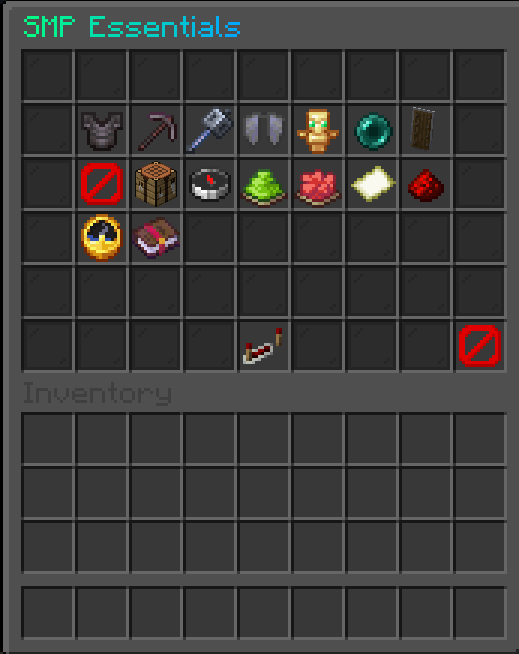
## 🖥️ Premium In-Game GUI
```text /smp menu ```
to open the main SMP Essentials control panel.
The GUI includes:
- ✅ Clean 54-slot layout
- ✅ Glass pane styling
- ✅ No italic item names or lore
- ✅ Clear status indicators
- ✅ Green/red toggle states
- ✅ Confirmation menus for dangerous actions
- ✅ Fast admin control without editing files every time
You can toggle major SMP rules directly in-game.
## 🚫 Item Restrictions
SMP Essentials can block common overpowered SMP items and gear.
You can toggle:
- 🛡️ Netherite armor
- ⚔️ Netherite tools
- 🔨 Mace usage and crafting
- 🪽 Elytra usage
- 💀 Totems of Undying
- 🟣 Ender pearls
- 🛡️ Shields
- 🚧 Custom blocked items
Blocked items can be prevented from:
- being used
- being equipped
- being picked up
- being moved in inventories
- being stored in bundles/shulkers
- being used from offhand
- being used by dispensers
- staying in player inventories
Strict protection can automatically remove blocked items from players.
## 🧰 Recipe Blocking
You can block crafting outputs by material.
```text /smp blockrecipe MACE /smp blockrecipe ELYTRA /smp unblockrecipe MACE ```
The plugin blocks:
- crafting table results
- crafter block recipes
- smithing results
- stonecutter-style result taking
- furnace-like smelting results
- inventory result exploits
This helps prevent players from bypassing restrictions through automation.
## ✨ Enchant Controls
SMP Essentials lets you block enchantments from a specific level upward.
```text /smp blockenchant SHARPNESS 5 /smp blockenchant PROTECTION 4 /smp unblockenchant SHARPNESS ```
This means:
- Sharpness IV can still be allowed
- Sharpness V can be blocked
- Protection III can still be allowed
- Protection IV can be blocked
Blocked enchant levels are downgraded or prevented from:
- existing player inventories
- enchanted books
- bundles
- shulkers
- anvil results
- enchantment table offers
- picked-up items
Perfect for SMPs that want strong gear progression without letting players become unkillable.
## ⏱️ Item Limits And Cooldowns
You can set global item limits and cooldowns.
```text /smp limit ENDER_PEARL 16 /smp cooldown ENDER_PEARL 10 /smp limit TOTEM_OF_UNDYING 1 ```
Useful for balancing:
- ender pearls
- golden apples
- totems
- potions
- bows
- any other material
Limits also check inside bundles and shulkers.
## 🚀 SMP Ready System
```text /smp ready ```
to prepare your SMP before launch.
- find a safe spawn location
- avoid unsafe areas
- avoid water-heavy ready zones
- teleport all online players
- set the world border to a small ready size
- heal players
- feed players
- clear potion effects
- set players to survival
- disable PvP before launch
Default ready border size:
```text 16 blocks ```
This is perfect for organized SMP openings.
## 🟢 SMP Start System
```text /smp start ```
to officially start the SMP.
- smoothly expand the world border
- enable PvP after a protection timer
- show a bossbar countdown
- give starter items
- broadcast launch messages
Default settings:
```text Ready border: 16 Final border: 5000 Expansion time: 300 seconds PvP protection: 120 seconds ```
The border uses vanilla smooth animation for a clean launch experience.
## 🟥 End Event System
```text /smp end ```
to start the final border event.
The end event can:
- shrink the border over time
- show bossbar progress
- show actionbar updates
- search for a low-water final arena
- shrink in phases
Example phased shrink:
```text 100 → 80 → 60 → 40 → 20 ```
You can also stop the active end border event:
```text /smp end stop ```
This freezes the current border size and cancels the event task.
## 🌍 Nether And End Access Control
SMP Essentials can control access to dimensions.
You can enable or disable:
- Nether portals
- End portals
The protection covers multiple bypass cases, including:
- normal portal entry
- ender pearl portal tricks
- boats entering portals
- minecarts entering portals
- teleport attempts into disabled dimensions
This is useful for servers that want to unlock dimensions later
📊 Mod Details
- Game
- Minecraft Plugins
- Author
- Duuchniuk
- Version
- 1.0.0
- Downloads
- 807
- Endorsements
- 2
- Category
- management
- Created
- 6/20/2026
- Updated
- 6/29/2026
- Game Versions
- 26.1, 26.1.1, 26.1.2, 26.2
- Tags
- management, technology, utility
🔧 How to Install Minecraft Plugins Mods
Download from Modrinth. Use Prism Launcher or drop into your mods folder.
📖 Full step-by-step install guide for Minecraft Plugins →
Visit the official mod page for specific installation instructions for this mod.
🎮 Need cheat codes or console commands? Check ur gaming wiki for Minecraft Plugins commands, item IDs, and more.
❓ Frequently Asked Questions
Which Minecraft Plugins versions does SMP Essentials plugin support?
The author lists 26.1, 26.1.1, 26.1.2, 26.2. Other versions may work but are untested by the author.
What is the latest version of SMP Essentials plugin?
Version 1.0.0, published 2026-06-29 with 807 downloads recorded at the source.
Keep browsing — more Minecraft Plugins mods await