SmartMotd
🟡 Updated this year🖼️ Gallery (1 images)
🔍 Analysis
- 🏆 #147 of 1080 bukkit mods in this game by downloads
📋 About This Mod
# SmartMOTD - Full Usage Guide # =========================== **What it does** ------------ SmartMOTD is a dynamic server-list MOTD system. It renders a 2-line MOTD (plus optional server icon) based on: - Mode priority (normal/maintenance/event/failover/full/busy/empty/seasonal/custom) - Built-in flags (maintenance/event/failover) and optional conditions - Placeholders (online/max/tps/mood/countdown/etc.) - Optional formatting (legacy colors, hex colors, gradients) - Optional web editor for normal mode entry 0 **Installation** ------------ 1) Put the plugin jar into /plugins. 2) Start the server once to generate config.yml. 3) Edit plugins/SmartMOTD/config.yml. 4) Reload with: /motd reload **Commands** -------- /motd reload Reloads config and restarts MOTD rendering. Permission: smartmotd.reload /motd maintenance Toggles flags.maintenance (can trigger the maintenance mode). Permission: smartmotd.toggle /motd event Toggles flags.event (switches between event and event-live based on the configured target time). Permission: smartmotd.toggle /motd failover Toggles flags.failover (can trigger the failover mode). Permission: smartmotd.toggle /motd mode set <mode> Forces a specific mode (ignores priority until cleared). Permission: smartmotd.toggle /motd mode clear Clears forced mode. Permission: smartmotd.toggle /motd mode status Shows current forced mode value. Permission: smartmotd.toggle /motd preset list Lists built-in preset config packs. Permission: smartmotd.preset /motd preset apply <name> Applies a built-in preset to plugins/SmartMOTD/config.yml (backs up existing config first). Then reloads SmartMOTD. Permission: smartmotd.preset /motd preview Prints a preview of the rendered MOTD for a mode in chat. If no mode is provided, it uses the currently forced mode value (if any). Permission: smartmotd.preview /motd debug Toggles config debug flag. Permission: smartmotd.debug /motd web Creates a one-time access link to the Web Editor (if enabled). In-game only. Permission: smartmotd.web **Permissions** ----------- smartmotd.admin - Full access (command root permission in plugin.yml) smartmotd.reload - /motd reload smartmotd.toggle - /motd maintenance|event|failover|mode smartmotd.preset - /motd preset smartmotd.preview - /motd preview smartmotd.debug - /motd debug smartmotd.web - /motd web **How mode selection works** ------------------------ 1) If state.forced-mode is set (via /motd mode set), that mode is used. 2) Otherwise SmartMOTD checks modes in the "priority:" list in order. 3) The first matching mode is used. 4) The normal mode is always used as the fallback if nothing else matches. Built-in matches: - maintenance: when flags.maintenance is true - failover: when flags.failover is true - event / event-live: when flags.event is true - event-live is used when the event target time has been reached - event is used before the target time - empty: when online == 0 - full: when online >= max - busy: when online >= busy.threshold Custom mode conditions can also be used (see "Mode conditions" below). **Mode conditions** --------------- Under a mode, you can add: modes.<mode>.conditions: min-online: <number> or "%max%" max-online: <number> months: mood: <calm|active|overloaded> (or moods: ) time-of-day: <morning|afternoon|evening|night> (or times: ) day-of-week: <monday..sunday> (or days: ) geo: <countryCode> (or geos: ) Notes: - min-online: "%max%" means "only match when server is full". - geo matching uses upper-case country codes like "US", "DE", "FR" (requires geo.enabled). **Multiple entries per mode (rotation + weights)** ---------------------------------------------- Each mode has entries: modes.<mode>.entries: - line1: "..." line2: "..." icon: "icons/default.png" weight: 1 chance: 1.0 Rotation config: modes.<mode>.rotation: type: sticky | random | sequential | weighted interval-seconds: 30 random-seed: "smartmotd" **How it behaves:** - sequential: goes through eligible entries in order - random/sticky: deterministic random selection that changes each interval - weighted: deterministic weighted selection using the entry weights - chance (0.0..1.0): makes an entry eligible only some of the time **Animation frames (optional)** --------------------------- You can animate an entry by adding frames: modes.<mode>.entries: - line1: "Base" line2: "Base" frames: - line1: "Frame 1" line2: "Frame 1" - line1: "Frame 2" line2: "Frame 2" frame-interval-seconds: 1 There is also a per-mode animation section: modes.<mode>.animation: enabled: true interval-seconds: 1 frames: - line1: "..." line2: "..." If performance-guard switches to safe mode, animations are disabled automatically. **Formatting (colors + gradients)** ---------------
# SmartMOTD - Full Usage Guide # ===========================
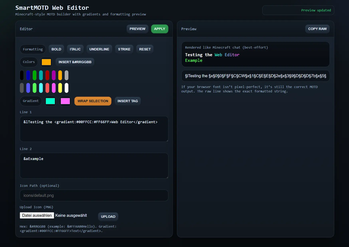
What it does ------------ SmartMOTD is a dynamic server-list MOTD system. It renders a 2-line MOTD (plus optional server icon) based on: - Mode priority (normal/maintenance/event/failover/full/busy/empty/seasonal/custom) - Built-in flags (maintenance/event/failover) and optional conditions - Placeholders (online/max/tps/mood/countdown/etc.) - Optional formatting (legacy colors, hex colors, gradients) - Optional web editor for normal mode entry 0
Installation ------------ 1) Put the plugin jar into /plugins. 2) Start the server once to generate config.yml. 3) Edit plugins/SmartMOTD/config.yml. 4) Reload with: /motd reload
Commands -------- /motd reload Reloads config and restarts MOTD rendering. Permission: smartmotd.reload
/motd maintenance Toggles flags.maintenance (can trigger the maintenance mode). Permission: smartmotd.toggle
/motd event Toggles flags.event (switches between event and event-live based on the configured target time). Permission: smartmotd.toggle
/motd failover Toggles flags.failover (can trigger the failover mode). Permission: smartmotd.toggle
/motd mode set
/motd mode clear Clears forced mode. Permission: smartmotd.toggle
/motd mode status Shows current forced mode value. Permission: smartmotd.toggle
/motd preset list Lists built-in preset config packs. Permission: smartmotd.preset
/motd preset apply
/motd preview Prints a preview of the rendered MOTD for a mode in chat. If no mode is provided, it uses the currently forced mode value (if any). Permission: smartmotd.preview
/motd debug Toggles config debug flag. Permission: smartmotd.debug
/motd web Creates a one-time access link to the Web Editor (if enabled). In-game only. Permission: smartmotd.web
Permissions ----------- smartmotd.admin - Full access (command root permission in plugin.yml) smartmotd.reload - /motd reload smartmotd.toggle - /motd maintenance|event|failover|mode smartmotd.preset - /motd preset smartmotd.preview - /motd preview smartmotd.debug - /motd debug smartmotd.web - /motd web
How mode selection works ------------------------ 1) If state.forced-mode is set (via /motd mode set), that mode is used. 2) Otherwise SmartMOTD checks modes in the "priority:" list in order. 3) The first matching mode is used. 4) The normal mode is always used as the fallback if nothing else matches.
Built-in matches: - maintenance: when flags.maintenance is true - failover: when flags.failover is true - event / event-live: when flags.event is true - event-live is used when the event target time has been reached - event is used before the target time - empty: when online == 0 - full: when online >= max - busy: when online >= busy.threshold
Custom mode conditions can also be used (see "Mode conditions" below).
Mode conditions
---------------
Under a mode, you can add:
modes.
Notes: - min-online: "%max%" means "only match when server is full". - geo matching uses upper-case country codes like "US", "DE", "FR" (requires geo.enabled).
Multiple entries per mode (rotation + weights)
----------------------------------------------
Each mode has entries:
modes.
Rotation config:
modes.
How it behaves: - sequential: goes through eligible entries in order - random/sticky: deterministic random selection that changes each interval - weighted: deterministic weighted selection using the entry weights - chance (0. 0.. 1. 0): makes an entry eligible only some of the time
Animation frames (optional)
---------------------------
You can animate an entry by adding frames:
modes.
There is also a per-mode animation section:
modes.
If performance-guard switches to safe mode, animations are disabled automatically.
Formatting (colors + gradients) ---------------
📊 Mod Details
- Game
- Minecraft Plugins
- Author
- Funkel
- Version
- 1.0.1
- Downloads
- 71
- Endorsements
- 1
- Category
- bukkit
- Created
- 1/13/2026
- Updated
- 12/25/2025
- Game Versions
- 1.21.10
- Tags
- management, technology, utility
🔧 How to Install Minecraft Plugins Mods
Download from Modrinth. Use Prism Launcher or drop into your mods folder.
📖 Full step-by-step install guide for Minecraft Plugins →
Visit the official mod page for specific installation instructions for this mod.
🎮 Need cheat codes or console commands? Check ur gaming wiki for Minecraft Plugins commands, item IDs, and more.
❓ Frequently Asked Questions
Which Minecraft Plugins versions does SmartMotd support?
The author lists 1.21.10. Other versions may work but are untested by the author.
What is the latest version of SmartMotd?
Version 1.0.1, published 2025-12-25 with 71 downloads recorded at the source.
Keep browsing — more Minecraft Plugins mods await