SmartBackups
🟡 Updated this year🖼️ Gallery (3 images)
🔍 Analysis
- 🏆 #458 of 1224 bukkit mods in this game by downloads
📋 About This Mod
[ !(https://cdn.modrinth.com/data/cached_images/2334cf3eb4b13ee2695bae533f8044f6237efd83.png)](https://discord.gg/uuZ6VPVMvP) # 🔒 SmartBackups
SmartBackups is a plugin that provides a fully GUI-based backup and rollback system, designed to be safe, simple, and accessible for everyone.
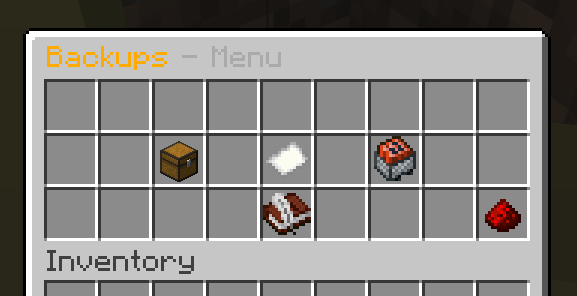
No complex commands: everything is managed through `/backups` and clickable menus.
## ✨ Main Features
### 📦 Automatic & Manual Backups - Automatic backups every X minutes (configurable) - Manual backup with `/backups create` - ZIP compression - Automatic rotation (keeps only the last N backups)
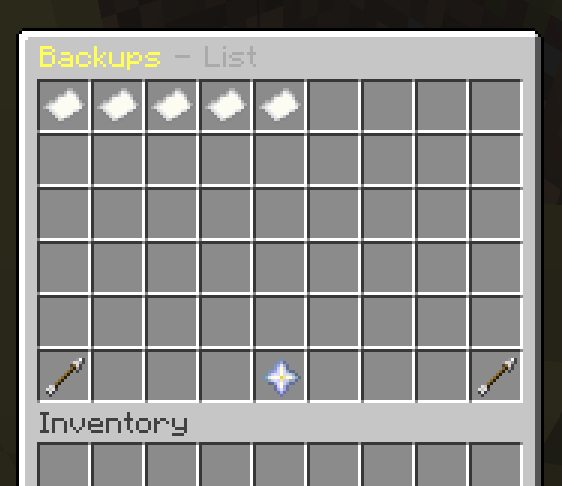
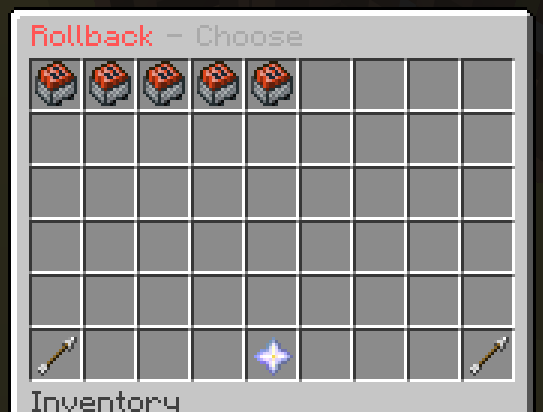
### 🧭 Full Graphical Interface (GUI) - `/backups` opens the main menu - Clean and intuitive menus: - ➕ Create backup - 📄 List backups - 🔄 Rollback - 🌍 Language (FR / EN)
No command memorization required.
### 🔄 Safe Rollback (REAL RESTORE) - GUI list of all backups sorted by date - Click a backup → confirmation menu - Confirm → - server restarts - files are actually restored from the ZIP - worlds, plugins, and configs are cleanly replaced
### 🌍 Built-in Language System - French by default - English available - Toggle via menu or command:
``` /backups lang fr /backups lang en ``` - All messages are customizable in `config.yml`
## 🧱 Default Backup Content - `world` - `world_nether` - `world_the_end` - `plugins` - `server.properties` - `bukkit.yml` - `spigot.yml` - `paper.yml`
➡️ Fully configurable in `config.yml`
## 🧠 Why SmartBackups? - ✔️ Easy-to-use GUI for admins - ✔️ No dependencies - ✔️ Paper 1. 21.x compatible - ✔️ Safe (anti-corruption & Zip-Slip protection) - ✔️ Perfect for public or private servers
## 📜 Commands
| Command | Description | |--------|------------| | `/backups` | Open main menu | | `/backups create` | Create a backup | | `/backups list` | List backups | | `/backups rollback` | Open rollback menu | | `/backups lang fr/en` | Change language |
## 🔐 Permissions
| Permission | Description | |----------|-------------| | `smartbackups.use` | Access the menu | | `smartbackups.create` | Create backups | | `smartbackups.rollback` | Restore backups |
## ⚠️ Important For automatic restart to work, Paper must have a `restart-script` configured. Otherwise, the plugin will shut down the server and you must restart it manually.
## 📦 Installation 1. Download the `.jar` 2. Put it into `/plugins` 3. Start the server 4. Use `/backups` [ !(https://cdn.modrinth.com/data/cached_images/00b12c57a65b4b518ccc459a74dce5791463fcbe.jpeg)](https://minestrator.com/a/CREEPER)
📊 Mod Details
- Game
- Minecraft Plugins
- Author
- Pierrecreeper
- Version
- 3.0.0
- Downloads
- 123
- Endorsements
- 1
- Category
- bukkit
- Created
- 1/5/2026
- Updated
- 12/30/2025
- Game Versions
- 1.21, 1.21.1, 1.21.2, 1.21.3, 1.21.4
- Tags
- management, utility
🔧 How to Install Minecraft Plugins Mods
Download from Modrinth. Use Prism Launcher or drop into your mods folder.
📖 Full step-by-step install guide for Minecraft Plugins →
Visit the official mod page for specific installation instructions for this mod.
🎮 Need cheat codes or console commands? Check ur gaming wiki for Minecraft Plugins commands, item IDs, and more.
❓ Frequently Asked Questions
Which Minecraft Plugins versions does SmartBackups support?
The author lists 1.21, 1.21.1, 1.21.2, 1.21.3, 1.21.4, 1.21.5. Other versions may work but are untested by the author.
What is the latest version of SmartBackups?
Version 3.0.0, published 2025-12-30 with 123 downloads recorded at the source.
Keep browsing — more Minecraft Plugins mods await