SMail
🟡 Updated this year🖼️ Gallery (9 images)
🔍 Analysis
- 🏆 #345 of 378 game-mechanics mods in this game by downloads
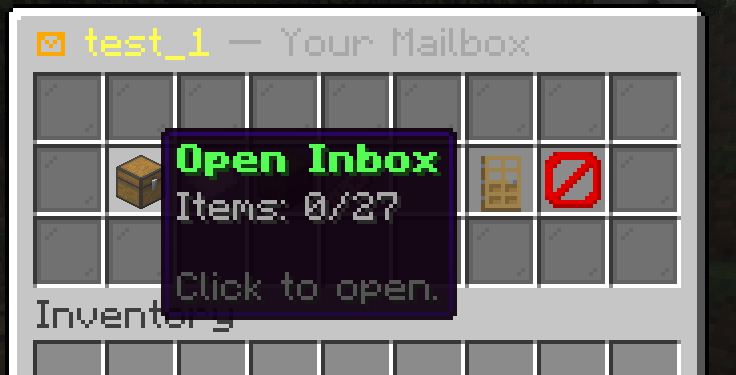
📋 About This Mod
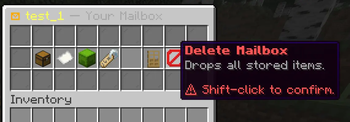
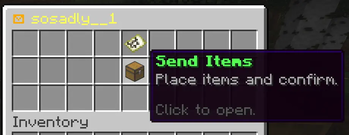
# SMail — Physical Mailbox System for Paper **SMail** turns a humble barrel into a real, in-world mailbox. Place one down, claim your own postal address, and start receiving packages from anywhere on the server. No commands required, no GUIs to memorize — just walk up to a mailbox and send. Built for **Paper 1.21.1**. --- ## ✨ Features - **Physical mailboxes.** Craft a custom mailbox item, place it as a barrel, and it becomes a registered post point with its own address. - **Custom addresses.** Every mailbox has a unique, player-chosen address (Latin / Cyrillic / digits supported). Rename it any time. - **Send items to any address.** Open someone's mailbox to deliver a package — or send from your own mailbox by address. - **Public / Private toggle.** Decide whether anyone can deliver to you, or only you can use your mailbox. - **Member access.** Invite trusted players to read your inbox without giving them full ownership. - **Delivery cost.** Optional configurable cost item (default: one Deepslate Diamond Ore per delivery) to give mail real weight on your economy. - **Animated arrivals.** Sounds and particles fire on every mailbox the moment new mail lands. - **SQLite persistence.** All mailboxes, addresses, members, and contents are saved server-side. Nothing lives in chunks — break the barrel, the mailbox is gone; place it back, it's still yours. - **Custom recipe.** A configurable crafting recipe for the mailbox item, toggleable in config. - **Fully translatable.** All player-facing text lives in `messages.yml` with full MiniMessage formatting. --- ## 📦 How it works 1. **Get a mailbox** — craft one with the configured recipe, or run `/smail give <player>` as admin. 2. **Place it down** — right-click any barrel placement; you'll be assigned a fresh address (or you can rename it). 3. **Send mail** — right-click anyone's mailbox to open the visitor menu and put items into the Send GUI. Hit confirm; the recipient gets a notification. 4. **Receive mail** — right-click your own mailbox to open your inbox. 5. **Manage** — toggle public/private, rename, add members, or delete the mailbox from the owner menu. --- ## 🛠 Commands | Command | Permission | Description | |---|---|---| | `/smail reload` | `smail.admin` | Reload config and messages | | `/smail give <player>` | `smail.admin` | Give the mailbox item to a player | | `/smail inspect <address>` | `smail.admin` | Inspect a mailbox by address | ## 🔑 Permissions | Node | Default | Description | |---|---|---| | `smail.use` | true | Open and interact with mailboxes | | `smail.create` | true | Craft and place mailboxes | | `smail.send` | true | Send mail to other mailboxes | | `smail.rename` | true | Rename your own mailboxes | | `smail.admin` | op | Full admin access | --- ## ⚙️ Configuration Everything is configurable in `config.yml`: - Default mailbox inventory size (9 – 54) - Maximum mailboxes per player - Maximum members per mailbox - Delivery delay (in ticks) - Delivery cost item & amount - Sounds & particles toggles - Recipe toggle All messages can be edited in `messages.yml` using **MiniMessage** formatting — full colors, gradients, hover and click events supported. --- ## 📥 Installation 1. Download the latest `SMail.jar` from the Files tab. 2. Drop it into your server's `plugins/` folder. 3. Restart the server (Paper **1.21.1** required). 4. Open the generated `plugins/SMail/config.yml` and tune to taste. 5. `/smail reload` after any edits. ---
# SMail — Physical Mailbox System for Paper
SMail turns a humble barrel into a real, in-world mailbox. Place one down, claim your own postal address, and start receiving packages from anywhere on the server. No commands required, no GUIs to memorize — just walk up to a mailbox and send.
Built for Paper 1. 21. 1.
## ✨ Features
- Physical mailboxes. Craft a custom mailbox item, place it as a barrel, and it becomes a registered post point with its own address.
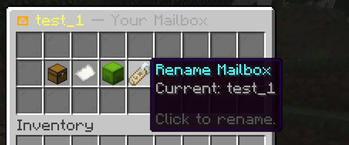
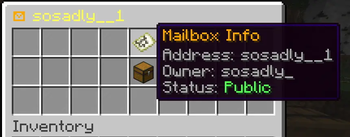
- Custom addresses. Every mailbox has a unique, player-chosen address (Latin / Cyrillic / digits supported). Rename it any time.
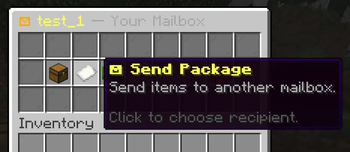
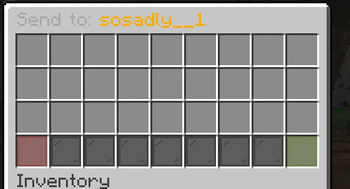
- Send items to any address. Open someone's mailbox to deliver a package — or send from your own mailbox by address.
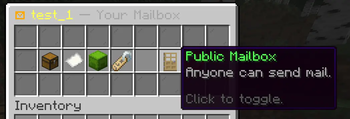
- Public / Private toggle. Decide whether anyone can deliver to you, or only you can use your mailbox.
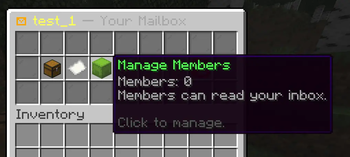
- Member access. Invite trusted players to read your inbox without giving them full ownership.
- Delivery cost. Optional configurable cost item (default: one Deepslate Diamond Ore per delivery) to give mail real weight on your economy.
- Animated arrivals. Sounds and particles fire on every mailbox the moment new mail lands.
- SQLite persistence. All mailboxes, addresses, members, and contents are saved server-side. Nothing lives in chunks — break the barrel, the mailbox is gone; place it back, it's still yours.
- Custom recipe. A configurable crafting recipe for the mailbox item, toggleable in config.
- Fully translatable. All player-facing text lives in `messages.yml` with full MiniMessage formatting.
## 📦 How it works
1. Get a mailbox — craft one with the configured recipe, or run `/smail give
## 🛠 Commands
| Command | Permission | Description |
|---|---|---|
| `/smail reload` | `smail.admin` | Reload config and messages |
| `/smail give
## 🔑 Permissions
| Node | Default | Description | |---|---|---| | `smail.use` | true | Open and interact with mailboxes | | `smail.create` | true | Craft and place mailboxes | | `smail.send` | true | Send mail to other mailboxes | | `smail.rename` | true | Rename your own mailboxes | | `smail.admin` | op | Full admin access |
## ⚙️ Configuration
Everything is configurable in `config.yml`:
- Default mailbox inventory size (9 – 54)
- Maximum mailboxes per player
- Maximum members per mailbox
- Delivery delay (in ticks)
- Delivery cost item & amount
- Sounds & particles toggles
- Recipe toggle
All messages can be edited in `messages.yml` using MiniMessage formatting — full colors, gradients, hover and click events supported.
## 📥 Installation
1. Download the latest `SMail.jar` from the Files tab. 2. Drop it into your server's `plugins/` folder. 3. Restart the server (Paper 1. 21. 1 required). 4. Open the generated `plugins/SMail/config.yml` and tune to taste. 5. `/smail reload` after any edits.
📊 Mod Details
- Game
- Minecraft Plugins
- Author
- sosadly
- Version
- 1.0.0
- Downloads
- 35
- Endorsements
- 1
- Category
- game-mechanics
- Created
- 5/17/2026
- Updated
- 5/15/2026
- Game Versions
- 1.21, 1.21.1, 1.21.2, 1.21.3, 1.21.4
- Tags
- game-mechanics, social, utility
🔧 How to Install Minecraft Plugins Mods
Download from Modrinth. Use Prism Launcher or drop into your mods folder.
📖 Full step-by-step install guide for Minecraft Plugins →
Visit the official mod page for specific installation instructions for this mod.
🎮 Need cheat codes or console commands? Check ur gaming wiki for Minecraft Plugins commands, item IDs, and more.
❓ Frequently Asked Questions
Which Minecraft Plugins versions does SMail support?
The author lists 1.21, 1.21.1, 1.21.2, 1.21.3, 1.21.4, 1.21.5. Other versions may work but are untested by the author.
What is the latest version of SMail?
Version 1.0.0, published 2026-05-15 with 35 downloads recorded at the source.
Keep browsing — more Minecraft Plugins mods await