SleepyCPU
🟠 Updated over a year ago🖼️ Gallery (1 images)
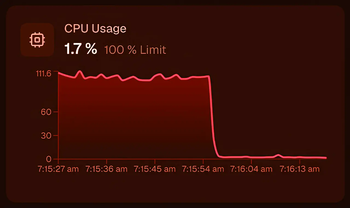
🔍 Analysis
- 🏆 #122 of 173 folia mods in this game by downloads
📋 About This Mod
# SleepyCPU Reduce server CPU usage automatically when your Minecraft server is empty. SleepyCPU detects when no players are online and temporarily slows down server activity. It optionally unloads chunks and nudges the JVM to free memory. As soon as a player joins, normal operation resumes. ## Features - Automatically enters a low-CPU mode when the server is empty - Configurable delay between server ticks while idle (sleepTicks) - Optional chunk unloading (unloadChunks) with save-on-unload toggle - Configurable cleanup interval to control how often chunk unload + GC occurs - Lightweight: no dependencies and single permission node ## How it works When the player count reaches 0, SleepyCPU: 1. Saves all worlds safely using region-aware scheduling 2. Sleeps between tick cycles by a configurable number of ticks 3. Periodically (configurable interval) unloads chunks per world and triggers a GC hint When a player joins, counters reset and the server resumes normal throughput. ## Configuration - Location: server-root/sleepycpu.yml - Keys: - settings.enabled: Master switch for low-CPU mode (true/false) - settings.sleepTicks: Delay between idle cycles in ticks (1 tick = 50ms) - settings.unloadChunks: Unload chunks while idle (true/false) - settings.saveChunksOnUnload: Save chunks when unloading (true/false) - settings.cleanupIntervalTicks: Idle cycles between chunk unload + GC - After editing, run /sleepycpu reload or restart the server ## Commands - /sleepycpu help — Show command info - /sleepycpu toggle — Enable/disable low-CPU mode - /sleepycpu status — Display current status and settings - /sleepycpu reload — Reload configuration from disk - /sleepycpu delay <ticks> — Set sleepTicks - /sleepycpu cleanupinterval <ticks> — Set cleanupIntervalTicks - /sleepycpu unloadchunks <true|false> — Toggle unloadChunks - /sleepycpu saveonunload <true|false> — Toggle saveChunksOnUnload Alias: /scpu ## Permissions - sleepycpu.admin — Access to all SleepyCPU commands (default: OP)
# SleepyCPU
Reduce server CPU usage automatically when your Minecraft server is empty.
SleepyCPU detects when no players are online and temporarily slows down server activity. It optionally unloads chunks and nudges the JVM to free memory. As soon as a player joins, normal operation resumes.
## Features - Automatically enters a low-CPU mode when the server is empty - Configurable delay between server ticks while idle (sleepTicks) - Optional chunk unloading (unloadChunks) with save-on-unload toggle - Configurable cleanup interval to control how often chunk unload + GC occurs - Lightweight: no dependencies and single permission node
## How it works When the player count reaches 0, SleepyCPU: 1. Saves all worlds safely using region-aware scheduling 2. Sleeps between tick cycles by a configurable number of ticks 3. Periodically (configurable interval) unloads chunks per world and triggers a GC hint
When a player joins, counters reset and the server resumes normal throughput.
## Configuration - Location: server-root/sleepycpu.yml - Keys: - settings.enabled: Master switch for low-CPU mode (true/false) - settings.sleepTicks: Delay between idle cycles in ticks (1 tick = 50ms) - settings.unloadChunks: Unload chunks while idle (true/false) - settings.saveChunksOnUnload: Save chunks when unloading (true/false) - settings.cleanupIntervalTicks: Idle cycles between chunk unload + GC - After editing, run /sleepycpu reload or restart the server
## Commands
- /sleepycpu help — Show command info
- /sleepycpu toggle — Enable/disable low-CPU mode
- /sleepycpu status — Display current status and settings
- /sleepycpu reload — Reload configuration from disk
- /sleepycpu delay
Alias: /scpu
## Permissions - sleepycpu.admin — Access to all SleepyCPU commands (default: OP)
📊 Mod Details
- Game
- Minecraft Plugins
- Author
- BloodRed
- Version
- 1.0
- Downloads
- 461
- Endorsements
- 6
- Category
- folia
- Created
- 8/12/2025
- Updated
- 8/10/2025
- Game Versions
- 1.20.1, 1.20.2, 1.20.3, 1.20.4, 1.20.5
🔧 How to Install Minecraft Plugins Mods
Download from Modrinth. Use Prism Launcher or drop into your mods folder.
📖 Full step-by-step install guide for Minecraft Plugins →
Visit the official mod page for specific installation instructions for this mod.
🎮 Need cheat codes or console commands? Check ur gaming wiki for Minecraft Plugins commands, item IDs, and more.
❓ Frequently Asked Questions
Which Minecraft Plugins versions does SleepyCPU support?
The author lists 1.20.1, 1.20.2, 1.20.3, 1.20.4, 1.20.5, 1.20.6. Other versions may work but are untested by the author.
What is the latest version of SleepyCPU?
Version 1.0, published 2025-08-10 with 461 downloads recorded at the source.
Keep browsing — more Minecraft Plugins mods await