sleep plugin
🟡 Updated this year🖼️ Gallery (2 images)
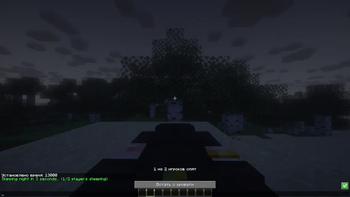
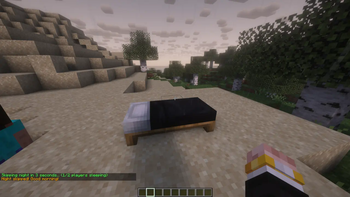
🔍 Analysis
- 👍 0.2% endorsement rate
- 🏆 #25 of 214 game-mechanics mods in this game by downloads
📋 About This Mod
# SleepPlugin Enhanced sleep mechanics for Minecraft **1.21.x and 26.x**. Instead of everyone having to sleep, only a configurable percentage of online players is needed to skip the night. Works on Paper, Purpur, Spigot and compatible servers. ## Features - Configurable sleep percentage — default 50% of online players, configurable per world - Weighted sleep votes with (https://modrinth.com/plugin/luckperms) (optional, auto-detected) - Bossbar showing live sleep progress - Phantom prevention (`spawn_phantoms` game rule) - Storm and night skipping - Smooth time transition from night to morning - Multiple message modes (normal, minimal, silent) - Ignore players in Nether and End dimensions - Smart counting for odd player counts - Multi-world support with per-world overrides - Multi-language support (English, Russian, and custom languages) - Configuration update system that preserves your settings across updates - Admin command `/sleep reload|status` ## Requirements - Minecraft: 1.21.x or 26.x - Server: Paper, Purpur, Spigot (or compatible) - Java: 21+ (1.21.x) / 25+ (26.x) ## Installation 1. Download `SleepPlugin-1.0.4.jar` 2. Place it in your server's `plugins/` folder 3. Restart the server ## Examples With default `sleep-percentage: 50`: - 2 players online: 1 player needs to sleep - 3 players online: 1 player needs to sleep ((3-1)/2 = 1) - 4 players online: 2 players need to sleep - 5 players online: 2 players need to sleep ((5-1)/2 = 2) - 6 players online: 3 players need to sleep With `sleep-percentage: 25`: - 4 players online: 1 player needs to sleep - 8 players online: 2 players need to sleep - 20 players online: 5 players need to sleep ## Configuration The config file is created at `plugins/SleepPlugin/config.yml` on first start: ```yaml # SleepPlugin Configuration # Do not change this version number manually version: "1.0.4" language: en_EN skip-delay: 3 morning-time: 1000 message-mode: normal min-players-required: 2 ignore-nether-end-players: true sleep-percentage: 50 prevent-phantoms: true bossbar: enabled: true color: YELLOW style: SOLID title: "Sleeping %s/%s" smooth-time-transition: enabled: true duration-ticks: 60 steps: 60 storm-settings: skip-storms: true # world-settings: # world: # sleep-percentage: 50 # min-players-required: 2 ``` ### Settings - `language`: Plugin message language (en_EN or ru_RU, or any custom code) - `skip-delay`: Seconds before the night is skipped - `morning-time`: Time value set when skipping to morning - `message-mode`: Message verbosity (normal, minimal, silent) - `min-players-required`: Minimum players needed to activate sleep mechanics - `ignore-nether-end-players`: Exclude Nether/End players from calculations - `sleep-percentage`: Percentage of online players that must sleep (1-100, default 50). At least 1 player is always required - `prevent-phantoms`: Disables phantom spawning while the plugin is active - `bossbar`: - `enabled`: Show the sleep progress bossbar - `color`: PINK, BLUE, RED, GREEN, YELLOW, PURPLE, WHITE - `style`: SOLID, SEGMENTED_6, SEGMENTED_10, SEGMENTED_12, SEGMENTED_20 - `title`: Bossbar title (`%s` = sleeping count / required count) - `smooth-time-transition`: Smooth time change settings (`enabled`, `duration-ticks`, `steps`) - `storm-settings`: Storm skipping (`skip-storms`) - `world-settings`: Per-world overrides. Add a section named after a world to override `sleep-percentage` and `min-players-required` for that world only ### Command - `/sleep status` — show percentage and per-world settings (permission: `sleepplugin.admin`) - `/sleep reload` — reload config and language files (permission: `sleepplugin.admin`) ## LuckyPerms Integration SleepPlugin optionally integrates with (https://luckperms.net) as a **soft-dependency**. Without it, the plugin behaves exactly as before (every player counts as 1). Install LuckyPerms and it is detected automatically. **Weighted sleep votes** — set the `sleepplugin.weight` meta so a player's sleep counts as multiple votes: ``` /lp group vip meta set sleepplugin.weight 2 ``` A VIP with weight 2 counts as 2 sleeping players, so fewer donors are needed to skip the night. Weight is clamped to 1-100 and supports LuckyPerms contexts (e.g. per world/server): ``` /lp group vip meta set sleepplugin.weight 2 server=survival ``` **Permissions:** - `sleepplugin.exempt` — player is not counted for sleep calculations (e.g. admins in creative/spectator). Default: false. - `sleepplugin.bypass.min-players` — sleeping player skips the night even below `min-players-required` or when alone. Default: false. - `sleepplugin.admin` — access to `/sleep` command. Default: op. > **Note:** `sleepplugin.exempt` and `sleepplugin.bypass.min-players` are plain Bukkit permissions — they work with any permissions plugin. ## Custom Language Files You can create your own translations: 1. Navigate to `plugins/SleepPlugin/lang/` 2. Copy `tem
# SleepPlugin
Enhanced sleep mechanics for Minecraft 1. 21.x and 26.x. Instead of everyone having to sleep, only a configurable percentage of online players is needed to skip the night. Works on Paper, Purpur, Spigot and compatible servers.
## Features
- Configurable sleep percentage — default 50% of online players, configurable per world
- Weighted sleep votes with (https://modrinth.com/plugin/luckperms) (optional, auto-detected)
- Bossbar showing live sleep progress
- Phantom prevention (`spawn_phantoms` game rule)
- Storm and night skipping
- Smooth time transition from night to morning
- Multiple message modes (normal, minimal, silent)
- Ignore players in Nether and End dimensions
- Smart counting for odd player counts
- Multi-world support with per-world overrides
- Multi-language support (English, Russian, and custom languages)
- Configuration update system that preserves your settings across updates
- Admin command `/sleep reload|status`
## Requirements
- Minecraft: 1. 21.x or 26.x
- Server: Paper, Purpur, Spigot (or compatible)
- Java: 21+ (1. 21.x) / 25+ (26.x)
## Installation
1. Download `SleepPlugin-1. 0. 4.jar` 2. Place it in your server's `plugins/` folder 3. Restart the server
## Examples
With default `sleep-percentage: 50`:
- 2 players online: 1 player needs to sleep
- 3 players online: 1 player needs to sleep ((3-1)/2 = 1)
- 4 players online: 2 players need to sleep
- 5 players online: 2 players need to sleep ((5-1)/2 = 2)
- 6 players online: 3 players need to sleep
With `sleep-percentage: 25`:
- 4 players online: 1 player needs to sleep
- 8 players online: 2 players need to sleep
- 20 players online: 5 players need to sleep
## Configuration
The config file is created at `plugins/SleepPlugin/config.yml` on first start:
```yaml # SleepPlugin Configuration # Do not change this version number manually version: "1. 0. 4"
language: en_EN skip-delay: 3 morning-time: 1000 message-mode: normal min-players-required: 2 ignore-nether-end-players: true sleep-percentage: 50 prevent-phantoms: true bossbar: enabled: true color: YELLOW style: SOLID title: "Sleeping %s/%s" smooth-time-transition: enabled: true duration-ticks: 60 steps: 60 storm-settings: skip-storms: true # world-settings: # world: # sleep-percentage: 50 # min-players-required: 2 ```
### Settings
- `language`: Plugin message language (en_EN or ru_RU, or any custom code)
- `skip-delay`: Seconds before the night is skipped
- `morning-time`: Time value set when skipping to morning
- `message-mode`: Message verbosity (normal, minimal, silent)
- `min-players-required`: Minimum players needed to activate sleep mechanics
- `ignore-nether-end-players`: Exclude Nether/End players from calculations
- `sleep-percentage`: Percentage of online players that must sleep (1-100, default 50). At least 1 player is always required
- `prevent-phantoms`: Disables phantom spawning while the plugin is active
- `bossbar`:
- - `enabled`: Show the sleep progress bossbar
- - `color`: PINK, BLUE, RED, GREEN, YELLOW, PURPLE, WHITE
- - `style`: SOLID, SEGMENTED_6, SEGMENTED_10, SEGMENTED_12, SEGMENTED_20
- - `title`: Bossbar title (`%s` = sleeping count / required count)
- `smooth-time-transition`: Smooth time change settings (`enabled`, `duration-ticks`, `steps`)
- `storm-settings`: Storm skipping (`skip-storms`)
- `world-settings`: Per-world overrides. Add a section named after a world to override `sleep-percentage` and `min-players-required` for that world only
### Command
- `/sleep status` — show percentage and per-world settings (permission: `sleepplugin.admin`)
- `/sleep reload` — reload config and language files (permission: `sleepplugin.admin`)
## LuckyPerms Integration
SleepPlugin optionally integrates with (https://luckperms.net) as a soft-dependency. Without it, the plugin behaves exactly as before (every player counts as 1). Install LuckyPerms and it is detected automatically.
Weighted sleep votes — set the `sleepplugin.weight` meta so a player's sleep counts as multiple votes:
``` /lp group vip meta set sleepplugin.weight 2 ```
A VIP with weight 2 counts as 2 sleeping players, so fewer donors are needed to skip the night. Weight is clamped to 1-100 and supports LuckyPerms contexts (e.g. per world/server):
``` /lp group vip meta set sleepplugin.weight 2 server=survival ```
Permissions:
- `sleepplugin.exempt` — player is not counted for sleep calculations (e.g. admins in creative/spectator). Default: false.
- `sleepplugin.bypass.min-players` — sleeping player skips the night even below `min-players-required` or when alone. Default: false.
- `sleepplugin.admin` — access to `/sleep` command. Default: op.
> Note: `sleepplugin.exempt` and `sleepplugin.bypass.min-players` are plain Bukkit permissions — they work with any permissions plugin.
## Custom Language Files
You can create your own translations:
1. Navigate to `plugins/SleepPlugin/lang/` 2. Copy `tem
📊 Mod Details
- Game
- Minecraft Plugins
- Author
- NovaDAndrew
- Version
- 1.0.4
- Downloads
- 14,557
- Endorsements
- 32
- Category
- game-mechanics
- Created
- 5/28/2025
- Updated
- 8/6/2026
- Game Versions
- 26.1, 26.1.1, 26.1.2, 26.2
- Tags
- game-mechanics, social, utility
🔧 How to Install Minecraft Plugins Mods
Download from Modrinth. Use Prism Launcher or drop into your mods folder.
📖 Full step-by-step install guide for Minecraft Plugins →
Visit the official mod page for specific installation instructions for this mod.
🎮 Need cheat codes or console commands? Check ur gaming wiki for Minecraft Plugins commands, item IDs, and more.
❓ Frequently Asked Questions
Which Minecraft Plugins versions does sleep plugin support?
The author lists 26.1, 26.1.1, 26.1.2, 26.2. Other versions may work but are untested by the author.
What is the latest version of sleep plugin?
Version 1.0.4, published 2026-08-06 with 14,557 downloads recorded at the source.
Keep browsing — more Minecraft Plugins mods await