SkyWars+
🟠 Updated over a year ago🖼️ Gallery (3 images)

🔍 Analysis
- 👍 0.6% endorsement rate
- 🏆 #15 of 16 minigame mods in this game by downloads
📋 About This Mod
!(https://cdn.modrinth.com/data/cached_images/0a82d5598337b294e0f92339d0ad7ba74393ec1a.png)
## !(https://cdn.modrinth.com/data/cached_images/e09d765bd682c03628713435253da407d385f80d.png)
- Map System – Just drop world folders into /plugins/SkyWarsPlus/maps and configure them easily
- Custom Game Configs – Set up different modes (Solos, Duos, etc.)
- Loot Editor – Add and customize loot in-game
- Auto Chest Detection – No need to manually add island chests (need to manually add op chest locations)
- Chest Refills - Add custom chest refill time for each game config
- Map IDs - Choose which maps you need, just provide the map id for the config
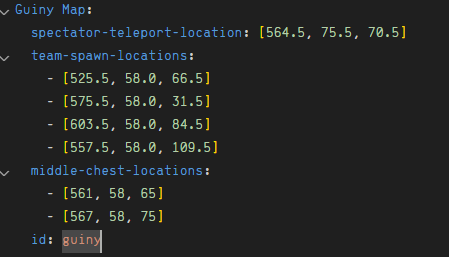
## !(https://cdn.modrinth.com/data/cached_images/238fc50b5b6e423aff48276c4afa13b21b3d4aaa.png) ### Step 1: Adding Maps > > Place your world folders inside: > plugins/SkyWarsPlus/maps/ > > The folder name of each world will be treated as the map name. > > Next, define the map data in map_data.yml like this: > > > ``` > Map Name: > spectator-teleport-location: > team-spawn-locations: > - > - > - > - > op-chest-locations: > - > - > id: mapid > ``` > > Explanation: > > waiting-area-location: Location where players wait before the game starts. > > team-spawn-locations: Locations where each team will spawn at the start of the match. > > chest-locations: Middle island chests only. These chests contain better loot. > Must be integers (no decimal points). > > Normal chest locations are detected automatically — you don't need to add them.
### Step 2: Creating Game Configurations
>
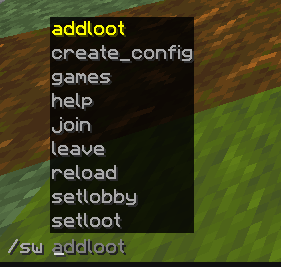
> Use this command to create a game configuration:
>
> ```
> /swp create_config
### Step 3: Configuring Loot
>
> Place items into any chest (for normal) or middle chest.
>
> Look directly at the chest.
>
> Run either:
>
> ```
> /swp setloot
### Step 4: Joining a Game
>
> To join a game:
>
> ```
> /swp join
## !(https://cdn.modrinth.com/data/cached_images/64d73bfa67ebe6978e9231bd1e6e8df7f88064d1.png) > SkyWars+ lets you fully customize its menus for a unique server experience.
### IMPORTANT: Menu customization requires correct YAML formatting. Incorrect spacing or syntax will break the menu.
## Menu Files > > skywars_menu.yml – Main SkyWars menu players can open > > join_menu.yml – Game join selector menu for different modes/configs
# skywars_menu.yml Guide ### Layout > > Example: > > ``` > # ONE, TWO, THREE..., SIX > rows: FIVE > > buttons: > 0: > name: "&b&lSkyWars+" > material: BOOK > glint: true > lore: > - "&7Welcome to &bSkyWars+&7!" > - "&7Fast-paced PvP minigame with" > - "&7custom maps and modes." > - "" > - "&eFight, loot & &ebe the last one standing!" > actions: [] > ``` > > rows: How many rows the menu has (values: ONE, TWO, THREE, FOUR, FIVE, SIX). > > buttons: Each numbered key represents a slot in the menu. > > name: The display name of the button (supports color codes). > > material: The Minecraft item used for the button. > > glint: true/false – whether the button should have an enchantment glow. > > lore: List of text lines shown when hovering over the button. > > actions: What happens when the player clicks the button.
### Actions
>
> Actions are added in
📊 Mod Details
- Game
- Minecraft Plugins
- Author
- Tomqnto
- Version
- 0.4.0
- Downloads
- 1,351
- Endorsements
- 8
- Category
- minigame
- Created
- 8/7/2025
- Updated
- 9/11/2025
- Game Versions
- 1.21, 1.21.1, 1.21.2, 1.21.3, 1.21.4
- Tags
- minigame
🔧 How to Install Minecraft Plugins Mods
Download from Modrinth. Use Prism Launcher or drop into your mods folder.
📖 Full step-by-step install guide for Minecraft Plugins →
Visit the official mod page for specific installation instructions for this mod.
🎮 Need cheat codes or console commands? Check ur gaming wiki for Minecraft Plugins commands, item IDs, and more.
❓ Frequently Asked Questions
Which Minecraft Plugins versions does SkyWars+ support?
The author lists 1.21, 1.21.1, 1.21.2, 1.21.3, 1.21.4, 1.21.5. Other versions may work but are untested by the author.
What is the latest version of SkyWars+?
Version 0.4.0, published 2025-09-11 with 1,351 downloads recorded at the source.
Keep browsing — more Minecraft Plugins mods await