SkyRGTitles
🟡 Updated this year🖼️ Gallery (3 images)


🔍 Analysis
- 🏆 #696 of 1224 bukkit mods in this game by downloads
📋 About This Mod
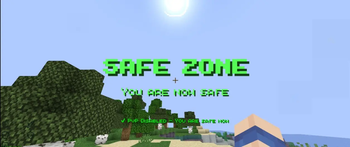
**🏁 Overview** SkyRGTitles is a Bukkit/Spigot plugin that enhances player experience by dynamically displaying titles, subtitles, and playing sounds when entering or exiting WorldGuard regions. **🔥 Features** Custom titles, subtitles, and sounds on region enter/exit. Execute custom commands when players enter/exit a region. Supports Hex colors, Minecraft color codes, and Unicode text. Animated text effects (Flash effect, instant display, configurable duration). Compatible with Minecraft 1.20x-1.21x Debug mode with particles and logging for easy configuration. **🌍 Installation** 1. Ensure you have WorldGuard installed. 2. Download the latest SkyRGTitles plugin JAR 3. Place the JAR file in your server's/plugins folder. 4. Restart your server. 5. Configure the plugin in plugins/SkyRGTitles/config.yml **⚡ Commands** /skyrgtitles reload Reloads the plugin configuration /skyrgtitles help Displays help information. /skyrgtitles version Shows plugin version **🏳️ Permissions** skyrgtitles.region.* Access all Regions messages (default: true) skyrgtitles.reload Permission to reload the plugin (default: op) skyrgtitles.admin Full admin access (default: op) skyrgtitles.bypass Bypass All regions messages
🏁 Overview
SkyRGTitles is a Bukkit/Spigot plugin that enhances player experience by dynamically displaying titles, subtitles, and playing sounds when entering or exiting WorldGuard regions.
🔥 Features
Custom titles, subtitles, and sounds on region enter/exit. Execute custom commands when players enter/exit a region. Supports Hex colors, Minecraft color codes, and Unicode text. Animated text effects (Flash effect, instant display, configurable duration). Compatible with Minecraft 1. 20x-1. 21x Debug mode with particles and logging for easy configuration.
🌍 Installation 1. Ensure you have WorldGuard installed. 2. Download the latest SkyRGTitles plugin JAR 3. Place the JAR file in your server's/plugins folder. 4. Restart your server. 5. Configure the plugin in plugins/SkyRGTitles/config.yml
⚡ Commands
/skyrgtitles reload Reloads the plugin configuration
/skyrgtitles help Displays help information.
/skyrgtitles version Shows plugin version
🏳️ Permissions
skyrgtitles.region.* Access all Regions messages (default: true)
skyrgtitles.reload Permission to reload the plugin (default: op)
skyrgtitles.admin Full admin access (default: op)
skyrgtitles.bypass Bypass All regions messages
📊 Mod Details
- Game
- Minecraft Plugins
- Author
- RockSky1
- Version
- 1.0.0
- Downloads
- 107
- Endorsements
- 0
- Category
- bukkit
- Created
- 11/18/2025
- Updated
- 2/25/2026
- Game Versions
- 1.20, 1.20.1, 1.20.2, 1.20.3, 1.20.4
- Tags
- management, optimization, utility
🔧 How to Install Minecraft Plugins Mods
Download from Modrinth. Use Prism Launcher or drop into your mods folder.
📖 Full step-by-step install guide for Minecraft Plugins →
Visit the official mod page for specific installation instructions for this mod.
🎮 Need cheat codes or console commands? Check ur gaming wiki for Minecraft Plugins commands, item IDs, and more.
❓ Frequently Asked Questions
Which Minecraft Plugins versions does SkyRGTitles support?
The author lists 1.20, 1.20.1, 1.20.2, 1.20.3, 1.20.4, 1.20.5. Other versions may work but are untested by the author.
What is the latest version of SkyRGTitles?
Version 1.0.0, published 2026-02-25 with 107 downloads recorded at the source.
Keep browsing — more Minecraft Plugins mods await