skTrace
🟡 Updated this year🖼️ Gallery (3 images)
🔍 Analysis
- 🏆 #11 of 13 optimization mods in this game by downloads
📋 About This Mod
## Find out where your server's Skript time actually goes skTrace is a profiler built for Skript. It measures your triggers, functions, events, loops and variable writes while the server runs, then turns that into an interactive HTML report you can open in a browser or share with one link. `/sktrace start`, let the lag happen, `/sktrace report`. You get a link. !(https://raw.githubusercontent.com/KalpeGames/skTrace/main/docs/banners/description.png) Server timings tell you Skript is expensive. They do not tell you *which script*, *which trigger*, or *which line*. skTrace does, because it hooks Skript's own trigger graph rather than sampling the JVM from outside. **Inside a report:** * **Per-trigger timing.** Calls, total, average and worst single call for every trigger, sorted so the expensive ones are at the top. * **Per-function timing.** Functions get their own table, so cost hidden inside whatever called them stops being invisible. * **Line-level hotspots.** Optional, off by default. Turn it on and the report highlights the exact statements eating the time, in a source viewer with a timing column. * **A tick chart against the 50ms budget.** Drag to select any range and the tables rebuild for just that window. The worst tick gets its own breakdown. * **Time by script.** Which file is responsible, at a glance. * **Variable churn.** How many global variables were created, updated and deleted, which ones were written most, and a writes per tick sparkline. It also detects Skript's periodic full rewrite of `variables.csv` and draws it on the tick chart, so you can see when a save lines up with a spike. * **A live loop view.** `/sktrace loops` shows which loops are running right now, their iteration count and how fast it is climbing. A background watchdog catches a truly frozen no-delay loop and logs the exact `script:line` to console, which is the only place still working during a freeze. ### Missed the spike? Turn on the rolling buffer and skTrace profiles continuously in the background. When something spikes, `/sktrace clip` snapshots the last 60 seconds (configurable) into a report, with no `/sktrace start` beforehand. Overhead is the same as a normal capture, and memory is roughly 20KB per trigger. ### Built to be safe on a live server Per-trigger, per-function and per-event timing are passive wrappers with negligible overhead, fully removed when profiling stops. Variable tracking observes Skript's existing save path and never reads or scans your `variables.csv`, so a huge file costs nothing. Loop watching only reads the iteration counter Skript already keeps. The one feature that rewrites anything, `line-level-profiling`, is off by default and clearly labelled experimental. Everything else in the report works without it. ### Commands | | | | --- | --- | | `/sktrace start` / `stop` | Begin and end a capture | | `/sktrace status` | Live summary in chat, hottest triggers first | | `/sktrace report` | Write the report and get a shareable link | | `/sktrace clip` | Snapshot the last N seconds from the rolling buffer | | `/sktrace loops` | Live view of running loops | | `/sktrace rolling on\|off` | Toggle the always-on buffer | | `/sktrace reset` | Clear collected stats | Aliased to `/skt`, permission `sktrace.use` (op by default). Flags on `report` and `clip`: `--no-upload` keeps it local, `--include-files` embeds script source, `--variable-values` lists what each save compacted, `--show-secrets` unmasks option values (option secrets are masked by default). ### Reports and privacy Every report is written to `plugins/Sktrace/reports/` first. It is then uploaded to (https://sktrace.kal.pe) for a short share link, and shared links expire after 24 hours. The service stores only the report's JSON data, never raw uploaded HTML, and re-renders each report from the same renderer shipped in the plugin. Do not want that? Set `upload-endpoint` to an empty string, or pass `--no-upload`. Reports are still written locally, and the site can open a `.json` file you drop into it. You can also self-host the worker. Option values are masked in reports unless you explicitly ask for them, so a token in an option does not end up in a link you paste in Discord. ### Requirements Paper or Spigot 1.20+, Skript 2.9 or newer, Java 21. Works alongside (https://modrinth.com/plugin/spark), which profiles the JVM. skTrace profiles Skript. > skTrace is an independent project. It is not affiliated with, endorsed by, or part of the > SkriptLang team or the Skript project. !(https://raw.githubusercontent.com/KalpeGames/skTrace/main/docs/banners/development.png) Open source under Apache-2.0 at (https://github.com/KalpeGames/skTrace). Bug reports and pull requests welcome, and the changelog for every release lives in the repo. The report renderer (`report.css`, `report.app.js`, `report.shell.html`) ships inside the plugin as th
## Find out where your server's Skript time actually goes
skTrace is a profiler built for Skript. It measures your triggers, functions, events, loops and variable writes while the server runs, then turns that into an interactive HTML report you can open in a browser or share with one link.
`/sktrace start`, let the lag happen, `/sktrace report`. You get a link.
!(https://raw.githubusercontent.com/KalpeGames/skTrace/main/docs/banners/description.png)
Server timings tell you Skript is expensive. They do not tell you which script, which trigger, or which line. skTrace does, because it hooks Skript's own trigger graph rather than sampling the JVM from outside.
Inside a report:
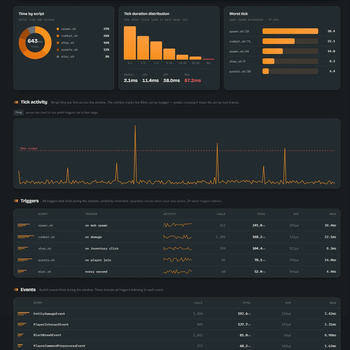
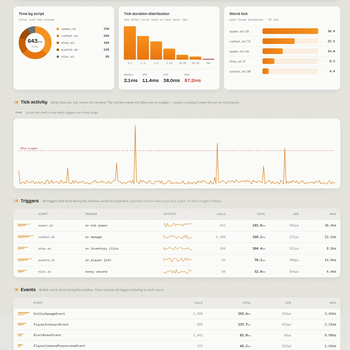
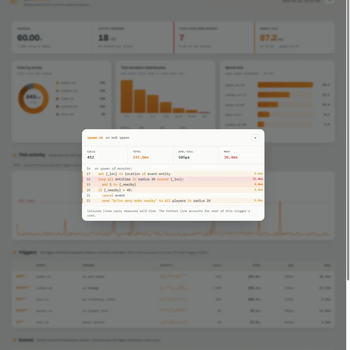
Per-trigger timing. Calls, total, average and worst single call for every trigger, sorted so the expensive ones are at the top. Per-function timing. Functions get their own table, so cost hidden inside whatever called them stops being invisible. Line-level hotspots. Optional, off by default. Turn it on and the report highlights the exact statements eating the time, in a source viewer with a timing column. A tick chart against the 50ms budget. Drag to select any range and the tables rebuild for just that window. The worst tick gets its own breakdown. Time by script. Which file is responsible, at a glance. Variable churn. How many global variables were created, updated and deleted, which ones were written most, and a writes per tick sparkline. It also detects Skript's periodic full rewrite of `variables.csv` and draws it on the tick chart, so you can see when a save lines up with a spike. * A live loop view. `/sktrace loops` shows which loops are running right now, their iteration count and how fast it is climbing. A background watchdog catches a truly frozen no-delay loop and logs the exact `script:line` to console, which is the only place still working during a freeze.
### Missed the spike?
Turn on the rolling buffer and skTrace profiles continuously in the background. When something spikes, `/sktrace clip` snapshots the last 60 seconds (configurable) into a report, with no `/sktrace start` beforehand. Overhead is the same as a normal capture, and memory is roughly 20KB per trigger.
### Built to be safe on a live server
Per-trigger, per-function and per-event timing are passive wrappers with negligible overhead, fully removed when profiling stops. Variable tracking observes Skript's existing save path and never reads or scans your `variables.csv`, so a huge file costs nothing. Loop watching only reads the iteration counter Skript already keeps.
The one feature that rewrites anything, `line-level-profiling`, is off by default and clearly labelled experimental. Everything else in the report works without it.
### Commands
| | | | --- | --- | | `/sktrace start` / `stop` | Begin and end a capture | | `/sktrace status` | Live summary in chat, hottest triggers first | | `/sktrace report` | Write the report and get a shareable link | | `/sktrace clip` | Snapshot the last N seconds from the rolling buffer | | `/sktrace loops` | Live view of running loops | | `/sktrace rolling on\|off` | Toggle the always-on buffer | | `/sktrace reset` | Clear collected stats |
Aliased to `/skt`, permission `sktrace.use` (op by default).
Flags on `report` and `clip`: `--no-upload` keeps it local, `--include-files` embeds script source, `--variable-values` lists what each save compacted, `--show-secrets` unmasks option values (option secrets are masked by default).
### Reports and privacy
Every report is written to `plugins/Sktrace/reports/` first. It is then uploaded to (https://sktrace.kal.pe) for a short share link, and shared links expire after 24 hours. The service stores only the report's JSON data, never raw uploaded HTML, and re-renders each report from the same renderer shipped in the plugin.
Do not want that? Set `upload-endpoint` to an empty string, or pass `--no-upload`. Reports are still written locally, and the site can open a `.json` file you drop into it. You can also self-host the worker.
Option values are masked in reports unless you explicitly ask for them, so a token in an option does not end up in a link you paste in Discord.
### Requirements
Paper or Spigot 1. 20+, Skript 2. 9 or newer, Java 21. Works alongside (https://modrinth.com/plugin/spark), which profiles the JVM. skTrace profiles Skript.
> skTrace is an independent project. It is not affiliated with, endorsed by, or part of the > SkriptLang team or the Skript project.
!(https://raw.githubusercontent.com/KalpeGames/skTrace/main/docs/banners/development.png)
Open source under Apache-2. 0 at (https://github.com/KalpeGames/skTrace). Bug reports and pull requests welcome, and the changelog for every release lives in the repo.
The report renderer (`report.css`, `report.app.js`, `report.shell.html`) ships inside the plugin as th
📊 Mod Details
- Game
- Minecraft Plugins
- Author
- Kalpe
- Version
- 0.1.4
- Downloads
- 399
- Endorsements
- 7
- Category
- optimization
- Created
- 5/31/2026
- Updated
- 6/11/2026
- Game Versions
- 1.20, 1.20.1, 1.20.2, 1.20.3, 1.20.4
- Tags
- optimization, technology, utility
🔧 How to Install Minecraft Plugins Mods
Download from Modrinth. Use Prism Launcher or drop into your mods folder.
📖 Full step-by-step install guide for Minecraft Plugins →
Visit the official mod page for specific installation instructions for this mod.
🎮 Need cheat codes or console commands? Check ur gaming wiki for Minecraft Plugins commands, item IDs, and more.
❓ Frequently Asked Questions
Which Minecraft Plugins versions does skTrace support?
The author lists 1.20, 1.20.1, 1.20.2, 1.20.3, 1.20.4, 1.20.5. Other versions may work but are untested by the author.
What is the latest version of skTrace?
Version 0.1.4, published 2026-06-11 with 399 downloads recorded at the source.
Keep browsing — more Minecraft Plugins mods await