SimpleReportPlugin
🟡 Updated this year🖼️ Gallery (1 images)
🔍 Analysis
- 🏆 #84 of 1080 bukkit mods in this game by downloads
📋 About This Mod
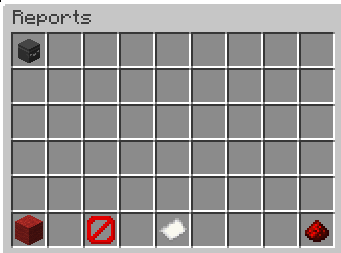
# SimpleReportPlugin A simple and lightweight **player report system** for **Spigot/Paper 1.21.x**. Players can report other players with a reason, while staff/OPs can review all reports in a clean inventory GUI and decide to **ban** the reported player or **delete** the report. All reports are stored **persistently in a JSON file**, so they remain available after server restarts. --- ## Features - **/report**: Players can report other players (including a reason) - **Anti-spam protection** - A player can report the same target **only once** as long as that report still exists - Global **5 minute cooldown**: a player can only create one new report every 5 minutes - **Staff GUI / Reports overview** - OPs can view reports in an **inventory GUI** - Select a report by clicking the **player head** - Actions via buttons: - **Ban** (Red Wool): bans the reported player and removes the selected report - **Delete** (Barrier): deletes the selected report (no ban) - **Close** (Redstone): closes the GUI - Reports stay after **restart** - ## Configuration (`config.yml`) The plugin automatically generates a configuration file on the first startup. It allows you to paste a Discord Webhook URL to receive instant logs in your Discord channel whenever a report is made, with an optional toggle to ping a specific role or `@everyone`. --- ## Commands ### `/report <player> <reason>` Creates a report for the given player. **Examples:** - `/report Steve Fly hacks` - `/report Alex Chat harassment` **Rules:** - You **cannot report yourself** - You cannot report the **same player multiple times** while the report exists - You can only create one report every **5 minutes** --- ### `/reports` Opens the reports GUI. - **OP only** by default (`default: op`) - Shows each report as a **player head** item including: - reporter - reason - timestamp --- ## Staff GUI Usage 1. Run `/reports` 2. Click a **head** to select a report (the paper item will show `Selected: <playername>`) 3. Click one of the action buttons: - **Ban (Red Wool)**: bans the player and removes the selected report - **Delete (Barrier)**: deletes the selected report only - **Close (Redstone)**: closes the GUI --- ## Data Storage - Reports are automatically saved when: - a report is created - a report is deleted - the server stops / plugin disables **Note:** Only reports are saved. The 5-minute cooldown is currently stored in memory and resets after server restart (reports remain saved). --- ## Compatibility - Designed for **Spigot/Paper 1.21.x** - Recommended: **Paper** for best performance - Java: **Java 21** --- ## Installation 1. Put the `.jar` into your server `plugins/` folder 2. Start the server 3. The plugin will automatically create `plugins/ReportPlugin/reports.json` once reports exist --- ## Support If you find a bug add me on Discord **Petarhrv16**
# SimpleReportPlugin
A simple and lightweight player report system for Spigot/Paper 1. 21.x. Players can report other players with a reason, while staff/OPs can review all reports in a clean inventory GUI and decide to ban the reported player or delete the report.
All reports are stored persistently in a JSON file, so they remain available after server restarts.
## Features
- /report: Players can report other players (including a reason)
- Anti-spam protection
- - A player can report the same target only once as long as that report still exists
- - Global 5 minute cooldown: a player can only create one new report every 5 minutes
- Staff GUI / Reports overview
- - OPs can view reports in an inventory GUI
- - Select a report by clicking the player head
- - Actions via buttons:
- - Ban (Red Wool): bans the reported player and removes the selected report
- - Delete (Barrier): deletes the selected report (no ban)
- - Close (Redstone): closes the GUI
- - Reports stay after restart
- ## Configuration (`config.yml`)
- The plugin automatically generates a configuration file on the first startup. It allows you to paste a Discord Webhook URL to receive instant logs in your Discord channel whenever a report is made, with an optional toggle to ping a specific role or `@everyone`.
## Commands
### `/report
Examples: - `/report Steve Fly hacks` - `/report Alex Chat harassment`
Rules: - You cannot report yourself - You cannot report the same player multiple times while the report exists - You can only create one report every 5 minutes
### `/reports` Opens the reports GUI.
- OP only by default (`default: op`)
- Shows each report as a player head item including:
- - reporter
- - reason
- - timestamp
## Staff GUI Usage
1. Run `/reports`
2. Click a head to select a report
(the paper item will show `Selected:
## Data Storage
- Reports are automatically saved when:
- - a report is created
- - a report is deleted
- - the server stops / plugin disables
## Compatibility
- Designed for Spigot/Paper 1. 21.x
- Recommended: Paper for best performance
- Java: Java 21
## Installation
1. Put the `.jar` into your server `plugins/` folder 2. Start the server 3. The plugin will automatically create `plugins/ReportPlugin/reports.json` once reports exist
If you find a bug add me on Discord Petarhrv16
📊 Mod Details
- Game
- Minecraft Plugins
- Author
- PrIyme
- Version
- 1.3
- Downloads
- 75
- Endorsements
- 2
- Category
- bukkit
- Created
- 4/26/2026
- Updated
- 5/30/2026
- Game Versions
- 1.21.11
- Tags
- game-mechanics, management, social
🔧 How to Install Minecraft Plugins Mods
Download from Modrinth. Use Prism Launcher or drop into your mods folder.
📖 Full step-by-step install guide for Minecraft Plugins →
Visit the official mod page for specific installation instructions for this mod.
🎮 Need cheat codes or console commands? Check ur gaming wiki for Minecraft Plugins commands, item IDs, and more.
❓ Frequently Asked Questions
Which Minecraft Plugins versions does SimpleReportPlugin support?
The author lists 1.21.11. Other versions may work but are untested by the author.
What is the latest version of SimpleReportPlugin?
Version 1.3, published 2026-05-30 with 75 downloads recorded at the source.
Keep browsing — more Minecraft Plugins mods await